
Cleanvoice review: Audio and video cleanup for podcasters: removes fillers, noise and silences
Audio and video cleanup for podcasters: removes fillers, noise and silences
Custom (contact sales), free plan: yes, free trial: 30 minutes of free credits on sign-up, prices checked on October 29, 2026.
Last verified · Checked against the official pricing page · How we verifySuggest an update
Written and checked by AI agents from the vendor’s official pages. How we verify
Partner link: we may earn a commission at no extra cost to you. It never changes our order or verdicts. Affiliate disclosure
What Cleanvoice does
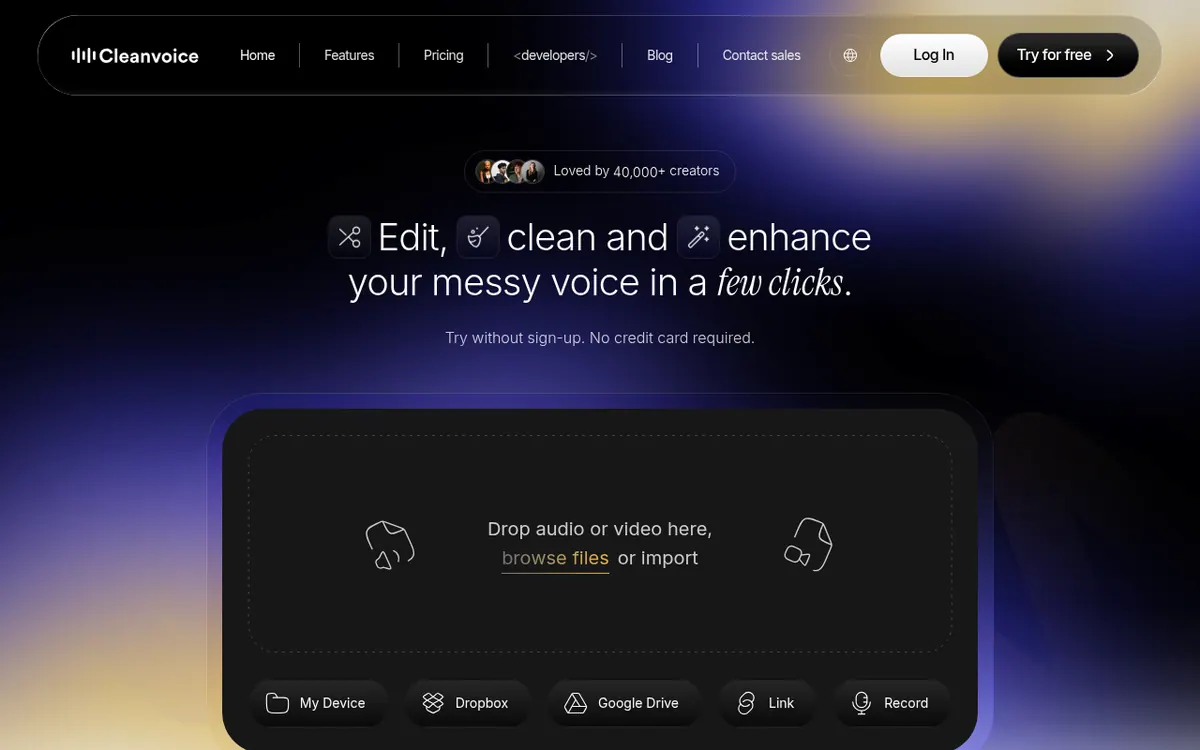
Removes filler words, pauses, breaths, mouth sounds and background noise from audio or video, and can export the cuts to your editor.
Cleanvoice AI is an audio and video editing service aimed at podcasters, voiceover artists, media agencies, businesses, audio engineers and video editors. You upload a recording from your device, Dropbox, Google Drive or a link, and the service finds filler words, stutters, long pauses, mouth sounds and breaths and cuts them out. It also strips background noise, hum, echo and reverb, and can lift a raw take toward studio sound. Multitrack files are handled in one pass, and the vendor says it transcribes automatically rather than asking you to edit from a transcript. You pick which edits to apply, using a preset template or a custom one, and a mute option keeps video in sync with the audio.
If you prefer to finish by hand, results can be exported as markers or a timeline for Adobe Audition, Adobe Premiere, Davinci Resolve, Reaper, Audacity or anything that reads EDL files. A Python SDK, JavaScript and a REST API are available for automation.
Pricing is credit based and quoted in dollars on the page, with a EUR/USD switch. New users get 30 minutes of free credits. Pay as You Go packs cost $11 for 5 hours, $20 for 10 hours and $45 for 30 hours, with credits valid for 2 years. Subscription tiers are listed at $11 for 10 hours, $28 for 30 hours and $90 for 100 hours of processed audio per month; unused credits roll over to a cap of three times the plan size. A Custom Plan starts at $0.01 per minute for 200+ hours. Prices exclude VAT, and uploaded files are deleted after 7 days.
- Filler word and stutter removal
- Background noise, hum and echo removal
- Silence and breath removal
- Mouth sound cleanup
- Studio sound enhancement
- Automatic transcription and summary
- Marker and timeline export to editors
- Python, JavaScript and REST API
- Batch uploads
Official video
Music Made For The Great Outdoors Podcast: Episode 1 Music & Elder Care - The Benefits · by Percussion Play
The player loads only when you press play.
Good for / Not for
Good for
- Podcasters who want rough edits and noise removal done automatically
- Voiceover and audiobook narrators cleaning home recordings
- Developers automating audio clean-up through the SDK or API
Not for
- Anyone needing a mobile or desktop app: only web and API are described
- Users who need files kept longer than 7 days
- Teams above 200 hours per month who need standard pricing: a custom quote is required
How to start
Try the editor without sign-up and without a credit card by dropping in an audio or video file. source
Sign up to receive 30 minutes of free credits and test the edits on your own recording. source
Choose a preset or custom template to select which edits apply, such as fillers only. source
Export the results or the timeline into your editor if you want to fine-tune manually. source
Limits and gotchas
From the official site and docs of Cleanvoice, checked on October 29, 2026.
Pros and cons
Pros
- 30 minutes of free credits on sign-up, with no credit card needed for the trial
- Covers fillers, stutters, silences, mouth sounds, breaths, noise and echo in one service
- Exports markers or a timeline to Audition, Premiere, Davinci Resolve, Reaper and Audacity
- Python SDK, JavaScript and REST API, with no hours limit stated for the API
- Pay as You Go credits stay valid for 2 years, and subscription credits roll over
Cons
- Prices are listed without VAT, so the final cost depends on your location
- Files are deleted after 7 days, so you must download results in time
- Billing rounds up, with a 1-minute minimum per file
- The pricing page does not say whether the displayed subscription prices are monthly or yearly
- Only web and API access are described; no desktop or mobile apps are mentioned
Our take
Cleanvoice AI suits people who record regularly and want repetitive clean-up, such as fillers, breaths, silences and background noise, handled automatically, with the option to export the cuts into an editor they already use. The free 30 minutes and the no-credit-card trial let you check the output on your own material before paying. Developers get an SDK and API without an hours cap. Trade-offs: the pages describe a web service plus API only, files are kept for just 7 days, billing rounds up to the minute, and prices exclude VAT. The pricing page does not make clear which billing period its subscription prices refer to, so confirm that before subscribing. Heavy users above 200 hours need a custom quote.
Comparisons and lists with Cleanvoice
Coming soon
Coming soon — we are writing comparisons that include Cleanvoice.
Cleanvoice pricing
| Plan | Monthly billing | Annual billing (per month) | Limits / what’s included |
|---|---|---|---|
| Free Trial | — | — | No credit card required; 30 minutes of free credits on sign-up (per homepage) |
| Pay as You Go (5 Hours) one-time credit pack, $11 for 5 hours | — | — | Credits purchased are valid for 2 years |
| Pay as You Go (10 Hours) one-time credit pack, $20 for 10 hours | — | — | Credits purchased are valid for 2 years |
| Pay as You Go (30 Hours) one-time credit pack, $45 for 30 hours | — | — | Credits purchased are valid for 2 years |
| Subscription (10 Hours) $11 for 10 hours of processed audio per month; billing toggl | — | — | Unused credits roll over, up to three times your plan limit |
| Subscription (30 Hours) $28 for 30 hours of processed audio per month; billing toggl | — | — | Unused credits roll over, up to three times your plan limit |
| Subscription (100 Hours) $90 for 100 hours of processed audio per month; billing togg | — | — | Unused credits roll over, up to three times your plan limit |
| Custom Plan from $0.01 per minute | — | — | 200+ hours processed audio, custom API endpoints, priority support |
Free trial: 30 minutes of free credits on sign-up. Free plan: yes.
Prices checked on on the official Cleanvoice pricing page. “—” = not published.
Frequently asked questions
Can I try Cleanvoice AI for free?
Yes. You can upload audio or video and try editing without a credit card, and sign-up gives 30 minutes of free credits.
How are credits billed?
Billing follows the duration of the audio, with a 1-minute minimum, and the duration is rounded upwards. You are not charged if an upload fails.
What happens to unused subscription credits?
They roll over to the next month, with a cap of three times your monthly credit budget. After cancelling, unused credits last until the end of the billing period.
Can I export the edits to my own editor?
Yes. Markers and timelines can be exported for Adobe Audition, Adobe Premiere, Davinci Resolve, Reaper, Audacity and EDL-compatible tools.
How long are my files stored?
Both the original and edited files are stored for 7 days and then permanently removed.
Recently verified in Voice & Text-to-Speech
 Adobe Podcast Verified Oct 31, 2026
 Cartesia Verified Oct 30, 2026
 Deepgram Verified Oct 30, 2026
 Resemble AI Verified Oct 30, 2026
 WellSaid Verified Oct 30, 2026
- Alitu Verified Oct 29, 2026
Add an AGIPicks badge to your site
The badge shows Cleanvoice’s verification status on AGIPicks and links to this page. Light/dark and compact versions: badges.

Suggest an update
Wrong price, outdated fact or a tool that shut down? Are you the vendor and disagree with this page? Tell us, ideally with a link to the official page. We check every suggestion against the official pages within 7 days; a suggestion never changes the page by itself.