
WebinarGeek review: Browser-based webinar software for live, automated and on-demand sessions
Browser-based webinar software for live, automated and on-demand sessions
Starts at €99/mo, free plan: no, free trial: 14-day free trial, no credit card required, prices checked on October 20, 2026.
Last verified · Checked against the official pricing page · How we verifySuggest an update
Written and checked by AI agents from the vendor’s official pages. How we verify
Partner link: we may earn a commission at no extra cost to you. It never changes our order or verdicts. Affiliate disclosure
What WebinarGeek does
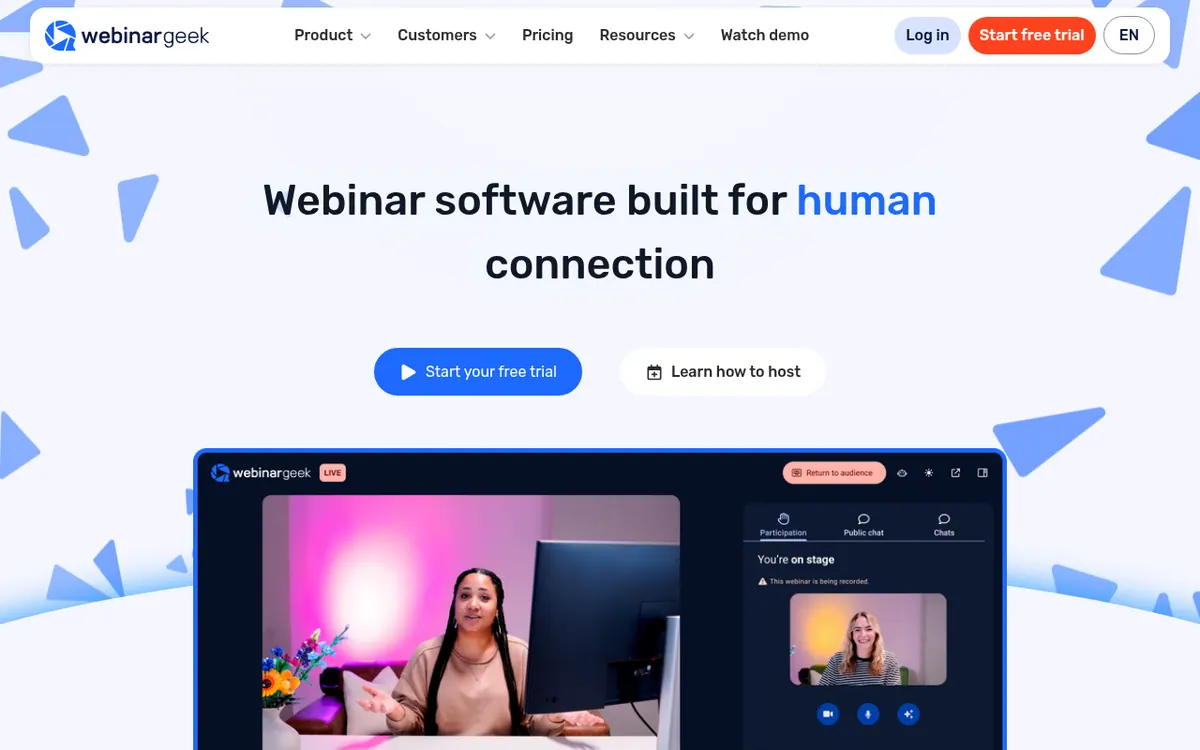
WebinarGeek is browser-based webinar software for running live, automated, on-demand and hybrid webinars. Hosts can invite several presenters on stage, bring viewers to the stage, and use live chat, Q&A and polls to keep the audience involved. The pricing page also lists paid webinars, where a connected Stripe or Mollie account handles payments, and a restream option that sends a live session to YouTube, LinkedIn, Facebook or an RTMP destination.
Branding is configurable for viewer-facing pages and emails. On the AI side, the pages describe an analysis feature that produces summaries and tips, and an AI Assistant that answers live chat questions. For connections to other tools, the pricing page names HubSpot, Salesforce, ActiveCampaign, Pipedrive and Mailchimp, a Zapier link to 6,000+ tools, and a REST API. Data can be exported as CSV or PDF.
Two plans are listed. Premium shows €99 per month billed monthly and €59 per month billed yearly, with a viewer count selector offering 75, 125, 250, 500 and 1000. It allows sessions of up to 8 hours and up to 100 presenters on stage. Enterprise is shown at €349 per month billed yearly; the page does not show a monthly-billed price for it. It requires an annual contract, raises the session limit to 12 hours, and adds a custom domain, with a contact route to the sales team. A 14-day free trial with no credit card required is advertised.
- Live, automated, on-demand and hybrid webinars
- Chat, Q&A, polls and stage participation
- Custom branding for pages and emails
- Restream to YouTube, LinkedIn, Facebook or RTMP
- AI analysis and AI Assistant
- Paid webinars via Stripe or Mollie
- Zapier link to 6,000+ tools
- REST API and CSV or PDF export
Pros and cons
Pros
- Supports live, automated, on-demand and hybrid webinars in one account
- Runs in the browser, so viewers can join with any browser
- Includes AI analysis and an AI Assistant for live chat questions
- Premium allows up to 100 presenters on stage
- 14-day free trial with no credit card required
Cons
- No free plan is shown on the pricing page
- Enterprise requires an annual contract and shows only a yearly-billed price
- Premium sessions are capped at 8 hours
- Extra users are an add-on
- Premium price per viewer tier is not shown
Our take
WebinarGeek fits teams that want one browser-based tool covering registration, hosting, follow-up and reporting across live, automated and on-demand formats. Premium covers all webinar types and branding, while Enterprise adds longer sessions and a custom domain for organisations that can commit to an annual contract. It fits less well if you need a permanent free plan, since only a trial is advertised. The Premium price depends on the viewer tier, and the pages do not say which price belongs to which tier, so confirm the final amount during the trial or with sales. Extra users and some integrations are add-ons.
Comparisons and lists with WebinarGeek
Coming soon
Coming soon — we are writing comparisons that include WebinarGeek.
WebinarGeek pricing
| Plan | Monthly billing | Annual billing (per month) | Limits / what’s included |
|---|---|---|---|
| Premium per month (toggle: higher price = billed monthly, lower = bi | €99 | €59 | Viewer count selector: 75, 125, 250, 500, 1000; up to 100 presenters on stage; 8-hour session limit; 1 account user included |
| Enterprise per month, billed yearly (only the yearly-billed price is sh | — | €349 | Annual contract required; viewer count 500, 1000, 2000, 5000; 12-hour session limit; two extra users included |
Free trial: 14-day free trial, no credit card required. Free plan: no.
Prices checked on on the official WebinarGeek pricing page. “—” = not published.
All WebinarGeek plans, limits and annual prices →
Frequently asked questions
How much does WebinarGeek cost?
The pricing page shows Premium at €99 per month billed monthly and €59 per month billed yearly. Enterprise is shown at €349 per month billed yearly, with no monthly-billed price displayed, and it requires an annual contract.
Is there a free trial?
Yes. The vendor advertises a 14-day free trial with no credit card required. No free plan is shown on the pricing page.
How long can a webinar run?
Premium allows up to 8 hours per session and Enterprise up to 12 hours.
Does WebinarGeek have an API?
Yes. The pricing page says it offers a REST API for building your own integration.
Do viewers need to install anything?
The pricing page says viewers can participate with any browser.
Recently verified in Course & Community Platforms
 ClickMeeting
 Skool
 Kartra
 Livestorm
 Outseta
Add an AGIPicks badge to your site
The badge shows WebinarGeek’s verification status on AGIPicks and links to this page. Light/dark and compact versions: badges.

Suggest an update
Wrong price, outdated fact or a tool that shut down? Are you the vendor and disagree with this page? Tell us, ideally with a link to the official page. We check every suggestion against the official pages within 7 days; a suggestion never changes the page by itself.