
Chromatic AI review: AI canvas for image, video and sound with monthly credits, for agencies and brands
AI canvas for image, video and sound with monthly credits, for agencies and brands
Starts at $20/mo, free plan: yes, prices checked on October 25, 2026.
Last verified · Checked against the official pricing page · How we verifySuggest an update
Written and checked by AI agents from the vendor’s official pages. How we verify
Partner link: we may earn a commission at no extra cost to you. It never changes our order or verdicts. Affiliate disclosure
What Chromatic AI does
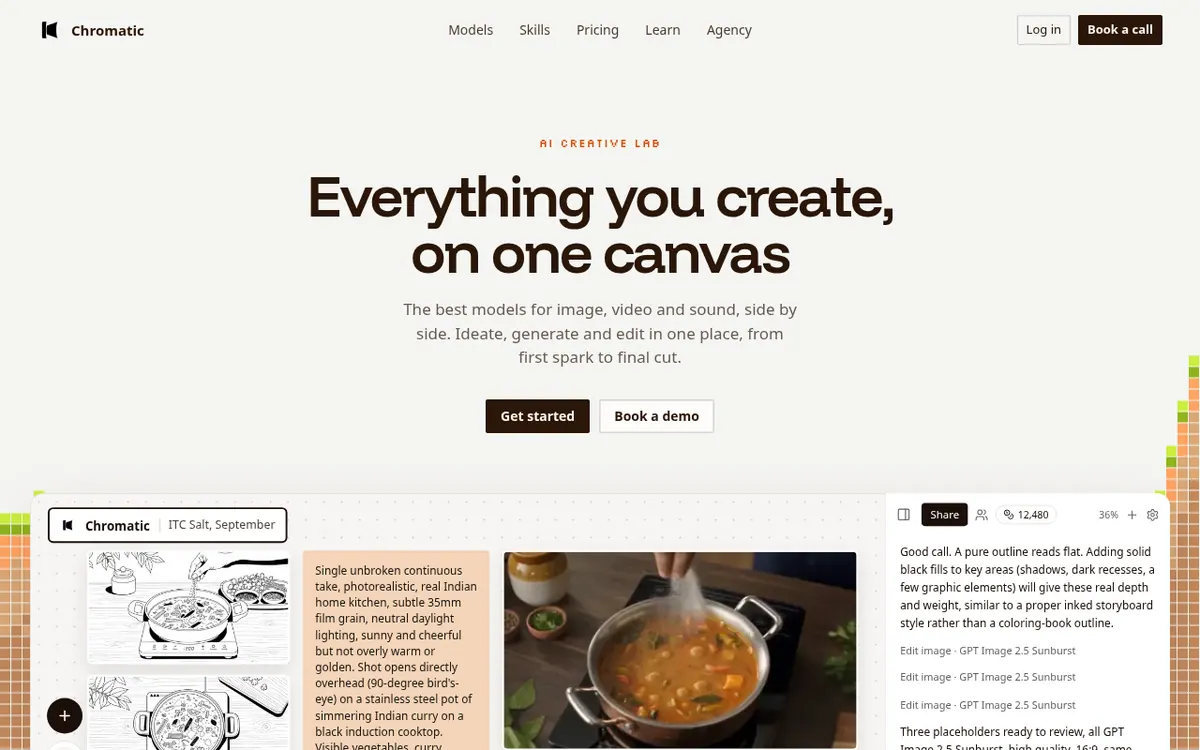
Runs image, video and sound models on one canvas, where the Light assistant writes prompts, and Skills save looks for reuse.
Chromatic Labs describes itself as an AI production workspace built around a single canvas. An assistant called Light works on that canvas: it drafts prompts, runs current models and hands back the output. Image, video and sound models are placed next to each other, so a team can brainstorm, generate and edit without switching tools.
The site targets agencies and the brands they produce for. For agencies it describes placing characters, frames and a rough cut in a pitch deck, and building storyboards from a script where clients comment on individual shots. Brand examples include recurring offer films, weekly catalogue and ad content, and a micro drama series. Skills let a team save a look or pipeline and run it again later; starter skills include product video, UGC talking video and storyboards.
Pricing is based on credits, and one credit is one cent. They renew monthly and can be spent on image, video or sound. The canvas shows the cost before you generate. The paid plans are priced at monthly billing: Ray at $20 / mo with 2,000 credits, Beam at $50 / mo with 5,000 credits, Focus at $100 / mo with 10,000 credits and Spectrum at $200 / mo with 20,000 credits, each billed monthly and cancellable anytime. Beam adds commercial use, Focus adds a priority generation queue, and Spectrum adds custom brand workflows, onboarding and direct founder support. A Free plan starts you with 100 credits, 14 models and 30 assistant messages per day, with no card needed. The page also shows a Yearly option labelled Save 20 %, but no yearly prices appear in its text.
- Multi-model canvas for image, video and sound
- Light assistant writes prompts and runs models
- Reusable Skills for saved looks and pipelines
- Storyboards from a script with client comments
- Cost shown before each generation
- Credit top-ups after subscribing
- Custom brand workflows on Spectrum
Good for / Not for
Good for
- Agencies that want to show characters, frames and a rough cut in a pitch deck
- Teams that storyboard from a script and collect client comments on each shot
- Brands that produce catalogue or ad content repeatedly and want saved Skills
Not for
- Anyone who needs published yearly prices: only a Save 20 % label is shown
- Users who need commercial use on the entry plan: it is listed from Beam
How to start
Limits and gotchas
From the official site and docs of Chromatic AI, checked on October 25, 2026.
Pros and cons
Pros
- Free plan with 100 credits, 14 models and 30 assistant messages a day, no card needed
- Image, video and sound models share one canvas and one credit balance
- Cost is shown on the canvas before each generation
- Skills let a team save a look or pipeline and repeat it
- Credits can be topped up after subscribing
Cons
- Yearly prices are not shown, only a Save 20 % label
- Commercial use is listed from Beam at $50 / mo billed monthly, not on Ray
- Longer clips, higher resolution and audio cost more than the page's example clip
- Custom workflow pricing on Spectrum is set separately during onboarding
- Free plan covers 14 models; subscribing unlocks every model
Our take
According to its pages, Chromatic Labs is aimed at agencies and the brands they make work for, so it fits teams that want pitching, storyboarding with client comments and repeatable campaign runs in one place. The pages name no other audiences. The free plan allows a look at the product before paying, and the cost is shown before each generation. Trade-offs: the Free plan covers 14 models, commercial use is listed from Beam at $50 / mo billed monthly, longer or audio clips cost more than the page's example, and custom workflow pricing is set separately. Yearly prices are not listed, so compare credit needs against your own volume.
Comparisons and lists with Chromatic AI
Coming soon
Coming soon — we are writing comparisons that include Chromatic AI.
Chromatic AI pricing
| Plan | Monthly billing | Annual billing (per month) | Limits / what’s included |
|---|---|---|---|
| Ray per month | $20 | — | Price is for monthly billing (Billed monthly, cancel anytime); 2,000 credits per month; unlimited Prism canvases; all generation models. The yearly price is not shown in the page text. |
| Beam per month | $50 | — | Price is for monthly billing (Billed monthly, cancel anytime); 5,000 credits per month; everything in Ray; commercial use. The yearly price is not shown in the page text. |
| Focus per month | $100 | — | Price is for monthly billing (Billed monthly, cancel anytime); 10,000 credits per month; everything in Beam; priority generation queue. The yearly price is not shown in the page text. |
| Spectrum per month | $200 | — | Price is for monthly billing (Billed monthly, cancel anytime); 20,000 credits per month; everything in Focus; custom Prism workflows, onboarding, direct founder support. The yearly price is not shown in the page text. |
| Free | — | — | 100 credits to start, 14 models, 30 assistant messages a day, no card needed |
Free trial: none listed. Free plan: yes.
Prices checked on on the official Chromatic AI pricing page. “—” = not published.
All Chromatic AI plans, limits and annual prices →
Frequently asked questions
Is there a free plan?
Yes. The Free plan starts with 100 credits, includes 14 models and 30 assistant messages a day, and needs no card.
How much do the paid plans cost?
Per month billed monthly: Ray is $20, Beam is $50, Focus is $100 and Spectrum is $200. The page shows a Yearly option labelled Save 20 %, but its text lists no yearly prices.
Can I buy more credits?
Yes. After subscribing you can top up at any time from billing.
What does Spectrum add?
Spectrum includes 20,000 credits per month, custom Prism workflows for your brand, workflow design and onboarding, and direct founder support. Workflow pricing is set during onboarding.
Recently verified in Automation & AI Agents
 Forethought Verified Nov 2, 2026
 Hippocratic AI Verified Nov 2, 2026
 Inngest Verified Nov 2, 2026
 Kolo AI Verified Nov 2, 2026
 Mercury Verified Nov 2, 2026
 MindStudio Verified Nov 2, 2026
Add an AGIPicks badge to your site
The badge shows Chromatic AI’s verification status on AGIPicks and links to this page. Light/dark and compact versions: badges.
Suggest an update
Wrong price, outdated fact or a tool that shut down? Are you the vendor and disagree with this page? Tell us, ideally with a link to the official page. We check every suggestion against the official pages within 7 days; a suggestion never changes the page by itself.