
Claude Code review: Agentic coding tool for terminal, IDE, web and Slack, included in paid Claude plans
Agentic coding tool for terminal, IDE, web and Slack, included in paid Claude plans
Starts at $20/mo, free plan: no, prices checked on October 31, 2026.
Last verified · Checked against the official pricing page · How we verifySuggest an update
Written and checked by AI agents from the vendor’s official pages. How we verify
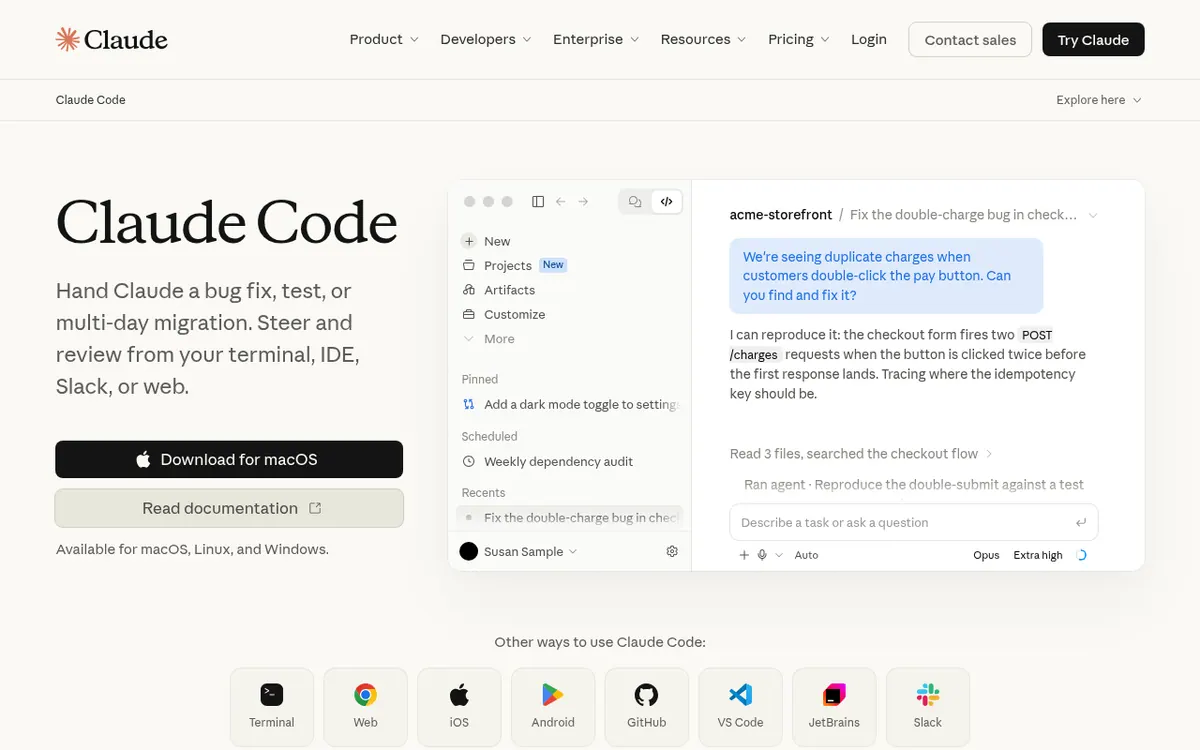
What Claude Code does
Reads your codebase, edits files, runs commands and tests, and opens pull requests from your terminal, IDE, web or Slack.
Claude Code is Anthropic's agentic coding tool. Rather than only suggesting snippets, it reads a codebase, edits files, runs commands and tests, and can open pull requests. It starts in the terminal, and it also has native extensions for VS Code and JetBrains IDEs, plus access from a browser, mobile apps, the Claude desktop app and Slack.
The vendor describes work ranging from bug fixes and tests to long refactors and migrations. It uses agentic search to map a project, works with GitHub, GitLab and command line tools, and can use MCP servers to extend what it can reach. It asks permission before changing files or running commands, and it can handle several tasks at once.
There is no free plan for Claude Code. It is included in the paid Claude plans. Pro costs $20 per month billed monthly or $17 per month billed yearly. Max is $100 per month and Ultra is $200 per month; the pricing page states both are billed monthly and shows no yearly option for them. Team Standard seats are $25 per seat per month billed monthly or $20 per seat per month billed annually, and Premium seats are $125 monthly or $100 billed annually. Enterprise is listed at $20 per seat per month billed annually, with a 20 seat minimum and usage at API rates. Claude Code draws from the same usage pool as your chats. Alternatively, a Console account consumes API tokens at standard API pricing.
- Edits files and runs commands in your repo
- Opens pull requests from issues
- Long-running refactors and migrations
- Agentic search for codebase onboarding
- VS Code and JetBrains extensions
- MCP server and CLI tool integration
- Permission prompts before changes
- Start coding tasks from Slack
Good for / Not for
Good for
- Developers who want an agent working inside their repository from the terminal
- Teams that need bug fixes, tests or long refactors and migrations handed off
- Teams on GitHub or GitLab who want issues turned into pull requests
Not for
- Anyone who needs a free plan; the pricing page lists none for Claude Code
- Buyers looking for a standalone Claude Code price; it comes with Claude plans or Console API billing
How to start
Choose from a Claude Pro, Max, Ultra, Team, or Enterprise plan, or else use a Claude Console account. source
Sign in with your Claude or Console credentials after you download Claude Code. source
Use the install command from the page in your terminal, or add the VS Code or JetBrains extension. source
Describe a task such as a bug fix or tests, and approve the permission prompts for file changes and commands. source
Limits and gotchas
From the official site and docs of Claude Code, checked on October 31, 2026.
Pros and cons
Pros
- Works in terminal, VS Code, JetBrains, browser, mobile apps and Slack
- Can edit files, run commands and tests, and open pull requests
- Asks permission before changing files or running commands
- Connects to Git, GitHub, GitLab and MCP servers
- Available through subscription plans or pay-per-token Console billing
Cons
- No free plan; Claude Code is only in paid plans
- Not sold on its own; it comes with a broader Claude plan or API billing
- Usage limits are shared with your chats, so heavy coding competes with other use
- Max and Ultra are billed monthly only; Enterprise has a 20 seat minimum plus API-rate usage
- No free trial is stated on the official pages
Our take
Claude Code suits developers and engineering teams who want an agent that works directly in their repository, runs tests and drafts pull requests, while staying in the terminal or editor they already use. Teams get seat-based plans with pooled API credits, and API-minded users can pay by token through a Console account. It is a weaker fit if you want a free option, since the pricing page lists no free plan, or if you need predictable spend, because usage is shared across your plan's limits and Enterprise adds usage at API rates. The pages publish no trial and no standalone price, so you must choose a broader Claude plan or Console billing first.
Comparisons and lists with Claude Code
Coming soon
Coming soon — we are writing comparisons that include Claude Code.
Claude Code pricing
| Plan | Monthly billing | Annual billing (per month) | Limits / what’s included |
|---|---|---|---|
| Pro per month | $20 | $17 | Claude Code shares the plan's usage limits with chats; $200 billed up front on the annual option |
| Max per month, billed monthly (no annual billing shown) | $100 | — | Billed monthly only; 5x Pro usage every 5 hours and every week |
| Ultra per month, billed monthly (no annual billing shown) | $200 | — | Billed monthly only; no 5-hour limit for verified accounts; 10x Pro usage every week |
| Team (Standard seat) per seat | $25 | $20 | For teams of 2 to 150; more usage than Pro |
| Team (Premium seat) per seat | $125 | $100 | 5x more usage than standard seats; for teams of 2 to 150 |
| Enterprise per seat | — | $20 | Billed annually, 20 seat minimum, plus usage billed at API rates |
Free trial: none listed. Free plan: no.
Prices checked on on the official Claude Code pricing page. “—” = not published.
All Claude Code plans, limits and annual prices →
Frequently asked questions
Is there a free plan for Claude Code?
No. The pricing page says Claude Code is included in all paid plans, and no trial is stated.
How much does it cost?
It comes with Claude plans. Pro is $20 per month billed monthly or $17 per month billed yearly. Max is $100 per month and Ultra is $200 per month, both billed monthly. Team Standard seats are $25 per seat per month billed monthly or $20 billed annually.
Where can I use Claude Code?
The official page lists terminal, web, iOS, Android, GitHub, VS Code, JetBrains and Slack, and says it is available for macOS, Linux and Windows.
Can I pay per token instead of a subscription?
Yes. With a Claude Console account, Claude Code consumes API tokens at standard API pricing.
Does it change my files without asking?
The vendor says it asks for permission before making changes to your files or running commands.
Recently verified in AI Coding & App Builders
 Base44
 Cursor
 Graphite
 OnSpace AI
 v0
 Warp
Add an AGIPicks badge to your site
The badge shows Claude Code’s verification status on AGIPicks and links to this page. Light/dark and compact versions: badges.

Suggest an update
Wrong price, outdated fact or a tool that shut down? Are you the vendor and disagree with this page? Tell us, ideally with a link to the official page. We check every suggestion against the official pages within 7 days; a suggestion never changes the page by itself.