
Creately review: Org charts, process maps, genograms and diagrams with AI drafts you approve
Org charts, process maps, genograms and diagrams with AI drafts you approve
Custom (contact sales), free plan: yes, free trial: 30-day evaluation of Advanced products with your own data, arranged through Ente, prices checked on October 29, 2026.
Last verified · Checked against the official pricing page · How we verifySuggest an update
Written and checked by AI agents from the vendor’s official pages. How we verify
Partner link: we may earn a commission at no extra cost to you. It never changes our order or verdicts. Affiliate disclosure
What Creately does
Draws org charts, process flowcharts and family diagrams from your spreadsheets and documents, with AI drafts you approve.
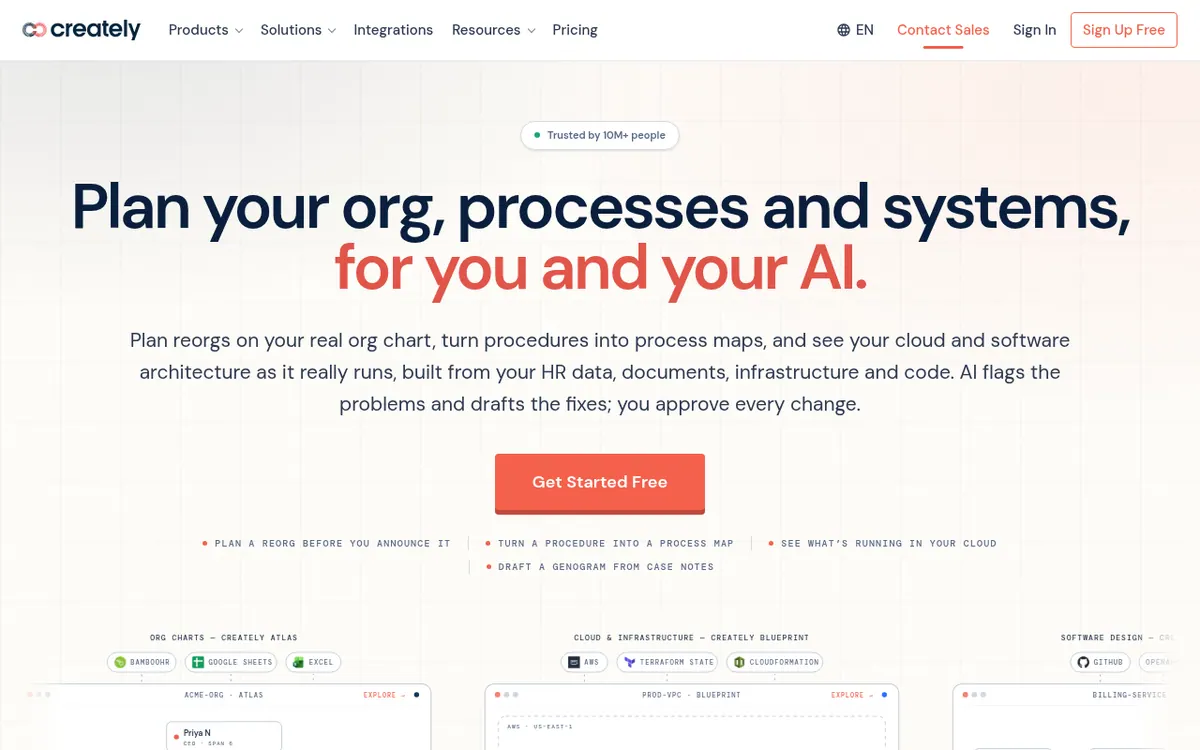
Creately is a diagramming and planning product that has grown into a set of connected tools for organizations. You can build an org chart from a staff spreadsheet, turn a procedure document into a flowchart with step owners, draw clinical genograms from pasted case notes, and sketch ideas on a shared whiteboard. Cloud architecture mapping on AWS and compliance mapping are labelled as coming, so treat them as previews rather than finished products.
The vendor describes its AI as a helper that looks through your diagrams, flags problems such as a step with no owner, and drafts a fix. A person approves, edits or rejects every change. Source systems such as BambooHR, Jira, GitHub and Google Sheets can be connected, and imports include CSV, XLSX, PDF and DOCX files.
Pricing is a single subscription across products. Free costs $0 and allows 45 shapes per diagram. Pro is $5 per editor per month billed yearly ($60 per editor), which adds unlimited shapes, exports and one connected data source. Business is $89 per organization per month billed yearly ($1,068 per organization), which adds unlimited data sources, admin controls, an audit log and priority support. Enterprise is custom and annual, and enables Advanced features product by product, with a 30-day evaluation on your own data.
- Org charts built from a staff spreadsheet
- Procedure documents turned into flowcharts
- Genograms in standard clinical notation
- BPMN 2.0 process maps with swimlanes
- Real-time whiteboard collaboration
- Export to PDF, SVG, PNG and JPEG
- AI changes applied only after approval
- Connectors for tools such as Jira and Google Sheets
Official video
How to Create Professional Genograms Faster | Creately Genogram App Overview · by Creately ·
The player loads only when you press play.
Good for / Not for
Good for
- Teams planning reorgs from an existing staff spreadsheet
- Teams documenting procedures as flowcharts with owners for each step
- Therapists and social workers drafting genograms from intake notes
Not for
- Anyone needing a monthly-billed price shown on the page
- Users who need Advanced analysis and governance without contacting sales
How to start
Start on the Free plan, which costs $0, and pick a product such as an org chart or a blank whiteboard. source
Upload a spreadsheet or document, or connect a source such as Google Sheets, so Creately can draw the first version. source
Review what the AI found and approve, edit or reject each suggested change. source
Limits and gotchas
- Free plan is limited to 45 shapes per diagram. source
- Pro includes one connected data source refreshed daily; unlimited sources need Business. source
- Until you move to Enterprise, Advanced features can only be previewed, and your 30-day trial begins once you complete your first successful import, extraction or scan. source
From the official site and docs of Creately, checked on October 29, 2026.
Pros and cons
Pros
- Free plan at $0 with real-time collaboration and all diagram types
- Starts from existing files and tools such as spreadsheets, documents, Jira and Google Sheets
- AI suggestions require approval before anything changes
- Pro is $5 per editor per month billed yearly, a low entry price for paid features
- SOC 2 Type II and ISO 27001 certified, per the pricing page
Cons
- Free plan is capped at 45 shapes per diagram
- Only yearly-billed per-month prices are shown for Pro and Business
- Advanced features are preview only until you move to Enterprise, which needs talking to sales
- Cloud architecture and compliance products are labelled as coming
- Business is priced per organization at $89 per month billed yearly, which may not suit very small teams
Our take
Creately fits teams that want to start from data they already hold, such as an HR spreadsheet or a procedure document, and get a diagram they can check and edit. The approval step for AI changes suits cautious organizations. It fits less well if you need monthly billing quoted on the page, since only yearly-billed prices are shown, or if you want deeper analysis and governance, which sit behind Enterprise and a sales conversation. Two of the products are still marked as coming, so confirm current availability before planning around them.
Comparisons and lists with Creately
Coming soon
Coming soon — we are writing comparisons that include Creately.
Creately pricing
| Plan | Monthly billing | Annual billing (per month) | Limits / what’s included |
|---|---|---|---|
| Free | Free | — | Up to 45 shapes per diagram; static import only for connected data |
| Pro per editor | — | $5 | Billed annually at $60 per editor; unlimited shapes and diagrams; one connected data source refreshed daily |
| Business per organization | — | $89 | Billed annually at $1,068 per organization; unlimited connected data sources; admin controls, audit log, priority support |
Free trial: 30-day evaluation of Advanced products with your own data, arranged through Ente. Free plan: yes.
Prices checked on on the official Creately pricing page. “—” = not published.
All Creately plans, limits and annual prices →
Frequently asked questions
Is there a free plan?
Yes. The Free plan costs $0, includes all diagram types and real-time collaboration, and allows up to 45 shapes per diagram.
How much does Pro cost?
Pro is $5 per editor per month, billed annually at $60 per editor. The page does not show a monthly-billed price.
What does Business add over Pro?
Business is $89 per organization per month, billed annually at $1,068 per organization. It adds unlimited connected data sources, admin controls, roles, an audit log and priority support.
Can I try the Advanced features?
Enterprise includes a 30-day evaluation of an Advanced product using your own data, arranged by talking to sales. On other plans Advanced features are preview only.
Does it integrate with other tools?
The integrations page lists Google Drive, Slack, Confluence and Microsoft Teams. The home page also lists connectors such as Jira, GitHub and Google Sheets.
Recently verified in AI Image Generation
 Backlog by Nulab Inc Verified Nov 2, 2026
 Based Labs Verified Nov 2, 2026
- Ideogram Verified Nov 2, 2026
 Playground Verified Nov 2, 2026
 Recraft Verified Nov 2, 2026
 Krea Verified Oct 30, 2026
Add an AGIPicks badge to your site
The badge shows Creately’s verification status on AGIPicks and links to this page. Light/dark and compact versions: badges.

Suggest an update
Wrong price, outdated fact or a tool that shut down? Are you the vendor and disagree with this page? Tell us, ideally with a link to the official page. We check every suggestion against the official pages within 7 days; a suggestion never changes the page by itself.