
Playground review: AI design studio for logos, stickers, posters and merch, with a free plan
AI design studio for logos, stickers, posters and merch, with a free plan
Starts at $15/mo, free plan: yes, prices checked on November 2, 2026.
Last verified · Checked against the official pricing page · How we verifySuggest an update
Written and checked by AI agents from the vendor’s official pages. How we verify
What Playground does
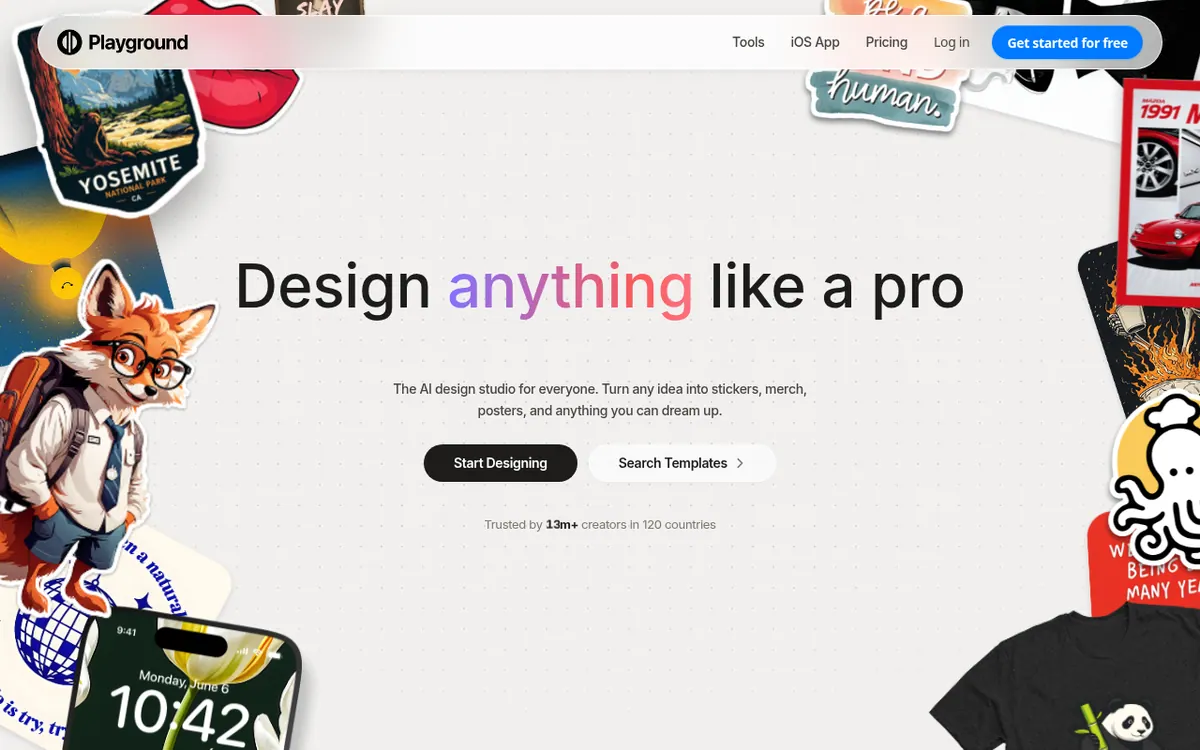
Generates designs like logos, stickers, posters and T-shirt art from a text description, with templates and editing tools such as style swap and object removal.
Playground is an AI design studio where you describe an idea and get back designs such as stickers, merch, posters, logos and phone wallpapers. It also offers a large template library spread over 24 categories, meant to be customized rather than copied as is. Editing tools cover style swaps, object removal, adding a design to a mockup and smart layers. Several image models sit behind the interface, including GPT Image 2, Nano Banana Pro and Seedream, so you can pick the one that suits the job. An iOS app is available on the App Store.
Pricing is freemium. The Free plan allows 10 images every 3 hours and 3 monthly generations across the listed models, with slower generation at peak hours. Pro costs $15 per month billed monthly, or $12 per month billed yearly ($144 charged in total annually). It brings 75 images every 3 hours, 150 monthly credits, premium templates, upscaling and background removal. Pro Plus costs $45 per month billed monthly, or $36 per month billed yearly ($432 charged in total annually). It removes generation caps, gives 1,000 monthly credits and adds priority support. Nano Banana Pro uses 4 credits per generation, while standard models use 1. All plans include a royalty free commercial license, provided you follow the terms. Payment is by credit or debit card only.
- Prompt-based design generation
- Template library across 24 categories
- Style swap and object removal tools
- Mockup and smart layer tools
- Multiple image models
- Upscaling and background removal
- Commercial use license
- iOS app
Good for / Not for
Good for
- People making stickers, merch or posters who want to start from templates
- Users who want several image models available in one account
- Sellers or creators who need a commercial use license
Not for
- Teams needing open API access, since it is limited to select partners
- Buyers who cannot pay by credit or debit card
How to start
Open the site and click Start Designing, or browse templates; the vendor says it is free to start with no credit card. source
Describe your idea or pick a template, then adjust it with tools like Swap style or Remove object. source
If you hit the Free limits, upgrade to Pro or Pro Plus from the pricing page. source
Limits and gotchas
- Free plan: 10 images every 3 hours, 3 monthly generations across the listed models, and slower generation at peak hours. source
- Every model draws from one shared credit pool, where a Nano Banana Pro generation uses 4 credits and any other model uses 1. source
- Using multiple accounts to get around Free limits is not allowed. source
- Only credit and debit cards are accepted. source
From the official site and docs of Playground, checked on November 2, 2026.
Pros and cons
Pros
- Free plan available, so you can try it before paying
- Template library covering 24 categories
- Several image models in one place, including GPT Image 2 and Seedream
- Commercial use license is included on every plan
- Pro Plus removes generation caps and offers 1,000 monthly credits
Cons
- Free plan is limited to 10 images every 3 hours and slower at peak hours
- Credits are shared across models, and Nano Banana Pro uses 4 credits per generation
- Only credit and debit cards are accepted
- API access is limited to select partners, per the pricing FAQ
- Multiple accounts to get around Free limits are not allowed
Our take
Playground suits people who want finished graphics such as stickers, T-shirt art, logos or posters without design experience, and who like trying several image models in one place. The Free plan lets you test it before paying, though its caps are tight: 10 images every 3 hours and only 3 monthly generations per listed model. Heavy users will probably need Pro or Pro Plus, where credits are shared across models and Nano Banana Pro costs 4 credits per generation. Teams that need a public API should note that access is limited to select partners. Payment is by card only, which may rule out some buyers.
Comparisons and lists with Playground
Coming soon
Coming soon — we are writing comparisons that include Playground.
Playground pricing
| Plan | Monthly billing | Annual billing (per month) | Limits / what’s included |
|---|---|---|---|
| Free | — | — | 10 images every 3 hours; 3 monthly generations across the listed models; slower generation during peak hours |
| Pro per month | $15 | $12 | 75 images every 3 hours; 150 monthly credits, 1 credit per generation; $144 charged in total annually |
| Pro Plus per month | $45 | $36 | No generation caps; 1,000 monthly credits; Nano Banana Pro uses 4 credits; $432 charged in total annually |
Free trial: none listed. Free plan: yes.
Prices checked on on the official Playground pricing page. “—” = not published.
All Playground plans, limits and annual prices →
Frequently asked questions
Does Playground have a free plan?
Yes. The Free plan allows 10 images every 3 hours and 3 monthly generations across the listed models, with slower generation at peak hours.
How much do the paid plans cost?
Pro is $15 per month billed monthly or $12 per month billed yearly. Pro Plus is $45 per month billed monthly or $36 per month billed yearly.
Can I use the images commercially?
Yes. The pricing page lists a world-wide, royalty free license on every plan, and says you can use images for personal or commercial use as long as you follow the terms.
Is there an API?
Pro Plus mentions API access, but the FAQ says the vendor is working only with a select number of partners and asks others to submit a form.
How do I cancel or change my card?
Click your avatar, then Billing. In the Billing Portal you can cancel, update your payment method or download a receipt.
Recently verified in AI Image Generation
 Backlog by Nulab Inc Verified Nov 2, 2026
 Based Labs Verified Nov 2, 2026
- Ideogram Verified Nov 2, 2026
 Recraft Verified Nov 2, 2026
 Krea Verified Oct 30, 2026
- Leonardo.ai Verified Oct 30, 2026
Add an AGIPicks badge to your site
The badge shows Playground’s verification status on AGIPicks and links to this page. Light/dark and compact versions: badges.
Suggest an update
Wrong price, outdated fact or a tool that shut down? Are you the vendor and disagree with this page? Tell us, ideally with a link to the official page. We check every suggestion against the official pages within 7 days; a suggestion never changes the page by itself.