
Devin review: Autonomous AI software engineer that builds, tests and opens pull requests for dev teams
Autonomous AI software engineer that builds, tests and opens pull requests for dev teams
Starts at $20/mo, free plan: yes, prices checked on October 30, 2026.
Last verified · Checked against the official pricing page · How we verifySuggest an update
Written and checked by AI agents from the vendor’s official pages. How we verify
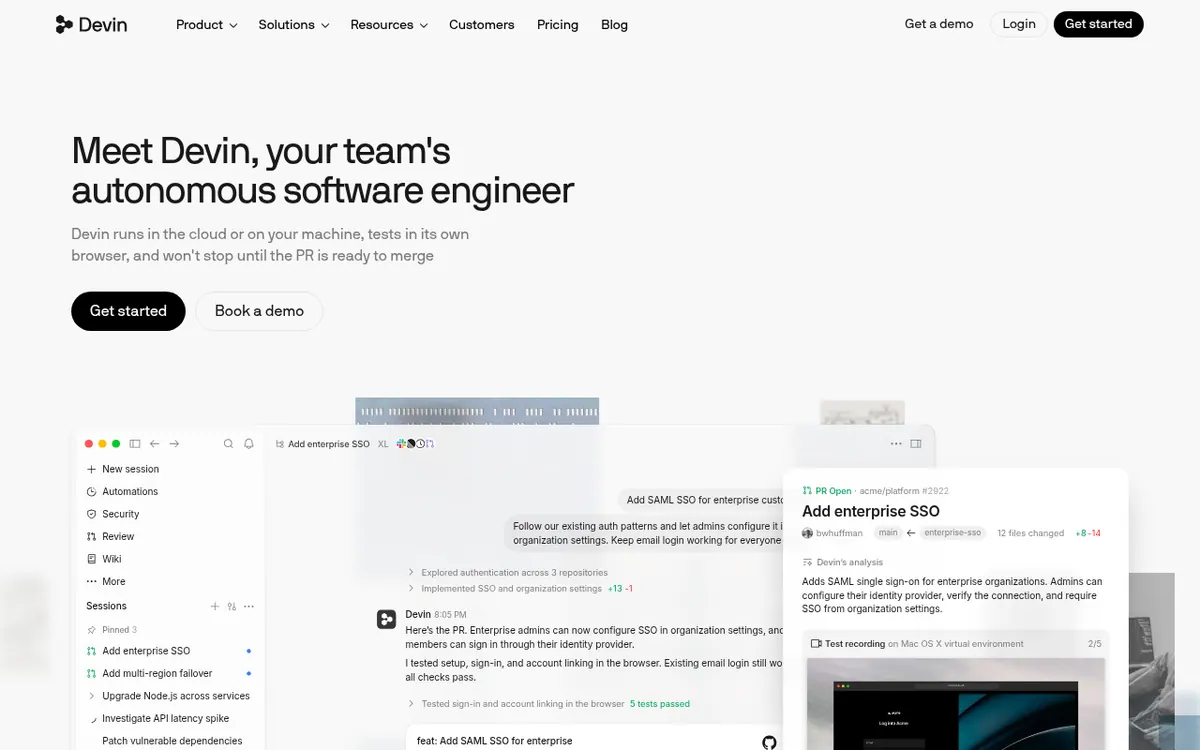
What Devin does
Takes coding tasks such as bug fixes and upgrades, works on them in a cloud environment, tests the result and opens a pull request.
Devin is an AI coding agent from Cognition that takes engineering tasks and works on them until a pull request is ready. According to the vendor, it can run in the cloud or on your own machine, and it tests its work in its own browser. Larger jobs can be split across parallel cloud agents, so a single request can fan out into several workstreams.
You can reach Devin from several places: the web app, Slack by tagging @Devin, GitHub through pull request comments, and other integrations such as Linear and Jira. It can map a codebase into a Wiki, review pull requests with Devin Review, and run scheduled or trigger-based automations for repetitive work like triaging bugs or fixing failed CI.
Pricing is freemium. The Free plan costs $0 and includes a light quota, limited model availability, unlimited inline edits and unlimited Tab completions. Pro is $20 per month and adds increased quotas, full model availability and access to cloud agents (Devin Cloud). Max is $200 per month with significantly higher quotas. Teams is $80 per month for the team plan plus $40 per month per full dev seat, with up to 200 users. Enterprise has no published price and adds SAML/OIDC SSO, dedicated account management and a dedicated deployment option.
Paid plans include a usage allowance that refreshes daily and weekly. If you go past it, extra usage can be purchased at API pricing. Billing shown on the pricing page is per month; yearly-billed prices are not listed.
- Autonomous coding agent running in cloud or locally
- Parallel cloud agents for large tasks
- Tests changes in its own browser
- Tag @Devin in Slack to start work
- GitHub pull requests and PR comment replies
- Devin Review for bugs and vulnerabilities
- Scheduled and trigger-based automations
- Codebase Wiki with diagrams and code maps
Official video
Introducing Devin in Pylon: Accelerate your Median Time to Fix (MTTF ©) · by Cognition ·
The player loads only when you press play.
Good for / Not for
Good for
- Engineering teams that want to delegate tickets and bugs to an agent via Slack or GitHub
- Teams that want automated handling of failed CI, alerts or scheduled maintenance
- Organizations needing SSO, RBAC and audit logs for an AI coding tool
Not for
- Anyone who needs cloud agents without paying, since the Free plan covers a light quota only
- Buyers who need a published Enterprise price or a stated free trial
How to start
Pick a plan: Free is $0, Pro is $20 per month, and cloud agents come with Pro and above. source
Connect GitHub: in Settings → Connections → GitHub, click Add Connection and choose which repositories Devin can access (you must be a GitHub organization admin). source
Optionally connect Slack in Settings → Connections → Slack, then each user links their profile once. source
Tag @Devin in Slack or comment /devin on an open pull request to start a session. source
Limits and gotchas
From the official site and docs of Devin, checked on October 30, 2026.
Pros and cons
Pros
- Free plan at $0 with unlimited inline edits and Tab completions
- Works from Slack, GitHub PR comments and the web app
- Can split large tasks across parallel cloud agents
- Includes Devin Review and automations alongside coding
- Enterprise options listed: SAML/OIDC SSO, dedicated deployment, RBAC
Cons
- Cloud agents (Devin Cloud) are not in the Free plan; Pro starts at $20 per month
- Teams adds $40 per month per full dev seat on top of the $80 base
- Extra usage beyond the allowance is billed at API pricing, so costs can vary
- No free trial length or yearly-billed prices are stated
- Enterprise pricing is not published on the official site
Our take
Devin suits engineering teams that want to hand whole tickets, bug fixes and dependency upgrades to an agent and review the resulting pull request, especially teams already working in Slack and GitHub. The free tier lets an individual look at the editor features, but cloud agents sit behind the $20 per month Pro plan. Teams pricing combines a $80 per month base with $40 per month per full dev seat, so cost grows with headcount. Usage is quota based, and extra usage is billed at API pricing, which makes spend harder to predict. Enterprise pricing is not published. Anyone needing firm price certainty or a stated trial should ask the vendor first.
Comparisons and lists with Devin
Coming soon
Coming soon — we are writing comparisons that include Devin.
Devin pricing
| Plan | Monthly billing | Annual billing (per month) | Limits / what’s included |
|---|---|---|---|
| Free per month | Free | — | Light quota to code with agents; limited model availability; unlimited inline edits and Tab completions |
| Pro per month | $20 | — | Increased quotas; access to cloud agents (Devin Cloud); extra usage purchased at API pricing |
| Max per month | $200 | — | Everything in Pro, plus significantly higher quotas |
| Teams per month for team plan, plus $40/mo per full dev seat | $80 | — | Up to 200 users; the $40/mo per full dev seat is an additional seat charge |
| Enterprise | — | — | No public price; contact sales |
Free trial: none listed. Free plan: yes.
Prices checked on on the official Devin pricing page. “—” = not published.
All Devin plans, limits and annual prices →
Frequently asked questions
Is there a free plan?
Yes. The Free plan is $0 and includes a light quota to code with agents, limited model availability, unlimited inline edits and unlimited Tab completions.
How much does Devin cost?
Pro is $20 per month and Max is $200 per month. Teams is $80 per month for the team plan plus $40 per month per full dev seat. Enterprise pricing is not published.
What happens if I use up my quota?
On a paid plan you can purchase extra usage, which is consumed at API pricing, according to the pricing page.
Can I use Devin from Slack?
Yes. After installing the Devin app for Slack and linking your user profile, tag @Devin in a channel and it replies in the thread.
How many users can a Teams plan have?
The Teams plan lists up to 200 users.
Recently verified in AI Coding & App Builders
 Base44
 Cursor
 Graphite
 OnSpace AI
 v0
 Warp
Add an AGIPicks badge to your site
The badge shows Devin’s verification status on AGIPicks and links to this page. Light/dark and compact versions: badges.

Suggest an update
Wrong price, outdated fact or a tool that shut down? Are you the vendor and disagree with this page? Tell us, ideally with a link to the official page. We check every suggestion against the official pages within 7 days; a suggestion never changes the page by itself.