
Devs.ai review: Build AI apps and agents with central IT approval, access control and spend visibility
Build AI apps and agents with central IT approval, access control and spend visibility
Custom (contact sales), free plan: yes, prices checked on October 25, 2026.
Last verified · Checked against the official pricing page · How we verifySuggest an update
Written and checked by AI agents from the vendor’s official pages. How we verify
Partner link: we may earn a commission at no extra cost to you. It never changes our order or verdicts. Affiliate disclosure
What Devs.ai does
Lets organisations build AI apps, websites, presentations and agents, with a Private AI Store where IT approves, versions and retires them.
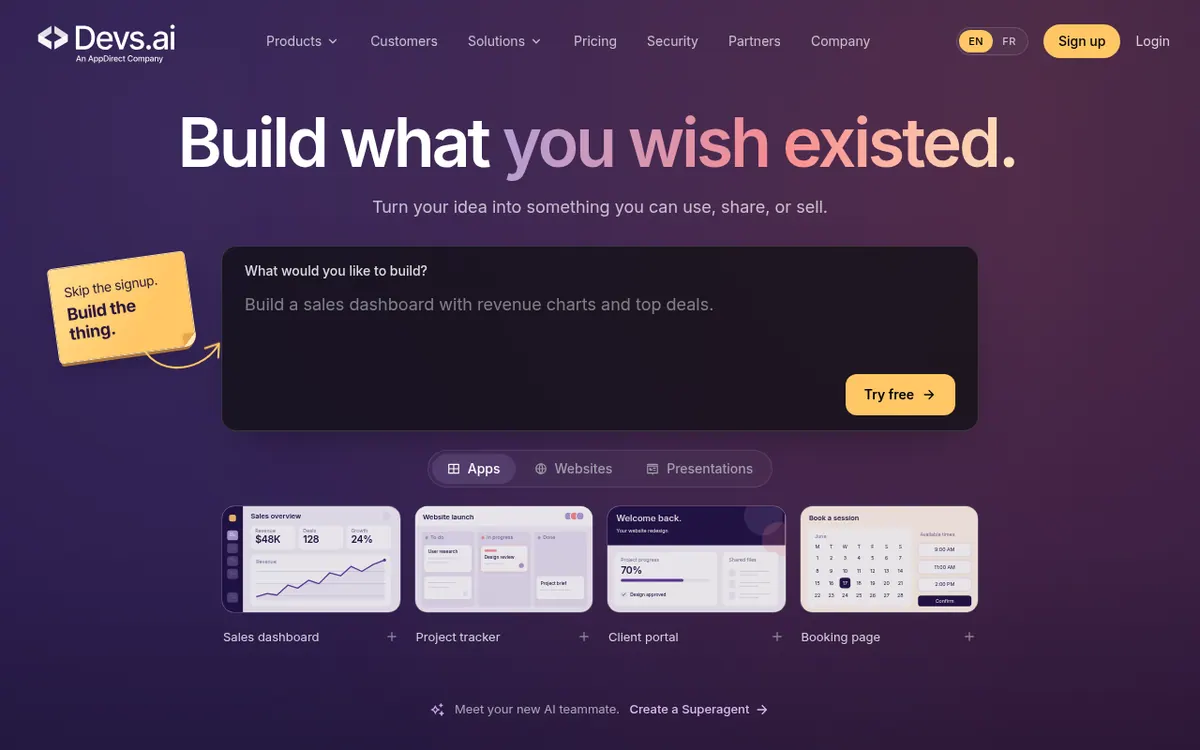
Devs.ai is a platform for creating AI apps and agents inside an organisation. According to its homepage, you can build apps, websites and presentations, and create agents the vendor calls Superagents. The site is written for companies where employees build things while IT keeps oversight.
For oversight, the vendor describes a Private AI Store. IT can approve, version and retire apps from one place, set role-based access, and see usage analytics and spend. The pricing table shows SSO, ACLs and multi-tenancy only in the Enterprise column. The pricing page also lists SOC 2 Type II, HIPAA, GDPR and CCPA.
Other capabilities described on the official pages include publishing apps through the vendor's own marketplace, 400+ partner marketplaces and the hyperscalers, and choosing or swapping AI models per agent or app. Connectors can be authorized with one click. The pricing page says 200+ connectors, growing weekly, while other official pages give a different count, so the number is unconfirmed here. Templates are marked as coming soon.
Pricing is per seat. Free costs $0 USD and covers core Agent Builder and App Builder plus 2 GB of data upload. Personal is $15 USD per seat per month, billed annually, and includes $10 of usage per month. Business is $30 USD per seat per month, billed annually, and includes $21 of usage per month. Enterprise has custom pricing on an annual contract. The pricing page has a Yearly/Monthly toggle, but the monthly-billing prices are not available in the facts used for this card.
- Build apps, websites and presentations from a prompt
- Create agents (Superagent)
- Private AI Store with approval, versioning and retirement
- Role-based access control
- Usage analytics and spend visibility
- Publishing through partner marketplaces and hyperscalers
- Model choice and swapping per agent or app
- One-click connector authorization
Good for / Not for
Good for
- Companies that want employees to build AI apps while IT keeps approval and access control
- Admins who need usage analytics and spend visibility
- Teams that want to choose or swap AI models per agent or app
- Organisations that want to publish apps through partner marketplaces
Not for
- Teams needing SSO, ACLs or multi-tenancy without Enterprise, since the pricing table lists them only there
- Buyers who need a stated platform list, API details or a free trial, which the pages do not give
How to start
Start on the Free plan at $0 USD, which covers core Agent Builder and App Builder with 2 GB of data upload. source
Build an app, website or presentation, or create a Superagent, from the homepage flow. source
Add connectors by authorizing them with one click. source
Pick or swap the AI model for each agent or app. source
Limits and gotchas
- Personal includes $10 of usage per month and Business includes $21 of usage per month. source
- Paid seat prices are labelled as billed annually, and Enterprise is on an annual contract. source
- The pricing page says 200+ connectors, while other official pages give a different count. source
- Templates are marked as coming soon. source
From the official site and docs of Devs.ai, checked on October 25, 2026.
Pros and cons
Pros
- Free plan at $0 USD with core Agent Builder and App Builder
- Private AI Store lets IT approve, version and retire apps
- Usage analytics and spend visibility are described
- AI models can be chosen and swapped per agent or app
- Compliance listed: SOC 2 Type II, HIPAA, GDPR and CCPA
Cons
- Paid plans are per seat, so cost grows with team size
- SSO, ACLs and multi-tenancy appear only in the Enterprise column, and Enterprise pricing is not published
- Paid prices shown are billed annually; monthly-billing prices are not available in the facts
- Free trial, platform list and API details are not stated
- Connector count differs between official pages, and templates are marked coming soon
Our take
Devs.ai appears aimed at organisations that want staff to build their own AI apps and agents while IT keeps central control. The Private AI Store, approval and versioning, role-based access and spend visibility are the main points for administrators. The Free plan lets an individual try the builders at no cost, though it covers only core functionality and 2 GB of data upload. Teams that need SSO, ACLs or multi-tenancy should note that the pricing table lists them only under Enterprise, whose price is not published. The paid prices we have are billed annually, so anyone wanting monthly billing must check the vendor. Platform support, API access and a free trial are not stated, and the connector count differs between official pages, so confirm what you need before committing.
Comparisons and lists with Devs.ai
Coming soon
Coming soon — we are writing comparisons that include Devs.ai.
Devs.ai pricing
| Plan | Monthly billing | Annual billing (per month) | Limits / what’s included |
|---|---|---|---|
| Free forever | Free | — | Core Agent Builder and App Builder; 2 GB data upload |
| Personal per seat / month, billed annually | — | $15 | Includes $10 of usage / month. The page has a Yearly/Monthly toggle; the captured text shows only this price, labelled 'Billed annually'. Monthly-billing price not captured. |
| Business per seat / month, billed annually | — | $30 | Includes $21 of usage / month. The page has a Yearly/Monthly toggle; the captured text shows only this price, labelled 'Billed annually'. Monthly-billing price not captured. |
| Enterprise custom, annual contract | — | — | Custom pricing; contact the vendor |
Free trial: none listed. Free plan: yes.
Prices checked on on the official Devs.ai pricing page. “—” = not published.
All Devs.ai plans, limits and annual prices →
Frequently asked questions
Does Devs.ai have a free plan?
Yes. The Free plan is $0 USD and covers core Agent Builder and App Builder with 2 GB of data upload.
How much do the paid plans cost?
Personal is $15 USD per seat per month, billed annually. Business is $30 USD per seat per month, billed annually. Enterprise is custom pricing on an annual contract. A Yearly/Monthly toggle exists, but monthly-billing prices are not available here, so check with the vendor.
What usage is included in paid plans?
According to the pricing page, Personal includes $10 of usage per month and Business includes $21 of usage per month.
Which plan includes SSO?
In the pricing table, SSO, ACLs and multi-tenancy appear only in the Enterprise column. The homepage also mentions SSO and role-based access for the Private AI Store without naming a plan.
How many connectors does Devs.ai offer?
The pricing page says 200+ connectors, growing weekly. Other official pages state a different count, so the figure is unconfirmed and worth checking with the vendor.
Recently verified in Automation & AI Agents
 Forethought Verified Nov 2, 2026
 Hippocratic AI Verified Nov 2, 2026
 Inngest Verified Nov 2, 2026
 Kolo AI Verified Nov 2, 2026
 Mercury Verified Nov 2, 2026
 MindStudio Verified Nov 2, 2026
Add an AGIPicks badge to your site
The badge shows Devs.ai’s verification status on AGIPicks and links to this page. Light/dark and compact versions: badges.

Suggest an update
Wrong price, outdated fact or a tool that shut down? Are you the vendor and disagree with this page? Tell us, ideally with a link to the official page. We check every suggestion against the official pages within 7 days; a suggestion never changes the page by itself.