
Octoparse review: No-code web scraper with templates, cloud runs, API access and a free plan
No-code web scraper with templates, cloud runs, API access and a free plan
Custom (contact sales), free plan: yes, prices checked on October 20, 2026.
Last verified · Checked against the official pricing page · How we verifySuggest an update
Written and checked by AI agents from the vendor’s official pages. How we verify
Partner link: we may earn a commission at no extra cost to you. It never changes our order or verdicts. Affiliate disclosure
What Octoparse does
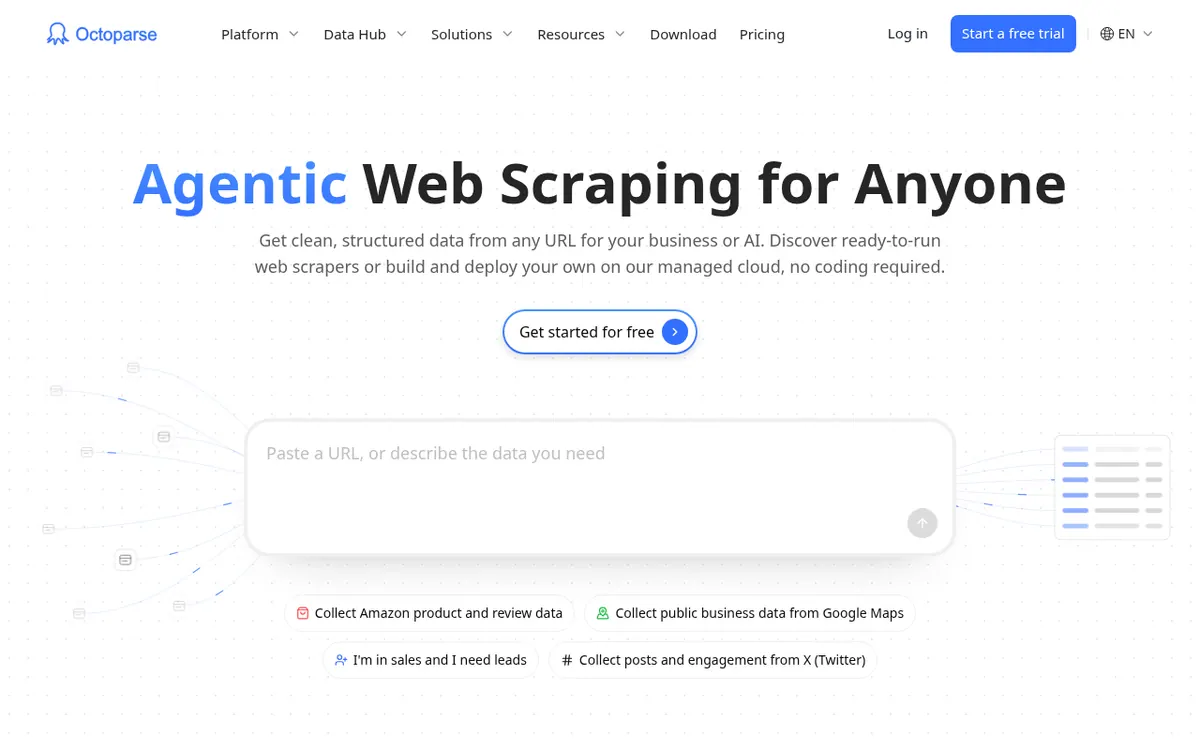
Octoparse is a web scraping tool from Octopus Data Inc. that turns website pages into structured data. You can begin with ready-made templates, ask an AI Assistant to build a task, or use Auto-detect in the desktop app and refine the result with drag-and-drop. According to its homepage, it can navigate pages, fill in forms, log into sites and clear CAPTCHAs before returning results.
Scrapers can run on your own computer, which keeps data private, or on Octoparse Cloud. The vendor says the cloud uses a fleet of real browsers, splits large jobs into parallel subtasks, rotates IPs automatically and runs 24/7. Data can be exported as Excel, CSV, JSON, HTML or XML files. Octoparse says it connects to AI tools, databases, cloud services and business apps, and it offers search APIs through REST API and MCP. The desktop app is offered for Windows and Mac.
Pricing is freemium. The Free plan costs $0, is free forever, needs no credit card, and includes 10 tasks, 1 device, local extraction and 50,000 rows of data export per month. Standard is $69 per month billed yearly and includes 100 tasks and up to 3 concurrent cloud processes. Professional is $249 per month billed yearly and includes 250 tasks and up to 20 concurrent cloud processes. Standard also lists task scheduling and Data Export API access. Residential proxies are an add-on at $3 per GB. Enterprise pricing is custom. All paid plans include a 5-day money-back guarantee.
- Ready-made scraping templates
- AI Assistant task building
- Auto-detect with drag-and-drop editing
- Handles forms, logins and CAPTCHAs
- Cloud runs with automatic IP rotation
- Export to Excel, CSV, JSON, HTML or XML
- Search APIs via REST API and MCP
- Task scheduling and Data Export API access on Standard
Official video
How to Generate Sales Leads Using Web Scraping · by Octoparse
The player loads only when you press play.
Pros and cons
Pros
- Free plan is free forever with no credit card required, and includes 10 tasks
- Three ways to build a scraper: templates, AI Assistant, or Auto-detect with drag-and-drop
- Cloud runs use parallel real browsers with automatic IP rotation, according to the vendor
- Exports to Excel, CSV, JSON, HTML or XML, plus REST API and MCP access
- Paid plans include a 5-day money-back guarantee
Cons
- Free plan is limited to 10 tasks, 1 device and local extraction
- Paid plan prices are given only as yearly-billed per-month figures, with no monthly-billing number
- Residential proxies are an add-on at $3 per GB
- Enterprise pricing is custom, so no public price
- Desktop downloads are mentioned only for Windows and Mac
Our take
Octoparse looks suited to people who want to collect web data without writing code. The Free plan lets an individual try local extraction with 10 tasks, and Standard adds cloud extraction, scheduling and API access for more regular work. Professional raises the task count to 250 and the concurrent cloud processes to up to 20, which suits heavier jobs. It fits less well if you need to compare monthly-billing prices, because the official pricing page states only the yearly-billed per-month figures as numbers. Residential proxies cost extra, and Enterprise requires a custom quote. This summary rests only on the vendor's official pages, so check the pricing page for current terms before buying.
Comparisons and lists with Octoparse
Coming soon
Coming soon — we are writing comparisons that include Octoparse.
Octoparse pricing
| Plan | Monthly billing | Annual billing (per month) | Limits / what’s included |
|---|---|---|---|
| Free | Free | — | 10 tasks, 1 device, 1 user, 50K data export per month, up to 10,000 data rows per export |
| Standard per month, billed annually | — | $69 | 100 tasks, up to 3 concurrent cloud processes; monthly-billing price not stated as a number |
| Professional per month, billed annually | — | $249 | 250 tasks, up to 20 concurrent cloud processes; monthly-billing price not stated as a number |
Free trial: none listed. Free plan: yes.
Prices checked on on the official Octoparse pricing page. “—” = not published.
All Octoparse plans, limits and annual prices →
Frequently asked questions
How much does Octoparse cost?
The Free plan is $0. Standard is $69 per month billed yearly and Professional is $249 per month billed yearly. Enterprise pricing is custom.
Is there a free version of Octoparse?
Yes. The Free plan is free forever with no credit card required. It includes 10 tasks, 1 device, local extraction and up to 50,000 rows of data export per month.
Can I get a refund on a paid plan?
All paid Octoparse plans include a 5-day money-back guarantee.
Which computers can run the Octoparse desktop app?
The official lead generation page says to download Octoparse to a Windows or Mac device.
What is the difference between Standard and Professional?
Standard includes 100 tasks and up to 3 concurrent cloud processes. Professional includes 250 tasks and up to 20 concurrent cloud processes.
Recently verified in Web Scraping & Proxies
 UpRock Verified Nov 2, 2026
 Crawlbase Verified Oct 29, 2026
 Undetectable.io Verified Oct 29, 2026
- Thordata Verified Oct 24, 2026
 Incogniton Verified Oct 23, 2026
 Apify Verified Oct 21, 2026
Add an AGIPicks badge to your site
The badge shows Octoparse’s verification status on AGIPicks and links to this page. Light/dark and compact versions: badges.

Suggest an update
Wrong price, outdated fact or a tool that shut down? Are you the vendor and disagree with this page? Tell us, ideally with a link to the official page. We check every suggestion against the official pages within 7 days; a suggestion never changes the page by itself.