
SimpleBackups review: Scheduled, monitored backups for databases, servers, cloud storage and SaaS apps
Scheduled, monitored backups for databases, servers, cloud storage and SaaS apps
Starts at $49/mo, free plan: yes, free trial: 7-day free trial, prices checked on October 29, 2026.
Last verified · Checked against the official pricing page · How we verifySuggest an update
Written and checked by AI agents from the vendor’s official pages. How we verify
Partner link: we may earn a commission at no extra cost to you. It never changes our order or verdicts. Affiliate disclosure
What SimpleBackups does
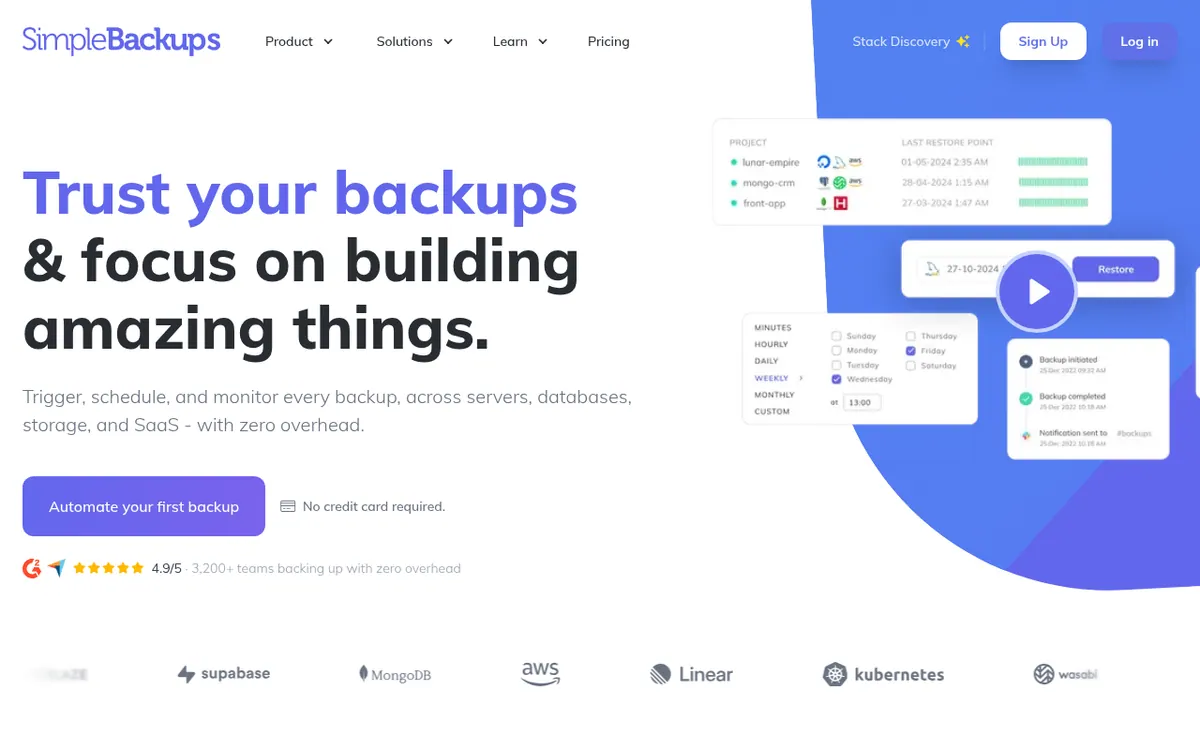
Schedules, runs and monitors backups of databases, servers, cloud storage and SaaS apps, and restores them from one dashboard.
SimpleBackups is a backup service that handles several kinds of data from one dashboard: databases (MySQL, PostgreSQL, MongoDB and Redis), servers and folders, cloud storage buckets, and SaaS apps such as GitLab, Linear, Notion and Knack.
Backups can be scheduled, started by hand or triggered through an API. One backup can carry up to four schedules, each with its own retention, but that needs the Lite plan or higher. The service watches running jobs and alerts you when something goes wrong, and it offers one-click or custom restores. Backups can be sent to your own storage or to SimpleStorage, and data is encrypted with AES-256. Team features include per-user access and read-only status pages.
Pricing is freemium and shown in US dollars. The Basic plan costs $0 and covers one backup job. Billed monthly, Lite is $49 per month, PLUS is $99 per month and Max is $299 per month. The page also offers a yearly option that it says saves 20%, but it shows no yearly price, so the figures here are monthly-billing prices only. Lite includes 5 backups, PLUS 20 and Max 100. Only the number of configured backups is capped, not the number of runs, and more jobs can be bought as add-ons. A 7-day free trial is advertised, and refunds are offered within 30 days.
- Database backups (MySQL, PostgreSQL, MongoDB, Redis)
- Server and folder backups with snapshots
- Cloud storage replication
- SaaS app backups (GitLab, Linear, Notion, Knack)
- Multiple schedules with separate retention
- One-click or custom restore
- Monitoring and alerts on backup problems
- AES-256 encryption
- Per-user access control
- API for automation
Good for / Not for
Good for
- Developers and small teams backing up MySQL, PostgreSQL, MongoDB or Redis databases
- Teams that want backups of GitLab, Linear, Notion or Knack kept in their own storage
- Teams that need several schedules and retention rules on one backup (Lite or higher)
Not for
- Anyone who needs more than one backup job on a free plan, since Basic covers only one
- Buyers who need a published yearly price, as the pricing page shows none
How to start
Sign up for SimpleBackups; the homepage says no credit card is required. source
Start on the free Basic plan, which allows your first backup job, or try the plans free for 7 days. source
Pick a schedule type for the backup: on demand, preset or a custom cron expression. source
Set up notification channels on the On Error event so you hear when a backup fails. source
Limits and gotchas
- Only the number of configured backups is capped, not the number of runs; more jobs are added through add-ons. source
- Quota applies only to SimpleStorage; connecting your own storage has no quota limit. source
- By default anomaly detection is disabled, and alerts about anomalies are not yet turned on for customers. source
- A schedule your plan does not allow locks the backup until you change the schedule or upgrade. source
From the official site and docs of SimpleBackups, checked on October 29, 2026.
Pros and cons
Pros
- Covers databases, servers, cloud storage and several SaaS apps in one service
- Free Basic plan, a 7-day trial and a 30-day refund window
- Backups can go to your own storage, which has no quota
- Up to four schedules per backup with separate retention on Lite and above
Cons
- Basic covers only one backup job, so wider use requires a paid plan
- Pricing page shows no yearly price, only a 20% saving claim
- Developer API is listed under the Max plan at $299 per month billed monthly
- Anomaly alerts are not yet customer-facing; error notifications are the alarm
- Extra backup jobs and storage cost more through add-ons
Our take
SimpleBackups suits teams that want a single place to schedule and watch backups for databases, servers, storage and a handful of SaaS tools, such as developers, agencies and small companies. The free Basic plan allows one backup job, so it works as a small trial, but wider use means paying from $49 per month on Lite when billed monthly. Pricing follows the number of configured backups, with add-ons on top, and the yearly price is not shown, so budgeting for annual billing needs a check with the vendor. It fits less well if you need an API on a lower tier, since the pricing page lists Developer API under Max. Anomaly alerts are not yet customer-facing, so error notifications remain the main failure alarm.
Comparisons and lists with SimpleBackups
Coming soon
Coming soon — we are writing comparisons that include SimpleBackups.
SimpleBackups pricing
| Plan | Monthly billing | Annual billing (per month) | Limits / what’s included |
|---|---|---|---|
| Basic per month | Free | — | 1 included backup job, 1 GB SimpleStorage, daily backup frequency |
| Lite per month billed monthly (the page's 'Pay monthly' option; t | $49 | — | 5 included backups, 50 GB SimpleStorage, up to every 12 h |
| PLUS per month billed monthly (the page's 'Pay monthly' option; t | $99 | — | 20 included backups, 200 GB SimpleStorage, up to every 1 h, unlimited team members |
| Max per month billed monthly (the page's 'Pay monthly' option; t | $299 | — | 100 included backups, 1 TB SimpleStorage, up to every 5 min, Developer API |
Free trial: 7-day free trial. Free plan: yes.
Prices checked on on the official SimpleBackups pricing page. “—” = not published.
All SimpleBackups plans, limits and annual prices →
Frequently asked questions
Is there a free plan?
Yes. The Basic plan is $0 and lets you set up one backup job. A 7-day free trial is also advertised.
How much do the paid plans cost?
Billed monthly, Lite is $49 per month, PLUS is $99 per month and Max is $299 per month. The page says paying yearly saves 20% but shows no yearly price.
What is a backup job and how is it limited?
A backup job is one configured backup. Plans cap the number of configured backups, not the number of runs. Lite includes 5, PLUS 20 and Max 100, and more can be added through add-ons.
Is there a refund policy?
Yes. If you are unhappy, email hello@simplebackups.com within 30 days and the vendor says it will refund you in full.
Does SimpleBackups have an API?
Yes, the homepage says the API can automate backup setup and triggers. The pricing page lists Developer API under the Max plan.
Recently verified in Website Builders & Hosting
 Elementor
 PageFly
 Pixpa
 Mixo
 xCloud
 Onepage
Add an AGIPicks badge to your site
The badge shows SimpleBackups’s verification status on AGIPicks and links to this page. Light/dark and compact versions: badges.
Suggest an update
Wrong price, outdated fact or a tool that shut down? Are you the vendor and disagree with this page? Tell us, ideally with a link to the official page. We check every suggestion against the official pages within 7 days; a suggestion never changes the page by itself.