
PageFly review: AI and drag-and-drop page builder with A/B testing and heatmaps for Shopify stores
AI and drag-and-drop page builder with A/B testing and heatmaps for Shopify stores
Starts at $24/mo, free plan: yes, free trial: 14 Days Free Trial, prices checked on October 30, 2026.
Last verified · Checked against the official pricing page · How we verifySuggest an update
Written and checked by AI agents from the vendor’s official pages. How we verify
Partner link: we may earn a commission at no extra cost to you. It never changes our order or verdicts. Affiliate disclosure
What PageFly does
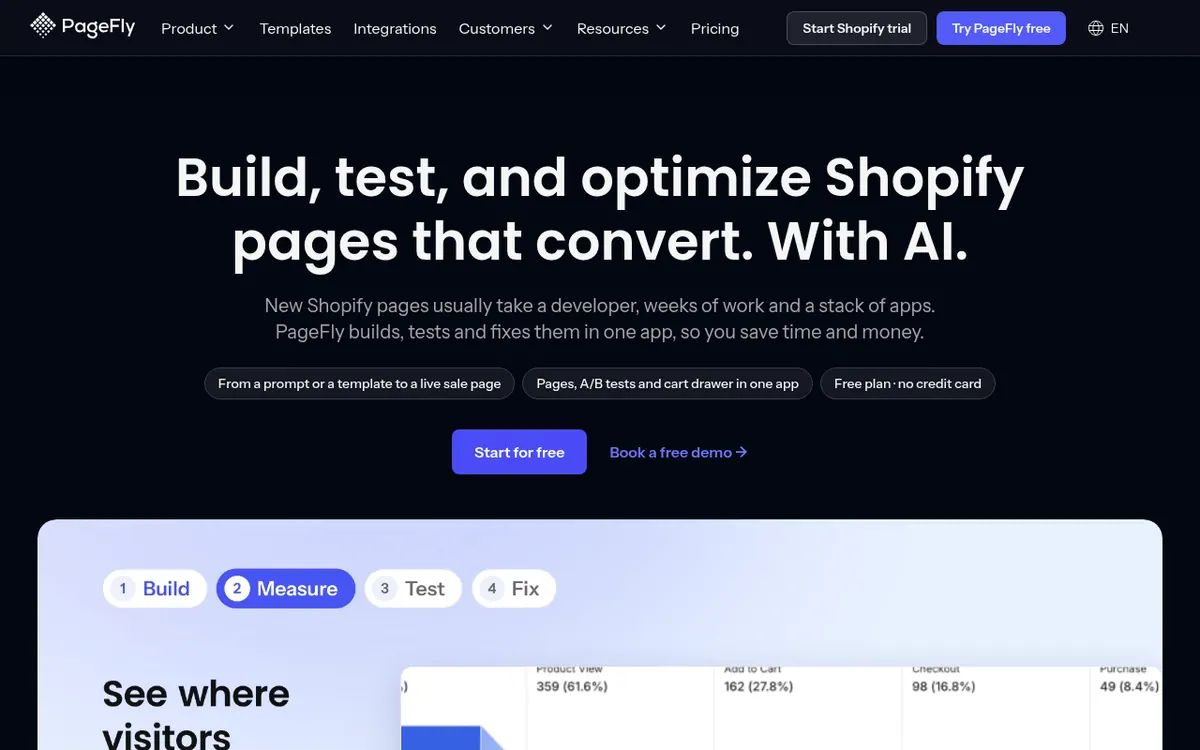
PageFly is an app for Shopify merchants that combines page building with conversion optimization. You can describe a page to its FlyMate AI assistant, start from one of 320+ page and section templates, or work in the drag-and-drop editor. The vendor also says pages can be briefed from Claude chat.
After a page is live, the same app offers measurement and testing tools: heatmaps, a sales funnel view that shows where shoppers drop off, AI Page Checkup that ranks what to fix, and A/B testing where you publish the winner in one click. AI Translator localizes page content.
Pricing is freemium and priced in USD. The Free plan costs $0 per month and allows 1 live page and 10 AI credits a month. Builder starts at $24 per month with 80 credits, Optimize starts at $39 per month with 140 credits, Accelerate is $99 per month with 400 credits, and Power is $199 per month with 800 credits. Builder and Optimize are slider plans, so price and credits change with the number of published page slots. Yearly billing exists only for Accelerate and Power. Extra credit packs can be bought on any plan, and paid plans carry a 30-day money-back guarantee. PageFly is made by SellerSmith Technology JSC.
- Prompt-based page building with FlyMate AI
- Drag-and-drop visual editor
- 320+ page and section templates
- A/B testing with one-click winner publishing
- Heatmaps of clicks and scrolling
- AI Page Checkup ranking what to fix
- Sales funnel drop-off view per page
- AI Translator for page content
Official video
Build a Shopify page with Claude or ChatGPT via the PageFly MCP connector (45s demo) · by PageFly Shopify Page Builder App ·
The player loads only when you press play.
Pros and cons
Pros
- Free plan with no credit card, including 320+ templates and AI page drafting
- Build, A/B test and analyze pages in one app on Optimize and above
- Higher plans lift limits: Accelerate offers unlimited pages and 400 AI credits
- 30-day money-back guarantee on every paid plan
- Pages can be started by prompt, template, drag-and-drop editor or Claude chat
Cons
- Free plan allows only 1 live page and 10 AI credits a month
- A/B testing, heatmaps and sales funnel need Optimize at $39 per month or higher
- Builder and Optimize prices depend on a slot slider, so the final price varies
- Yearly billing is offered only on Accelerate and Power
- AI features draw on monthly credits; extra packs cost more
Our take
PageFly fits Shopify merchants who want page creation, testing and analysis inside one app rather than several separate tools. The free plan lets you try the builder and AI drafting before paying, though it is limited to 1 live page and 10 AI credits. A/B testing, heatmaps and the sales funnel view only arrive with Optimize at $39 per month, so Builder is mainly a page builder with analytics. Prices on the two lower tiers move with a slider, so check your final number before committing. Stores outside Shopify are not covered by anything on the official pages. Heavy AI users should watch the monthly credit allowances, though extra packs are sold.
Comparisons and lists with PageFly
Coming soon
Coming soon — we are writing comparisons that include PageFly.
PageFly pricing
| Plan | Monthly billing | Annual billing (per month) | Limits / what’s included |
|---|---|---|---|
| Free per month | Free | — | 1 live page, 10 AI credits a month, 320+ templates |
| Builder from, per month (slider plan) | $24 | — | Starts at 5 slots and 80 credits; billed monthly only |
| Optimize from, per month (slider plan) | $39 | — | Starts at 20 slots and 140 credits; A/B testing (3 tests at a time), heatmaps (10 pages) |
| Accelerate per month | $99 | — | Unlimited pages, 400 AI credits a month, heatmaps on 50 pages; yearly option exists |
| Power per month | $199 | — | Unlimited pages, 800 AI credits a month, unlimited heatmaps; yearly option exists |
Free trial: 14 Days Free Trial. Free plan: yes.
Prices checked on on the official PageFly pricing page. “—” = not published.
All PageFly plans, limits and annual prices →
Frequently asked questions
Does PageFly have a free plan?
Yes. The Free plan costs $0 per month and includes 1 live page, 10 AI credits a month and 320+ templates. No credit card is required.
How much do the paid plans cost?
Builder starts at $24 per month, Optimize at $39, Accelerate is $99 and Power is $199. Builder and Optimize prices move with a page-slot slider.
Which plan includes A/B testing and heatmaps?
Optimize and above. Optimize lists A/B testing with 3 tests at a time and heatmaps on 10 pages; Accelerate and Power raise those limits.
Can I pay yearly?
Yearly billing is available only on Accelerate and Power. Free, Builder and Optimize are billed monthly.
Is there a refund policy?
The pricing page states a 30-day money-back guarantee on every paid plan, applying to the first payment once per store.
Recently verified in AI for E-commerce
 Genlook
 Octane AI
 Rep AI
 SellerSprite
 Crosslist
Add an AGIPicks badge to your site
The badge shows PageFly’s verification status on AGIPicks and links to this page. Light/dark and compact versions: badges.

Suggest an update
Wrong price, outdated fact or a tool that shut down? Are you the vendor and disagree with this page? Tell us, ideally with a link to the official page. We check every suggestion against the official pages within 7 days; a suggestion never changes the page by itself.