
Crosslist review: Crosslist publishes one listing to many resale marketplaces from a single form
Crosslist publishes one listing to many resale marketplaces from a single form
Starts at $29.99/mo, free plan: no, free trial: 3 days of Crosslist or 20 free listings, whichever comes first, backed by a 3-da, prices checked on October 29, 2026.
Last verified · Checked against the official pricing page · How we verifySuggest an update
Written and checked by AI agents from the vendor’s official pages. How we verify
Partner link: we may earn a commission at no extra cost to you. It never changes our order or verdicts. Affiliate disclosure
What Crosslist does
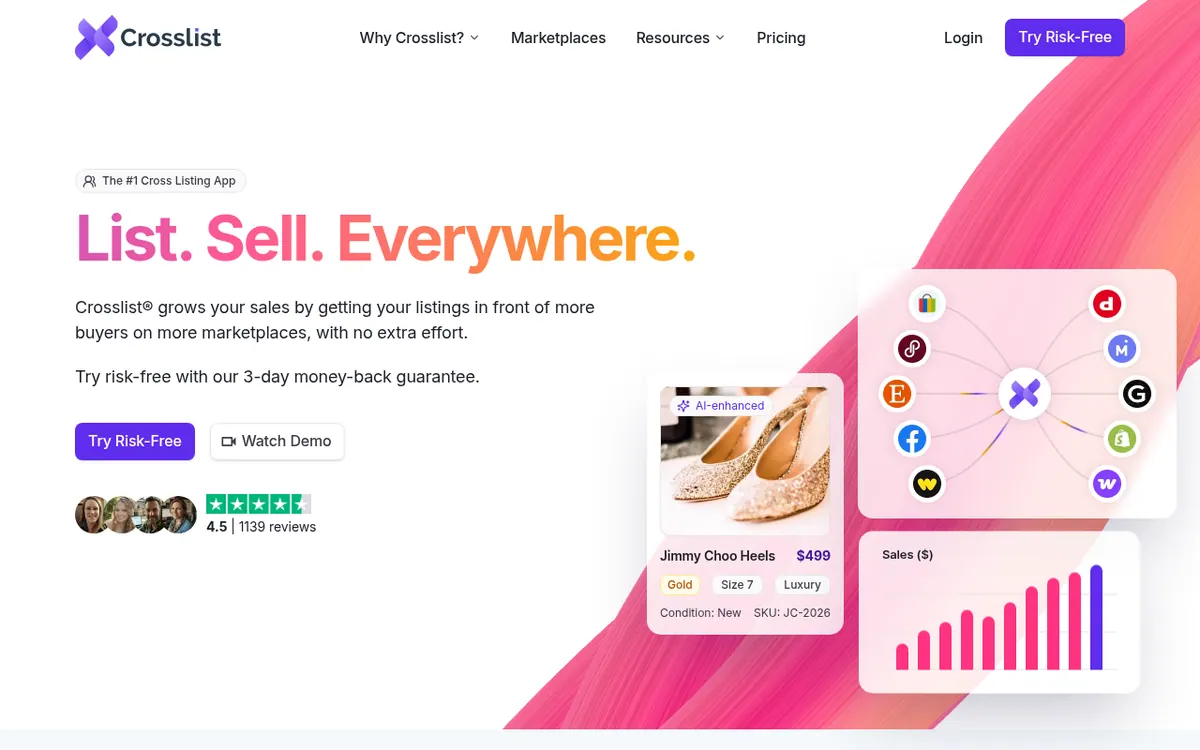
Lets resellers fill in one listing form and publish it to many marketplaces, transfer existing listings, and delist sold items elsewhere.
Crosslist is a subscription tool for resellers who list the same items on more than one marketplace. You fill in a single universal form and publish the listing to the marketplaces you pick. Existing listings can be transferred between 11+ marketplaces, and publishing can run in the background while you work on other things. On the Gold and Diamond plans, sold items are delisted elsewhere automatically to avoid overselling.
Other tools include bulk editing of prices, titles and descriptions, a background remover and photo editor, and a dashboard showing sales, revenue and profit. AI features can build or complete a listing from a photo and suggest prices. They need an add-on at +$4.99/month and run on monthly credits: 200 on Bronze, 500 on Silver, 1000 on Gold and 2000 on Diamond.
There are four paid plans: Bronze at $29.99 per month, Silver at $34.99, Gold at $39.99 and Diamond at $44.99. They differ mainly in how many new listings you can add each month (200, 500, 1000 or unlimited) and in images per listing (9, 9, 15 and 24). No free plan is listed. The pricing page offers 3 days of Crosslist or 20 free listings, whichever comes first. Crosslist is available in the United States, the United Kingdom, Canada and Australia, and users residing in the European Union are not supported.
- Universal listing form for many marketplaces
- Transfer listings between marketplaces
- Background publishing
- Autodelisting of sold items (Gold and Diamond)
- AI listing creation from a photo (add-on)
- AI price suggestions (add-on)
- Background remover and photo editor
- Bulk editing of listings
- Sales analytics dashboard
- iOS and Android apps
Official video
Crosslist: The #1 Cross Listing App (Demo) · by Crosslist ·
The player loads only when you press play.
Good for / Not for
Good for
- Resellers who sell the same items on several marketplaces and want one place to create listings
- Sellers who want to move existing listings between marketplaces
- Sellers who manage inventory from a phone with the iOS or Android app
Not for
- Users residing in the European Union, who are not supported
- Anyone who needs a free plan, since none is listed
How to start
Check that you live in the United States, United Kingdom, Canada or Australia, the only supported countries. source
Begin your Crosslist trial lasting 3 days, or use 20 free listings, ending at whichever limit you reach first. source
Install the browser extension, which runs inside your own browser, or use the iOS or Android app. source
Create a listing once in the universal form and publish it to your marketplaces, or transfer existing listings. source
Limits and gotchas
- Monthly listing caps: Bronze 200, Silver 500, Gold 1,000, Diamond unlimited. source
- AI features need an add-on at +$4.99/month and use monthly credits. source
- Refunds must be requested through in-app chat within 72 hours, only if fewer than 20 listings were created. Canceling alone does not start a refund. source
- Annual plan refunds carry a $9.99 processing fee. source
- The mobile apps lack autodelisting for some marketplaces. source
From the official site and docs of Crosslist, checked on October 29, 2026.
Pros and cons
Pros
- One universal form publishes a listing to many marketplaces
- Plans start at $29.99 per month with all marketplaces included
- Diamond plan allows unlimited new listings each month
- Bulk editing of prices, titles and descriptions
- iOS and Android apps for managing inventory from a phone
Cons
- No free plan is listed on the pricing page
- Refunds need a request within 72 hours and fewer than 20 listings created
- Autodelisting, CSV import and export, and sales analytics start at Gold
- AI features need a +$4.99/month add-on and use credits
- Not available to users residing in the European Union
Our take
Crosslist suits resellers in the United States, United Kingdom, Canada or Australia who already sell on several marketplaces and want one place to create, transfer and delist items. The plans are tiered by monthly listing allowance, so your inventory volume decides the price, and it is worth counting your listings before you choose. Autodelisting, CSV import and export, and sales analytics start at Gold. AI tools cost an extra +$4.99/month and are capped by credits. It does not fit anyone who wants a free plan, anyone living in the European Union, or buyers who need yearly per-month prices, because the pricing page shows no such prices. Refunds are only possible within 72 hours and if fewer than 20 listings were created, so evaluate the tool quickly.
Comparisons and lists with Crosslist
Coming soon
Coming soon — we are writing comparisons that include Crosslist.
Crosslist pricing
| Plan | Monthly billing | Annual billing (per month) | Limits / what’s included |
|---|---|---|---|
| Bronze per month | $29.99 | — | Adds 200 new listings to the inventory every month; 9 images per listing; 200 AI credits per month with the AI add-on (+$4.99/month) |
| Silver per month | $34.99 | — | Adds 500 new listings to the inventory every month; 9 images per listing; 500 AI credits per month with the AI add-on (+$4.99/month) |
| Gold per month | $39.99 | — | Adds 1000 new listings to the inventory every month; 15 images per listing; CSV import and export, autodelisting, sales analytics; 1000 AI credits per month with the AI add-on (+$4.99/month) |
| Diamond per month | $44.99 | — | Unlimited new listings every month; 24 images per listing; CSV import and export, autodelisting, sales analytics; 2000 AI credits per month with the AI add-on (+$4.99/month) |
Free trial: 3 days of Crosslist or 20 free listings, whichever comes first, backed by a 3-da. Free plan: no.
Prices checked on on the official Crosslist pricing page. “—” = not published.
All Crosslist plans, limits and annual prices →
Frequently asked questions
How much does Crosslist cost?
Bronze is $29.99 per month, Silver $34.99, Gold $39.99 and Diamond $44.99. The AI features are a separate add-on at +$4.99/month. The pricing page shows no yearly per-month prices.
Is there a free plan or trial?
No free plan is listed. The pricing page offers 3 days of Crosslist or 20 free listings, whichever comes first.
Which countries can use Crosslist?
It is available in the United States, the United Kingdom, Canada and Australia. Users residing in the European Union are not supported.
How many listings can I add?
Bronze includes 200 listings, Silver 500, Gold 1,000 and Diamond unlimited.
How do refunds work?
A refund must be requested through in-app chat within 72 hours of purchase, and only if fewer than 20 listings were created. Canceling alone does not start a refund, and annual plans carry a $9.99 processing fee.
Recently verified in AI for E-commerce
 Genlook
 Octane AI
 PageFly
 Rep AI
 SellerSprite
Add an AGIPicks badge to your site
The badge shows Crosslist’s verification status on AGIPicks and links to this page. Light/dark and compact versions: badges.
Suggest an update
Wrong price, outdated fact or a tool that shut down? Are you the vendor and disagree with this page? Tell us, ideally with a link to the official page. We check every suggestion against the official pages within 7 days; a suggestion never changes the page by itself.