
Speechify review: Text to speech, voice typing and a voice AI assistant for reading and writing
Text to speech, voice typing and a voice AI assistant for reading and writing
Starts at $29/mo, free plan: yes, prices checked on October 26, 2026.
Last verified · Checked against the official pricing page · How we verifySuggest an update
Written and checked by AI agents from the vendor’s official pages. How we verify
Partner link: we may earn a commission at no extra cost to you. It never changes our order or verdicts. Affiliate disclosure
What Speechify does
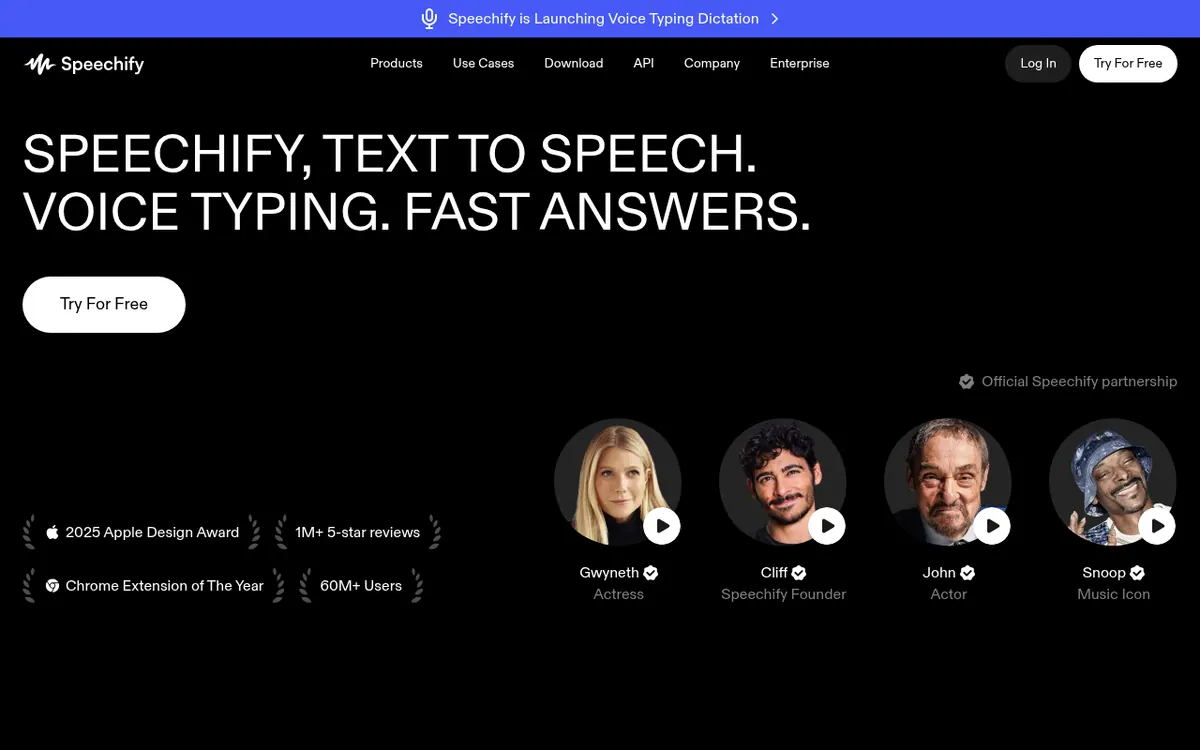
Reads PDFs, documents and web pages aloud in AI voices, and lets you dictate text by voice and ask a voice assistant for summaries.
Speechify is a voice-focused product that reads text aloud and also lets you write by speaking. You can load PDFs, documents or web pages and listen to them in AI voices, with highlighting that lets you follow along. A photo of a printed page can be scanned and read out to you. Beyond reading, it offers voice typing for dictating into other apps, a Voice AI Assistant that gives summaries and answers, a podcast generator that starts from a document or a short description, and a meeting note taker.
The homepage lists a web app, a Chrome extension, iOS, Android, Mac and Windows apps, and the pricing page points to a separate Speechify API for developers.
Pricing is freemium. The Free plan allows listening at speeds up to 1.5x with 10 robotic sounding voices and covers text to speech features only. The Premium plan is shown at $29 per month billed monthly, since the pricing page displays prices per month, billed monthly. Premium adds 1000+ voices, 60+ languages, listening at 5x speeds, Scan & Listen, AI summaries and chats, voice typing, AI podcasts, the Voice AI Assistant, and integrations with Google Drive, Dropbox and Microsoft OneDrive. A Yearly toggle labelled SAVE 60% exists, but the yearly-billed per-month price is not shown in the page text. No free trial length is stated.
- Reads PDFs, docs and web pages aloud
- Text highlighting while listening
- Scan a page photo and listen
- Voice typing dictation
- Voice AI Assistant for summaries and questions
- AI podcast creation from documents
- AI meeting note taker
- Google Drive, Dropbox and OneDrive integrations on Premium
Good for / Not for
Good for
- Students who want to listen to study material, summaries and podcasts
- Professionals who work through documents and emails by listening and dictating
- People who prefer listening to text, using adjustable voices and speed
Not for
- Users who need more than 1.5x speed or natural voices without paying, as the Free plan has 10 robotic sounding voices
- Anyone needing a published yearly per-month price or a stated trial length, since neither is shown
How to start
Pick an entry point: web app, Chrome extension, or an iOS, Android, Mac or Windows app, and choose Try For Free. source
Start on the Free plan, which allows listening at speeds up to 1.5x with text to speech features only. source
Upgrade to Premium at $29 per month billed monthly for voice typing, AI summaries and chats, and AI podcasts. source
Limits and gotchas
From the official site and docs of Speechify, checked on October 26, 2026.
Pros and cons
Pros
- A Free plan exists, so basic text to speech can be tried without paying
- Reads PDFs, docs and web pages, and can scan a photo of a page
- Premium lists 1000+ voices and 60+ languages
- Offered on web, Chrome, iOS, Android, Mac and Windows
- Combines reading, voice typing, summaries and podcast creation in one product
Cons
- Free plan is limited to 1.5x speed and 10 robotic sounding voices
- Free plan covers text to speech features only
- Premium is $29 per month billed monthly, and the yearly-billed per-month price is not shown
- No free trial length is stated on the pages
- No Linux app is mentioned
Our take
Speechify fits people who prefer listening to long documents, such as students and professionals working through PDFs, and anyone who wants dictation and an assistant in the same product as the reader. The Free plan lets you try basic reading, but it limits speed, voices and features. Voice typing, summaries, podcasts and the assistant sit in Premium at $29 per month billed monthly. The yearly-billed price is not visible on the pages, so the cost of a yearly commitment cannot be worked out from the site. This summary rests only on the official pages, not on use of the product.
Comparisons and lists with Speechify
Coming soon
Coming soon — we are writing comparisons that include Speechify.
Speechify pricing
| Plan | Monthly billing | Annual billing (per month) | Limits / what’s included |
|---|---|---|---|
| Free | — | — | Listen at speeds up to 1.5x; 10 robotic sounding voices; text to speech features only |
| Premium per month, billed monthly | $29 | — | Price shown per month, billed monthly. The Yearly toggle is labelled SAVE 60%, but the yearly-billed price is not shown. 1000+ voices, 60+ languages, listen at 5x speeds |
Free trial: none listed. Free plan: yes.
Prices checked on on the official Speechify pricing page. “—” = not published.
Frequently asked questions
Does Speechify have a free plan?
Yes. The Free plan allows listening at speeds up to 1.5x with 10 robotic sounding voices and includes text to speech features only.
How much does Speechify Premium cost?
Premium is shown at $29 per month billed monthly. The Yearly toggle is labelled SAVE 60%, but the yearly-billed per-month price is not shown in the page text.
Which devices does Speechify run on?
The official pages list a web app, a Chrome extension, iOS, Android, Mac and Windows apps.
Can Speechify be used for dictation?
Yes. Voice typing lets you dictate text in other apps, and it is listed among the Premium features.
Is there an API?
The pricing page lists a Speechify API for integrating AI voices into your own apps, with its own pricing page.
Recently verified in Voice & Text-to-Speech
- NaturalReader Verified Nov 2, 2026
 Adobe Podcast Verified Oct 31, 2026
 Cartesia Verified Oct 30, 2026
 Deepgram Verified Oct 30, 2026
 Resemble AI Verified Oct 30, 2026
 WellSaid Verified Oct 30, 2026
Add an AGIPicks badge to your site
The badge shows Speechify’s verification status on AGIPicks and links to this page. Light/dark and compact versions: badges.

Suggest an update
Wrong price, outdated fact or a tool that shut down? Are you the vendor and disagree with this page? Tell us, ideally with a link to the official page. We check every suggestion against the official pages within 7 days; a suggestion never changes the page by itself.