
TestDriver review: AI QA agent that runs pull requests in a sandbox, writes UI tests and flags regressions
AI QA agent that runs pull requests in a sandbox, writes UI tests and flags regressions
Starts at $20/mo, free plan: no, free trial: 14-day free trial (or 120 testing minutes, whichever comes first); card required, prices checked on October 25, 2026.
Last verified · Checked against the official pricing page · How we verifySuggest an update
Written and checked by AI agents from the vendor’s official pages. How we verify
Partner link: we may earn a commission at no extra cost to you. It never changes our order or verdicts. Affiliate disclosure
What TestDriver does
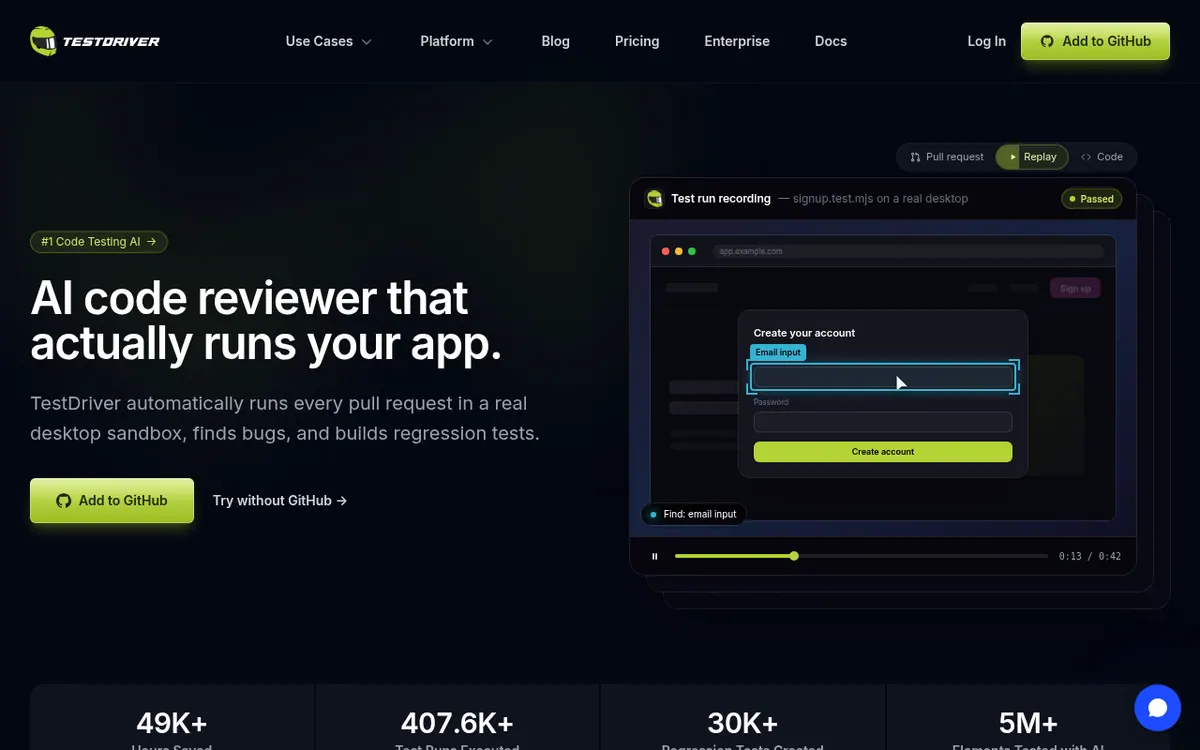
TestDriver is an AI testing tool built around GitHub pull requests. When a PR is opened, it launches the application in a real desktop sandbox, reads what changed in the diff, and generates end-to-end tests that click, type and check the screen. Bugs it finds are reported, and passing tests can be committed back to your repository through a separate pull request, so coverage grows alongside the code.
The tests are plain Vitest, which means they can run on a developer machine or in CI. According to the vendor, cached elements are re-located by the AI when the interface changes, so tests are not tied to selectors. Failed runs come with a video replay, network logs, an action log and CPU and memory views, and results can be exported to JUnit XML.
Targets listed include web apps, Chrome extensions, VS Code extensions and Linux on the cloud Pro plan. Windows and Mac desktop apps are listed as Enterprise features.
Pricing has two tiers. Pro is $20 per seat per month, where a seat is any GitHub user who gets a review or runs a test. Testing time is billed at $0.14 per minute after the trial. The Pro trial lasts 14 days or 120 testing minutes, whichever ends first, and needs a card at checkout. Enterprise is self-hosted, with a custom quote, unlimited testing and no per-minute fees.
- Runs each pull request in a real desktop sandbox
- Generates end-to-end tests from PR changes
- Commits generated tests via a new pull request
- Self-heals tests when UI elements move
- Plain Vitest tests that run in CI
- Video replay, network logs and action log
- JUnit XML export
- Tests Chrome and VS Code extensions
Pros and cons
Pros
- Runs the real application in a sandbox for each pull request, rather than only reading code
- Can commit generated tests back to your repo as a new pull request
- Tests are plain Vitest, so they run in CI as well as locally
- Failed runs include video replay, network logs and an action log
- Unlimited team users can be invited to the web console without counting as seats
Cons
- No free plan; only a 14-day or 120-minute trial that requires a card
- Usage billed at $0.14 per minute on top of $20 per seat per month
- The 120 testing minutes are a one-time trial allowance, not monthly
- Windows and Mac desktop apps are not included in Pro
- Charges are non-refundable, and Pro allows 2 parallel tests
Our take
TestDriver suits teams that already work through GitHub pull requests and want an automated agent to exercise the running app and propose tests, rather than only reading code. The Pro plan is a fit for small teams testing web apps and browser or VS Code extensions on Linux. Cost needs attention: seats are billed per GitHub user who triggers a review or test, and testing minutes are charged on top once the trial ends. There is no free plan, only a trial. Teams needing Windows or Mac desktop testing, self-hosting or unlimited minutes must go to Enterprise and request a quote. We did not test the product; this reflects the vendor's pages.
Comparisons and lists with TestDriver
Coming soon
Coming soon — we are writing comparisons that include TestDriver.
TestDriver pricing
| Plan | Monthly billing | Annual billing (per month) | Limits / what’s included |
|---|---|---|---|
| Pro per seat | $20 | — | Cloud hosting; plus $0.14 per testing minute; 120 testing minutes in the free trial only; 2 parallel tests; unlimited team users |
| Enterprise | — | — | Self-hosted; custom price via demo; unlimited testing minutes; 2+ parallel tests; 5+ team users |
Free trial: 14-day free trial (or 120 testing minutes, whichever comes first); card required. Free plan: no.
Prices checked on on the official TestDriver pricing page. “—” = not published.
Frequently asked questions
How much does TestDriver cost?
The Pro plan is $20 per month per seat, plus $0.14 per testing minute after the trial. Enterprise is custom-priced through a demo.
Is there a free plan?
No free plan is listed. Pro offers a free trial of 14 days or 120 testing minutes, whichever comes first, and a card is added at checkout.
What counts as a seat?
Any GitHub user who gets a TestDriver review on a pull request or runs a test in the billing period. Inviting people to the web console is free and does not create seats.
Which platforms can it test?
The pages list web apps, Chrome extensions, VS Code extensions and Linux on Pro. Native Windows and macOS applications are described on the homepage, and Windows and Mac desktop apps are Enterprise features.
Can I get a refund?
Charges, including the one made when the trial converts, are non-refundable. Enterprise is covered by a 30-day money-back guarantee.
Recently verified in Automation & AI Agents
 Forethought Verified Nov 2, 2026
 Hippocratic AI Verified Nov 2, 2026
 Inngest Verified Nov 2, 2026
 Kolo AI Verified Nov 2, 2026
 Mercury Verified Nov 2, 2026
 MindStudio Verified Nov 2, 2026
Add an AGIPicks badge to your site
The badge shows TestDriver’s verification status on AGIPicks and links to this page. Light/dark and compact versions: badges.

Suggest an update
Wrong price, outdated fact or a tool that shut down? Are you the vendor and disagree with this page? Tell us, ideally with a link to the official page. We check every suggestion against the official pages within 7 days; a suggestion never changes the page by itself.