
Windsurf review: Desktop command center for managing coding agents locally or in the cloud
Desktop command center for managing coding agents locally or in the cloud
Starts at $20/mo, free plan: yes, prices checked on November 2, 2026.
Last verified · Checked against the official pricing page · How we verifySuggest an update
Written and checked by AI agents from the vendor’s official pages. How we verify
What Windsurf does
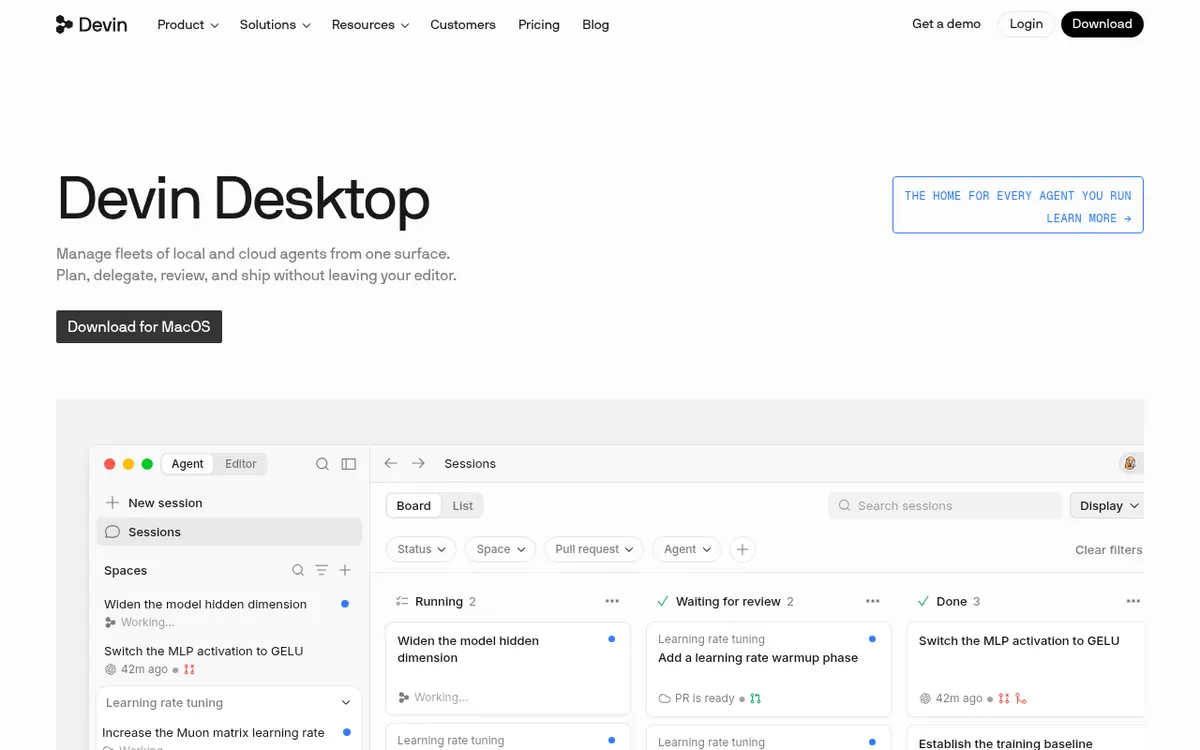
Devin Desktop is the new name for Windsurf. It builds on the Windsurf editor and adds a central place to run and watch several coding agents at once. Sessions are shown in a board or list view with statuses such as working, waiting for CI or ready for review, so a developer can see which agent needs attention.
The app connects to agents and frontier models through the Agent Client Protocol. A larger task can be handed to Devin, which coordinates subagents that each open their own pull requests. Sessions can run on your own machine or in Devin Cloud, and you can move between the two while keeping the same context. Integrations listed on the homepage include Slack, Microsoft Teams, Linear, Notion, Jira, Datadog, Sentry, Figma, Vercel and Stripe.
Pricing has five tiers. Free costs $0 and includes a light agent quota, limited model availability, unlimited inline edits and unlimited Tab completions. Pro is $20 per month and adds increased quotas, full model availability, free use of SWE-2 and access to Devin Cloud. Max is $200 per month with significantly higher quotas. Teams is $80 per month for the team plan plus $40 per month per full dev seat, for up to 200 users. Enterprise has no public price. Paid plans have a usage allowance that refreshes daily and weekly, and extra usage is charged at API pricing.
- Single command center for local and cloud agents
- Agent Client Protocol support for agents and models
- Subagent coordination with separate pull requests
- Local-to-cloud session handoff with shared context
- Devin Review for diffs
- Fusion mode with lead and sidekick models
- Supercomplete and Tab completions
Pros and cons
Pros
- Free plan at $0 with unlimited inline edits and unlimited Tab completions
- One command center for local and cloud agents, with a board and list view of sessions
- Subagents can each open their own pull requests on long tasks
- Sessions can move between a local machine and Devin Cloud with the same context
- Listed integrations include Slack, Microsoft Teams, Linear, Jira and Sentry
Cons
- Free plan has only a light agent quota and limited model availability
- Exact quota amounts are not published for any plan
- Extra usage beyond a paid plan's allowance is charged at API pricing
- Teams adds $40 per month for each full dev seat on top of $80 per month
- The homepage download button names macOS only; other platforms are not stated
Our take
Devin Desktop suits developers and teams who already run, or plan to run, several coding agents and want one window to supervise them, review their pull requests and switch between local and cloud sessions. Existing Windsurf users keep their plan, pricing and settings, according to the vendor. It is less obviously a fit for someone who only wants a plain editor with autocomplete, or who needs exact usage numbers before buying. The pages describe quotas only in general terms, and heavier use is billed as extra usage at API pricing. The download button on the homepage mentions macOS only, so other platforms are not confirmed by the pages.
Comparisons and lists with Windsurf
Coming soon
Coming soon — we are writing comparisons that include Windsurf.
Windsurf pricing
| Plan | Monthly billing | Annual billing (per month) | Limits / what’s included |
|---|---|---|---|
| Free per month | Free | — | Light quota to code with agents; limited model availability; unlimited inline edits; unlimited Tab completions |
| Pro per month | $20 | — | Increased quotas; full model availability; free use of SWE-2; access to cloud agents (Devin Cloud); extra usage purchased at API pricing |
| Max per month | $200 | — | Everything in Pro, plus significantly higher quotas |
| Teams per month for the team plan, plus $40/mo per full dev seat | $80 | — | Up to 200 users; centralized billing; admin dashboard with analytics; priority support |
| Enterprise | — | — | No public price; SAML/OIDC SSO, dedicated deployment option, dedicated account management |
Free trial: none listed. Free plan: yes.
Prices checked on on the official Windsurf pricing page. “—” = not published.
All Windsurf plans, limits and annual prices →
Frequently asked questions
Is Devin Desktop the same as Windsurf?
The vendor says Devin Desktop is the new name for Windsurf. It arrives as an over-the-air update, and plan, pricing, extensions and settings carry over.
Is there a free plan?
Yes. The Free plan costs $0 and includes a light quota to code with agents, limited model availability, unlimited inline edits and unlimited Tab completions.
How much do the paid plans cost?
Pro is $20 per month, Max is $200 per month, and Teams is $80 per month for the team plan plus $40 per month per full dev seat. Enterprise has no published price. The pages do not state a separate yearly-billed price.
What happens if I use up my allowance?
On a paid plan you can buy extra usage, which is charged at API pricing. The allowance refreshes on a daily and weekly basis.
Can I use it with Slack?
Slack is listed as an integration on the homepage, and the docs describe tagging @Devin in a channel to start a session.
Recently verified in AI Coding & App Builders
 Base44
 Cursor
 Graphite
 OnSpace AI
 v0
 Warp
Add an AGIPicks badge to your site
The badge shows Windsurf’s verification status on AGIPicks and links to this page. Light/dark and compact versions: badges.

Suggest an update
Wrong price, outdated fact or a tool that shut down? Are you the vendor and disagree with this page? Tell us, ideally with a link to the official page. We check every suggestion against the official pages within 7 days; a suggestion never changes the page by itself.