
Browse AI review: No-code web scraping and website monitoring with prebuilt robots and integrations
No-code web scraping and website monitoring with prebuilt robots and integrations
Starts at $48/mo, free plan: yes, prices checked on October 20, 2026.
Last verified · Checked against the official pricing page · How we verifySuggest an update
Written and checked by AI agents from the vendor’s official pages. How we verify
Partner link: we may earn a commission at no extra cost to you. It never changes our order or verdicts. Affiliate disclosure
What Browse AI does
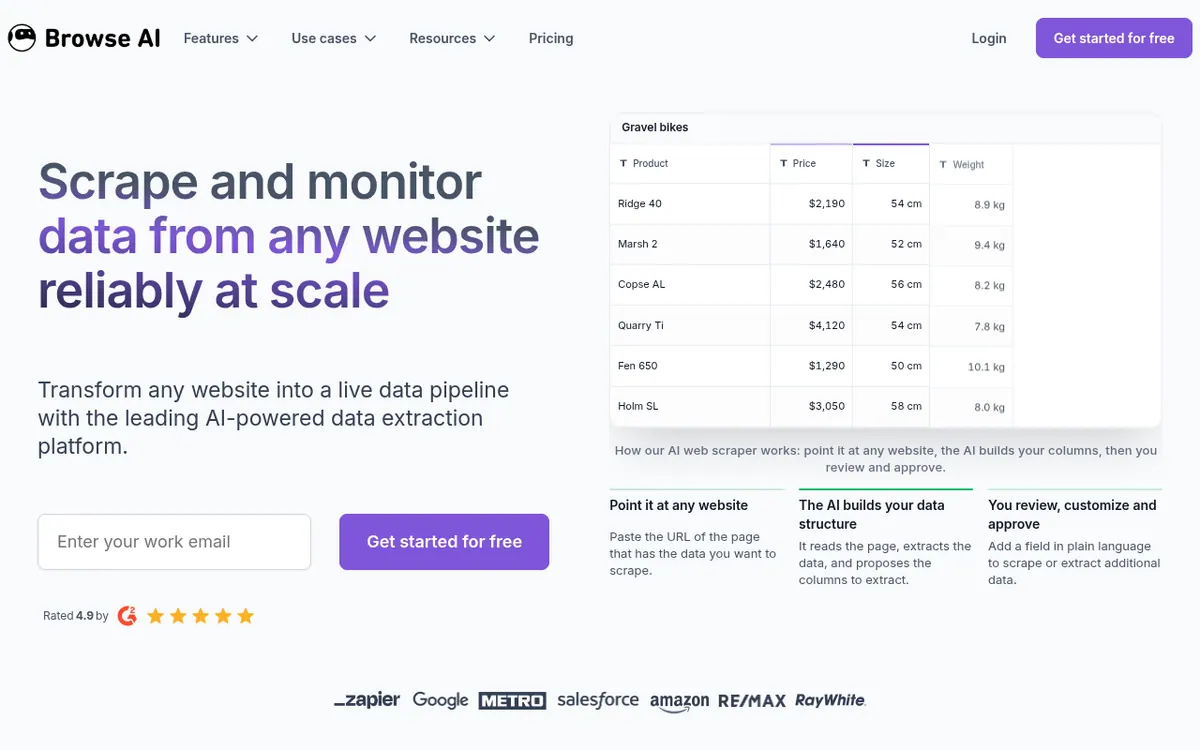
Browse AI is a no-code platform for pulling structured data out of websites and watching pages for changes. You paste a page address, the AI reads it and proposes the columns to extract, and you review, adjust and approve them. Work is done by robots, which can also record steps such as logging in, clicking and filling forms. Monitors can run hourly, daily, weekly or monthly, and deep scraping follows pages and subpages through workflows.
The vendor lists 200+ prebuilt robots for areas like e-commerce, real estate and recruiting, plus integrations with Google Sheets, Airtable, Zapier, Make, Pabbly, webhooks, Amazon S3 and a REST API. Data can also be exported as a JSON file. Companies that want a hands-off setup can buy fully managed web scraping services.
Pricing is credit based. One credit extracts 10 rows or captures a screenshot, and sites flagged as Premium cost more per run. The Free plan gives 50 credits per month. Personal costs $48 per month billed monthly or $19 per month billed yearly, and Professional costs $87 per month billed monthly or $69 per month billed yearly. Premium starts at $500 per month billed annually. Prices are in USD, and credits reset when the billing cycle ends.
- AI-proposed data columns from any page URL
- Scheduled website change monitoring
- Deep scraping of pages and subpages
- Scraping of dynamic content like forms and drop-downs
- 200+ prebuilt robots
- Google Sheets, Airtable, Zapier and Make integrations
- REST API and webhooks
- Managed scraping services
Pros and cons
Pros
- Free plan with 50 credits per month and no credit card required to sign up
- No coding needed: the AI proposes columns and you approve them
- Monitoring can run hourly, daily, weekly or monthly
- Connects to Google Sheets, Airtable, Zapier, Make, webhooks, Amazon S3 and a REST API
- Fully managed service option available through the Premium plan
Cons
- Credits are used by rows, screenshots and Premium sites, which makes cost harder to predict
- Unused credits reset at the end of the billing cycle
- The Free plan is limited to 50 credits per month
- Premium sites cost a minimum of 2 to 10 credits per run
- Premium plan is billed annually and starts at $500 per month
Our take
Browse AI suits people who want to collect or monitor website data without writing code, from a single product page to larger recurring jobs, and who are happy to send results to a spreadsheet, an automation tool or an API. The free plan allows a low-risk start. It fits less well if you need predictable costs on heavy workloads, because credits are consumed by rows, screenshots and Premium sites, and unused credits reset. Buyers should check the pricing page closely, since billing terms are shown in several views, and weigh the yearly discount against monthly flexibility.
Comparisons and lists with Browse AI
Coming soon
Coming soon — we are writing comparisons that include Browse AI.
Browse AI pricing
| Plan | Monthly billing | Annual billing (per month) | Limits / what’s included |
|---|---|---|---|
| Free | Free | — | 50 credits per month, 2 websites, 3 users, unlimited robots |
| Personal per month | $48 | $19 | 2,000 credits per month on monthly billing, 5 websites, 3 users, unlimited robots, basic email support |
| Professional per month | $87 | $69 | 5,000 credits per month on monthly billing, 10 websites, 10 users, unlimited robots, priority email support |
| Premium from, per month, billed annually | — | $500 | Custom limits on users, websites and credits; fully managed; 600,000+ credits per year |
Free trial: none listed. Free plan: yes.
Prices checked on on the official Browse AI pricing page. “—” = not published.
All Browse AI plans, limits and annual prices →
Frequently asked questions
Does Browse AI have a free plan?
Yes. The Free plan includes 50 credits per month, 2 websites and 3 users, and signing up does not require a credit card.
How much do the paid plans cost?
Personal is $48 per month billed monthly or $19 per month billed yearly. Professional is $87 per month billed monthly or $69 per month billed yearly. Premium starts at $500 per month billed annually. All prices are in USD.
What is a credit?
One credit lets you extract 10 rows of data from a page or capture a screenshot. Sites marked Premium cost a minimum of 2 to 10 credits per run, and credits reset when the billing cycle ends.
Do I need to know how to code?
No. The vendor states that you can automate tasks and extract website data without being a developer.
Can I connect Browse AI to other tools?
Yes. Listed options include Google Sheets, Airtable, Zapier, Make, Pabbly, webhooks, Amazon S3 and a REST API.
Recently verified in Automation & AI Agents
 Forethought Verified Nov 2, 2026
 Hippocratic AI Verified Nov 2, 2026
 Inngest Verified Nov 2, 2026
 Kolo AI Verified Nov 2, 2026
 Mercury Verified Nov 2, 2026
 MindStudio Verified Nov 2, 2026
Add an AGIPicks badge to your site
The badge shows Browse AI’s verification status on AGIPicks and links to this page. Light/dark and compact versions: badges.

Suggest an update
Wrong price, outdated fact or a tool that shut down? Are you the vendor and disagree with this page? Tell us, ideally with a link to the official page. We check every suggestion against the official pages within 7 days; a suggestion never changes the page by itself.