
ClickUp review: Work management app with tasks, docs, chat and AI; free plan for unlimited users
Work management app with tasks, docs, chat and AI; free plan for unlimited users
Custom (contact sales), free plan: yes, prices checked on October 30, 2026.
Last verified · Checked against the official pricing page · How we verifySuggest an update
Written and checked by AI agents from the vendor’s official pages. How we verify
What ClickUp does
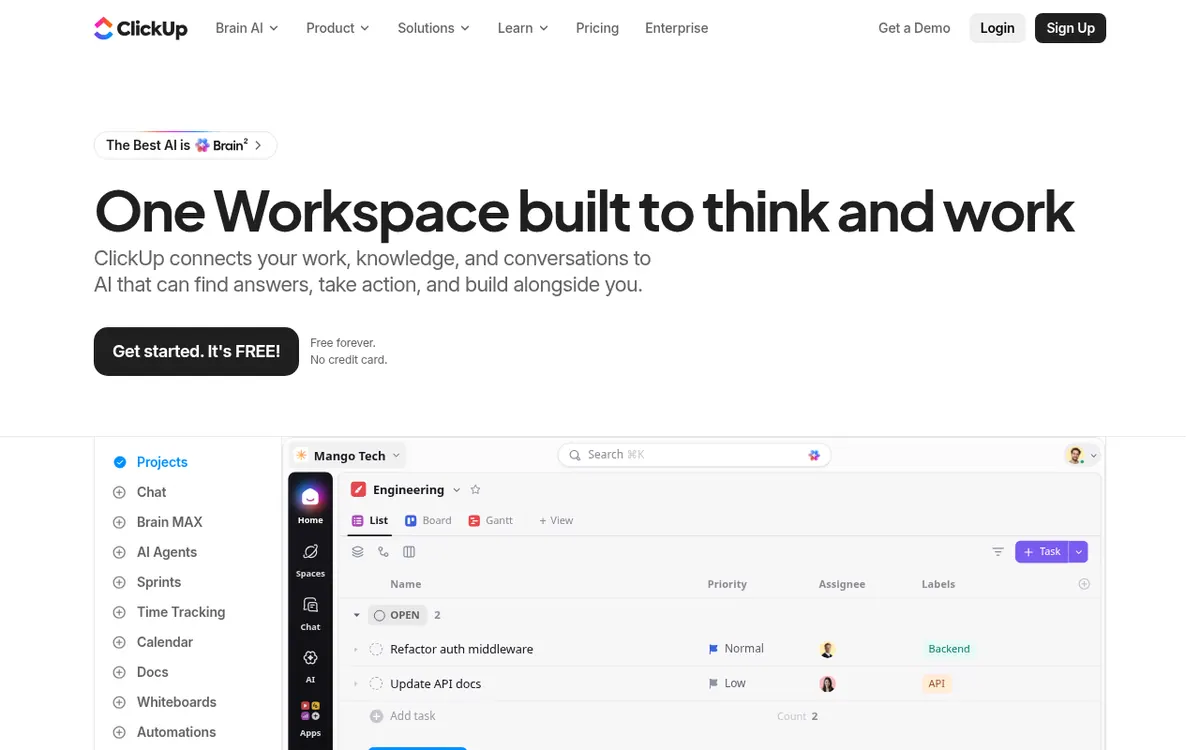
ClickUp is a work management platform that puts tasks, docs, goals and chat in one workspace, with an AI assistant called Brain² on top. According to the vendor, Brain² can see tasks, docs and conversations, and it chooses an AI model for each job. Super Agents are described as able to turn conversations into assigned tasks.
Teams can view work as lists, boards, calendars, timelines or Gantt charts. The pages also list sprints, whiteboards, dashboards, automations, forms and time tracking. Time tracking covers timers, manual entries, billable rates, reports and weekly timesheet approvals. Apps are listed for macOS, Windows, iOS and Android, and an API is mentioned on the pricing page.
Pricing is per user. The Free Forever plan costs $0 and offers unlimited tasks and subtasks, but it has 60MB of file storage and 100 automation actions per workspace per month. The paid plans shown are Core at $9, Business at $17 and Max at $100, each as a per-user price per month billed yearly. The pricing page does not show monthly-billed prices for them. Enterprise has custom pricing through the sales team.
AI usage runs on pooled credits: 500 per workspace on Free, then 1,000, 1,500, 3,000 and 10,000 per user per month as the plans go up. Extra credits cost $10 per 10K credits. Upgrading applies to the entire workspace, and the vendor offers a full refund within 30 days.
- Unlimited tasks and subtasks
- List, board, calendar, timeline and Gantt views
- Collaborative docs and whiteboards
- Sprint management
- Built-in time tracking and timesheet approvals
- Brain² AI assistant
- Super Agents that create assigned tasks
- Automations with webhooks on higher plans
Pros and cons
Pros
- Free Forever plan at $0 with no credit card required
- Tasks, docs, chat, goals and time tracking sit in one workspace
- Built-in time tracking with billable rates and timesheet approvals
- Apps are listed for macOS, Windows, iOS and Android
- AI assistant Brain² draws on tasks, docs and conversations, with credits included in every plan
Cons
- Paid prices are shown only as per user per month billed yearly; no monthly-billed prices are given
- Free plan has 60MB of file storage and 100 automation actions per workspace per month
- Upgrading must cover the entire workspace, not individual members
- AI use is limited by pooled credits; extra credits cost $10 per 10K credits
- Enterprise pricing is not published; it requires contacting sales
Our take
ClickUp suits teams that want tasks, docs, chat, time tracking and AI in one place and would like to start on a free plan before paying. The Free Forever plan has no card requirement and no stated task limit, so it works as a low-risk way to try the structure. It fits less well if you need exact monthly-billed costs, because the pricing page only shows per-user prices per month billed yearly. Paid plans are billed for the whole workspace, and AI use is capped by pooled credits, so heavy AI users should check the credit allowance and the $10 per 10K credits top-up. Enterprise buyers must contact sales for a price.
Comparisons and lists with ClickUp
Coming soon
Coming soon — we are writing comparisons that include ClickUp.
ClickUp pricing
| Plan | Monthly billing | Annual billing (per month) | Limits / what’s included |
|---|---|---|---|
| Free Forever per user | Free | — | 60MB file storage; 500 AI credits / workspace; 100 automation actions / workspace / month; 5 automation active rules |
| Core per user | — | $9 | Shown as user / mo · billed yearly; only the yearly-billed per-month price is shown; 1,000 AI credits / user / mo pooled; 1,000 automation actions / workspace / month |
| Business per user | — | $17 | Shown as user / mo · billed yearly; only the yearly-billed per-month price is shown; 1,500 AI credits / user / mo pooled; 10,000 automation actions / workspace / month |
| Enterprise custom pricing, contact sales | — | — | 3,000 AI credits / user / mo pooled; 1M automation actions / workspace / month |
| Max per user | — | $100 | Shown as user / mo · billed yearly; only the yearly-billed per-month price is shown; 10,000 AI credits / user / mo pooled |
Free trial: none listed. Free plan: yes.
Prices checked on on the official ClickUp pricing page. “—” = not published.
All ClickUp plans, limits and annual prices →
Frequently asked questions
Does ClickUp have a free plan?
Yes. The Free Forever plan costs $0 and requires no credit card. It includes unlimited tasks and subtasks, but has 60MB of file storage.
How much do the paid plans cost?
Core is $9, Business is $17 and Max is $100, each per user per month billed yearly. Enterprise pricing is custom. Monthly-billed prices are not shown on the pricing page.
How do AI credits work?
Each plan includes a credit allowance: 500 per workspace on Free, and 1,000, 1,500, 3,000 or 10,000 per user per month, pooled, on the higher plans. Extra credits cost $10 per 10K credits.
Is there a refund policy?
The pricing page says you can ask for a full refund within 30 days if you are not satisfied.
Does ClickUp include time tracking?
Yes. The vendor says time tracking is built in, with timers, manual entries, billable rates, reports and timesheet approvals.
Recently verified in Productivity
 Fyxer
 Craft
 Eurekaa.io
 Jotform
 Logseq
 Notion
Add an AGIPicks badge to your site
The badge shows ClickUp’s verification status on AGIPicks and links to this page. Light/dark and compact versions: badges.

Suggest an update
Wrong price, outdated fact or a tool that shut down? Are you the vendor and disagree with this page? Tell us, ideally with a link to the official page. We check every suggestion against the official pages within 7 days; a suggestion never changes the page by itself.