
Flowith review: AI workspace for generating images, video, slides and websites with many models
AI workspace for generating images, video, slides and websites with many models
Starts at $19.90/mo, free plan: yes, free trial: 7-day Ultimate trial for $9.99 with 9,000 credits (paid intro offer), prices checked on October 29, 2026.
Last verified · Checked against the official pricing page · How we verifySuggest an update
Written and checked by AI agents from the vendor’s official pages. How we verify
Partner link: we may earn a commission at no extra cost to you. It never changes our order or verdicts. Affiliate disclosure
What Flowith does
Lets you generate and edit images, video, slides and websites on one canvas using many AI models, paid with credits.
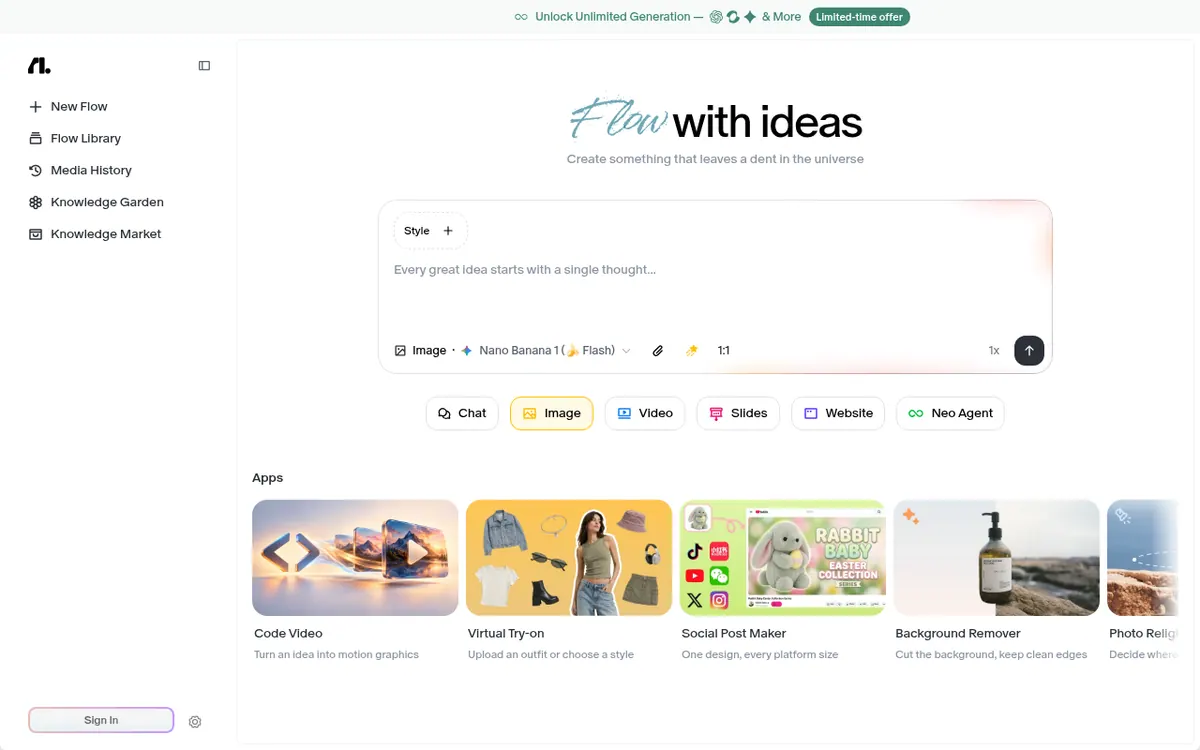
Flowith is an AI workspace built around a canvas where you can work with several AI models in one place. The vendor describes it as an agentic workspace and names ChatGPT, Claude and DeepSeek among the models it connects. Its home page lists modes for chat, image, video, slides, website and a Neo Agent, plus small apps such as a background remover, an image upscaler, a crop and resize tool and a virtual try-on.
Image generation is a visible focus, with a long list of selectable models including Nano Banana, Seedream and GPT Image variants.
Pricing is freemium and priced in USD. The Starter plan costs $0 and includes 300 credits one-time with limited models. Pro is $19.90 per month billed monthly or $17.91 per month billed yearly, with 20,000 credits plus $4 in free generations each month. Ultimate is $49.90 per month billed monthly or $44.91 per month billed yearly, with 50,000 credits, $38 in free generations and an Unlimited Pack. Infinite is $499.90 per month billed monthly or $399.92 per month billed yearly, with 500,000 credits, $188 in free generations and the Unlimited Pack. A 7-day Ultimate trial is offered for $9.99 with 9,000 credits.
Access is through Flowith Web and Flowith iOS. Unlimited Mode has fair-use rules, including a lower queue priority and concurrency caps.
- Multi-model AI canvas
- Image generation and editing
- Video, slides and website modes
- Neo Agent mode
- Background remover, upscaler and other mini apps
- Image and video batch mode
- Unlimited Mode for selected models
- Commercial license on paid plans
Good for / Not for
Good for
- Creators who want many image models in one workspace
- Users who want to generate slides or websites alongside images and video
- People who want a commercial license on paid plans
Not for
- Anyone needing an Android or desktop app, since only Web and iOS are listed
- Users who need API access now, as it is listed as coming soon
How to start
Limits and gotchas
From the official site and docs of Flowith, checked on October 29, 2026.
Pros and cons
Pros
- Free Starter plan at $0 lets you try it before paying
- Many image models and several modes (chat, video, slides, website) in one workspace
- Yearly billing lowers the monthly price on every paid plan, for example Pro at $17.91 per month
- Paid plans include a commercial license and image and video batch mode
- Unlimited Mode on Ultimate and Infinite lets selected models run without using credits
Cons
- Starter has only 300 credits one-time and limited models
- Only Web and iOS are listed; no Android or desktop apps are stated
- API access is listed as coming soon, not available
- Unlimited Mode has lower queue priority, concurrency caps and a ban on automation
- Refunds only if you contact them within 48 hours of payment
Our take
Flowith suits people who want one canvas for image, video, slides and website generation across many models, and who are fine with a credit-based system. The free Starter plan, at 300 credits one-time, works as a short test rather than ongoing use. Paid tiers rise steeply, from $19.90 to $499.90 per month billed monthly, so the right tier depends on how many credits you need. It is a poor match if you need an Android or desktop app, or a working API: the pages list only Web and iOS, and API access as coming soon. Unlimited Mode comes with queueing, concurrency caps and a ban on automation, so heavy scripted workflows do not fit. Refunds are tightly limited.
Comparisons and lists with Flowith
Coming soon
Coming soon — we are writing comparisons that include Flowith.
Flowith pricing
| Plan | Monthly billing | Annual billing (per month) | Limits / what’s included |
|---|---|---|---|
| Starter | Free | — | 300 credits one-time; limited models; no Unlimited Pack access |
| Pro per month | $19.90 | $17.91 | 20,000 cr. + $4 Free Gens monthly |
| Ultimate per month | $49.90 | $44.91 | 50,000 cr. + $38 Free Gens monthly, plus Unlimited Pack |
| Infinite per month | $499.90 | $399.92 | 500,000 cr. + $188 Free Gens monthly, plus Unlimited Pack |
Free trial: 7-day Ultimate trial for $9.99 with 9,000 credits (paid intro offer). Free plan: yes.
Prices checked on on the official Flowith pricing page. “—” = not published.
All Flowith plans, limits and annual prices →
Frequently asked questions
Does Flowith have a free plan?
Yes. The Starter plan costs $0 and includes 300 credits one-time, with limited models.
How much does Flowith cost?
Pro is $19.90 per month billed monthly or $17.91 per month billed yearly. Ultimate is $49.90 monthly or $44.91 yearly. Infinite is $499.90 monthly or $399.92 yearly.
Is there a trial?
A 7-day Ultimate trial is offered for $9.99 with 9,000 credits. The page says it then renews at $49.90 per month.
Which platforms does it run on?
The pricing page says all plans include Flowith Web and Flowith iOS.
Can I get a refund?
Subscription fees are non-refundable, with an exception if you contact the vendor within 48 hours after payment and meet its usage condition.
Recently verified in AI Chatbots & Assistants
 Chat AI 5
 DeepSeek
 Gleap
 Microsoft Copilot
Add an AGIPicks badge to your site
The badge shows Flowith’s verification status on AGIPicks and links to this page. Light/dark and compact versions: badges.

Suggest an update
Wrong price, outdated fact or a tool that shut down? Are you the vendor and disagree with this page? Tell us, ideally with a link to the official page. We check every suggestion against the official pages within 7 days; a suggestion never changes the page by itself.