Manychat review: Automates DM and comment conversations on Instagram, TikTok, WhatsApp and more
Automates DM and comment conversations on Instagram, TikTok, WhatsApp and more
Custom (contact sales), free plan: yes, free trial: 14-day free trial for Essential or Pro, prices checked on October 30, 2026.
Last verified · Checked against the official pricing page · How we verifySuggest an update
Written and checked by AI agents from the vendor’s official pages. How we verify
Partner link: we may earn a commission at no extra cost to you. It never changes our order or verdicts. Affiliate disclosure
What Manychat does
Automates replies to comments and DMs on Instagram, TikTok, Messenger, WhatsApp and more, and captures leads through message flows.
Manychat is a chat marketing tool that automates conversations in direct messages and comment threads for creators, small businesses and brands. It connects to Instagram, TikTok, WhatsApp, Facebook Messenger, Telegram, SMS and email, depending on the plan. You can set up replies to comments, welcome messages for new followers, FAQ answers, giveaways and lead capture of emails or phone numbers, either from ready-made templates or in a flow builder. The vendor also says its AI can help build flows, and the higher plans add Manychat AI that is taught your business and tone of voice, plus broadcasts and a shared inbox for teams.
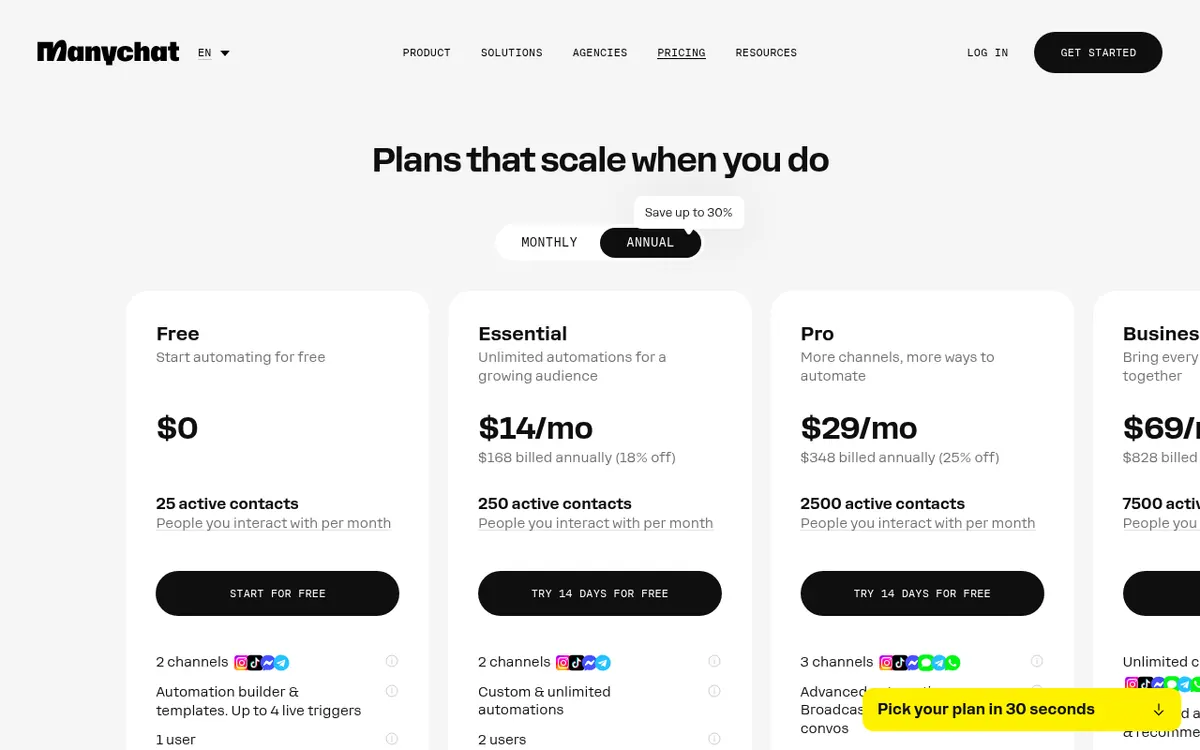
Pricing is based on active contacts, meaning people you interact with in a monthly billing period. The Free plan costs $0 and includes 25 active contacts, 1 user and up to 4 live triggers, and it shows "Powered by Manychat" branding. Paid plans are Essential at $14, Pro at $29, Business at $69 and Advanced at $139, each per month billed yearly; the pricing page does not list a separate monthly-billing price. A 14-day free trial is offered for Essential and Pro. Going over a plan's contact allowance triggers an overage fee per extra contact rather than a shutdown. WhatsApp requires a Pro account and carries extra conversation-based charges.
- Instagram DM and comment reply automation
- Multi-channel support: TikTok, WhatsApp, Messenger, Telegram, SMS, email
- Flow Builder and Quick Automations
- Ready-made templates
- Email and phone number capture
- Manychat AI replies in your tone
- Broadcasts to your audience
- Shared team inbox
Official video
Meet The Girl Who Solved Content Creation | Elaine Empalmado Interview · by Manychat ·
The player loads only when you press play.
Good for / Not for
Good for
- Creators who get many comments and DMs and want automatic replies
- Small businesses collecting emails or phone numbers through message flows
- Teams that need a shared inbox across several channels
Not for
- Anyone needing a published monthly-billing price; only yearly-billed prices are shown
- Free-plan users who want AI replies or Broadcasts, which start at Pro
- Those who need more than 2 channels without paying for Pro or above
How to start
Sign up for free; the homepage says no credit card is required to start. source
Connect your social or messaging channels; Free allows any 2 of Instagram, TikTok, Facebook Messenger or Telegram. source
Build a flow from Quick Automations, a template or the Flow Builder, then go live; the vendor says this takes minutes. source
Optionally try Essential or Pro free for 14 days; paid plans require a credit card. source
Limits and gotchas
- Free plan: 25 active contacts, 1 user and Manychat branding on messages. source
- Exceeding included Active Contacts triggers an overage fee per additional contact. source
- Annual plans cannot be downgraded until the annual term ends. source
- WhatsApp is charged per conversation on top of the plan; the first 1000 conversations per month are free. source
From the official site and docs of Manychat, checked on October 29, 2026.
Pros and cons
Pros
- Free plan exists and does not require a credit card
- Covers Instagram, TikTok, WhatsApp, Messenger, Telegram, SMS and email
- Templates plus a flow builder, with AI help to build flows
- 14-day free trial for Essential and Pro
- Automations do not shut off when you exceed the contact limit
Cons
- Free plan is limited to 25 active contacts and shows Manychat branding
- Overage fees apply for each additional active contact
- WhatsApp requires a Pro account and adds conversation-based charges
- Paid plans require a credit card and annual plans cannot be downgraded until the term ends
- Only per-month prices with yearly billing are shown; no separate monthly price is listed
Our take
Manychat suits creators and small businesses that handle many Instagram or messaging-app comments and DMs and want to automate replies, lead capture and follow-ups. The Free plan lets you try the builder at no cost, though it is small and carries Manychat branding. Costs depend on active contacts, so a growing audience can mean overage fees or a plan upgrade. WhatsApp needs Pro plus separate charges, and annual plans cannot be downgraded mid-term. Check the exact channel list for each plan before committing.
Comparisons and lists with Manychat
Coming soon
Coming soon — we are writing comparisons that include Manychat.
Manychat pricing
| Plan | Monthly billing | Annual billing (per month) | Limits / what’s included |
|---|---|---|---|
| Free | Free | — | 25 active contacts per month; 2 channels; up to 4 live triggers; 1 user; Manychat branding |
| Essential per month billed yearly | — | $14 | 2 channels; 2 users; unlimited automations; 14-day free trial; overage fee per additional active contact |
| Pro per month billed yearly | — | $29 | 3 channels; 3 users; Broadcasts and Manychat AI; 14-day free trial; overage fee per additional active contact |
| Business per month billed yearly | — | $69 | Unlimited channels; 5 users; multi-user Inbox; priority support; overage fee per additional active contact |
| Advanced per month billed yearly | — | $139 | Unlimited channels; 10 users; multi-user Inbox; priority support; overage fee per additional active contact |
Free trial: 14-day free trial for Essential or Pro. Free plan: yes.
Prices checked on on the official Manychat pricing page. “—” = not published.
All Manychat plans, limits and annual prices →
Frequently asked questions
Does Manychat have a free plan?
Yes. The Free plan costs $0, includes 25 active contacts and does not require a credit card.
How much do paid plans cost?
Essential is $14, Pro $29, Business $69 and Advanced $139, each per month billed yearly. The pricing page shows no separate monthly-billing price.
Is there a free trial?
Yes, Essential and Pro can be tried free for 14 days.
What happens if I exceed my active contact limit?
Your automations do not shut off; an overage fee is charged for each additional active contact.
Can I use WhatsApp on the Free plan?
No. Manychat for WhatsApp is only available on Pro accounts, with additional charges on top.
Recently verified in AI Chatbots & Assistants
 DeepSeek
 Gleap
 Microsoft Copilot
 Continue
 Flowith
Add an AGIPicks badge to your site
The badge shows Manychat’s verification status on AGIPicks and links to this page. Light/dark and compact versions: badges.
Suggest an update
Wrong price, outdated fact or a tool that shut down? Are you the vendor and disagree with this page? Tell us, ideally with a link to the official page. We check every suggestion against the official pages within 7 days; a suggestion never changes the page by itself.