
Guideflow review: Interactive product demo builder with sandbox, AI editing and analytics for teams
Interactive product demo builder with sandbox, AI editing and analytics for teams
Starts at $40/mo, free plan: yes, prices checked on October 26, 2026.
Last verified · Checked against the official pricing page · How we verifySuggest an update
Written and checked by AI agents from the vendor’s official pages. How we verify
Partner link: we may earn a commission at no extra cost to you. It never changes our order or verdicts. Affiliate disclosure
What Guideflow does
Captures a website or app flow from the browser and turns it into an interactive demo you can edit, personalize, share and track.
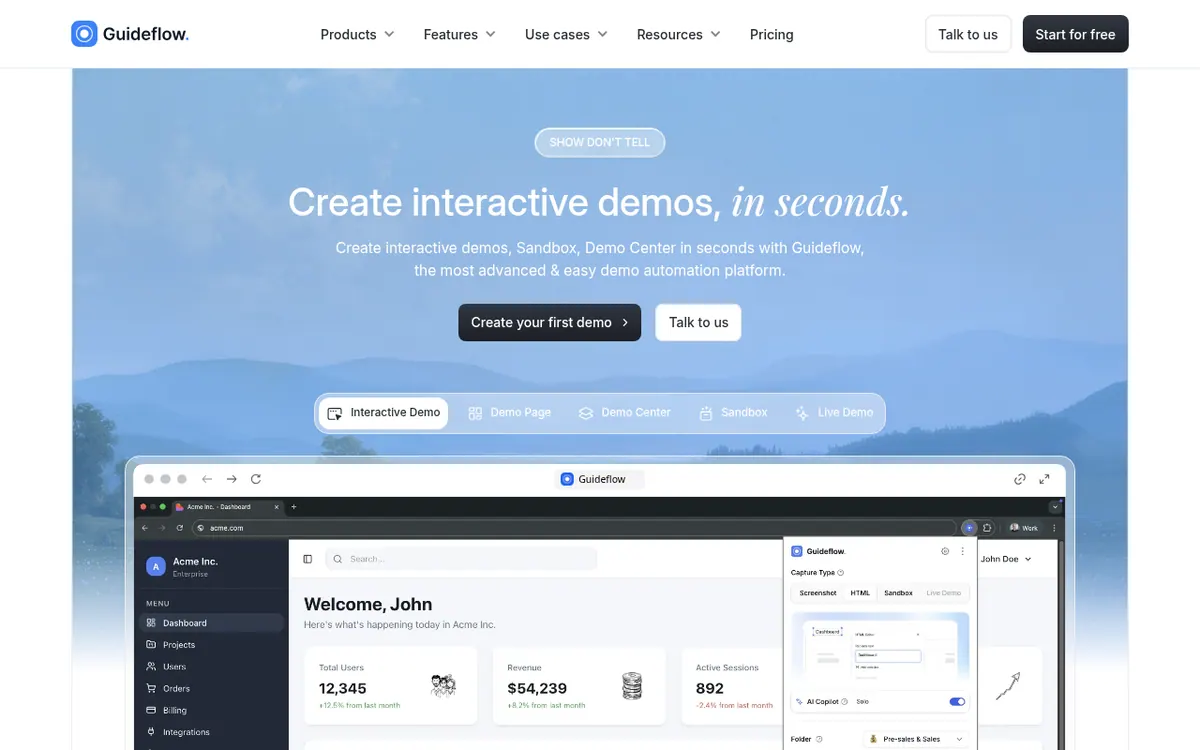
Guideflow is a tool for turning a website or app flow into an interactive, clickable demo. According to its homepage, you start a capture directly from your browser in a few clicks, then edit the result in a plug & play builder covering steps, branding and images. The vendor also lists AI that adjusts steps, popups, translations, voiceovers and avatars.
Demos can be personalized for individual leads with a no-code editor. Finished demos are shared through public links or embedded on a website, in emails or in Notion, and they can be exported as video, PDF or GIF. Analytics cover impressions, completion rate, leads collected and conversion, and the vendor says demo metrics can be pushed into a CRM or Slack. A separate Sandbox product builds clickable product environments without coding, and it includes a presenter mode with private notes for live demos.
Pricing is freemium. The Free plan is $0 per month and includes 5 guideflows, unlimited viewers, 7-days analytics, a watermark and 1 team member. Solo is $40 per month billed monthly or $35 per month billed yearly, with 1 member included and +$35 per additional user. Startup is $599 per month billed monthly, or $499 per month billed yearly, where the yearly view labels it Growth; it includes 10 members, with +$50 per additional user. Advanced is $1,799 per month billed monthly or $1,499 per month billed yearly, with Demo Center as an add-on. Enterprise shows Contact us on the plan cards, and a summary table on the same page lists a different figure, so the Enterprise price is unconfirmed. Live Demo is an Enterprise add-on.
- Browser-based demo capture
- Plug & play step builder
- AI translations, voiceovers and avatars
- Per-lead personalization
- Public links and embeds
- Video, PDF and GIF export
- Analytics on impressions and completion rate
- Sandbox product environments
- Presenter notes for live demos
Good for / Not for
Good for
- Teams that want clickable product demos instead of static screenshots or slides
- Teams that personalize demos for individual leads
- Teams that want analytics on impressions, completion rate and leads collected
Not for
- Buyers who need a stated trial length, as none is published
- Free-plan users who need no watermark or more than 5 guideflows
How to start
Start capturing your website or app directly from your browser; a Chrome extension, MacOs app and Windows app are listed. source
Edit steps, branding and images in the plug & play builder. source
Share the guideflow by public link or embed it on your website, in emails or in Notion. source
Begin on the Free plan at $0 per month, or choose a paid plan on the pricing page. source
Limits and gotchas
From the official site and docs of Guideflow, checked on October 26, 2026.
Pros and cons
Pros
- Free plan at $0 with unlimited viewers
- Captures a flow directly from the browser; a Chrome extension, MacOs app and Windows app are listed
- AI features for translations, voiceovers and avatars
- Per-lead personalization through a no-code editor
- Exports to video, PDF or GIF, plus analytics on completion rate and leads collected
Cons
- Free plan has a watermark, 5 guideflows, 7-days analytics and 1 team member
- Extra users cost +$35 on Solo and +$50 on Startup
- Startup is $599 per month billed monthly and Advanced is $1,799 per month billed monthly
- Demo Center and Live Demo are add-ons rather than included
- Enterprise price is unconfirmed, and no trial length or API is stated on the pages
Our take
Guideflow fits teams that want to replace static screenshots and slides with clickable demos, share them with leads by link or embed, and see how viewers engage through impressions and completion rate. The Free plan lets you try capture and editing, but it carries a watermark, 5 guideflows, 7-days analytics and a single team member. Paid plans add per-user charges beyond the included members, and the step from Solo to Startup is large on the listed prices. Demo Center and Live Demo are add-ons, and the Enterprise price is not clearly published. The pages state no trial length and do not describe an API, so developers or buyers who need those should confirm with the vendor before committing.
Comparisons and lists with Guideflow
Coming soon
Coming soon — we are writing comparisons that include Guideflow.
Guideflow pricing
| Plan | Monthly billing | Annual billing (per month) | Limits / what’s included |
|---|---|---|---|
| Free | Free | $0 | 5 guideflows, unlimited viewers, 7-days analytics, watermark, 1 team member |
| Solo per month; 1 member included, +$35 per add. user | $40 | $35 | Unlimited guideflows; 1 member included; +$35 per add. user |
| Startup per month; 10 members included, +$50 per add. user | $599 | $499 | 10 members included; +$50 per add. user; the yearly view labels this plan Growth |
| Advanced per month | $1,799 | $1,499 | Custom seat number; Demo Center is an add-on |
| Enterprise | — | — | Custom seat number; Live Demo is an add-on |
Free trial: none listed. Free plan: yes.
Prices checked on on the official Guideflow pricing page. “—” = not published.
All Guideflow plans, limits and annual prices →
Frequently asked questions
Does Guideflow have a free plan?
Yes. The Free plan is $0 per month and includes 5 guideflows, unlimited viewers, 7-days analytics, a watermark and 1 team member.
How much does the Solo plan cost?
Solo is $40 per month billed monthly and $35 per month billed yearly. It includes 1 member, and each additional user is +$35.
How many users does the Startup plan include?
Startup includes 10 members, and each additional user is +$50. It is $599 per month billed monthly or $499 per month billed yearly, where the yearly view calls it Growth.
What does Enterprise cost?
The plan cards show Enterprise as Contact us, while a summary table on the same pricing page lists a different figure, so the price is unconfirmed.
How can I share a demo?
You can share a public link, embed it on your website, in emails or in Notion, or export it as video, PDF or GIF.
Recently verified in Productivity
 Fyxer
 Craft
 ClickUp
 Eurekaa.io
 Jotform
 Logseq
Add an AGIPicks badge to your site
The badge shows Guideflow’s verification status on AGIPicks and links to this page. Light/dark and compact versions: badges.

Suggest an update
Wrong price, outdated fact or a tool that shut down? Are you the vendor and disagree with this page? Tell us, ideally with a link to the official page. We check every suggestion against the official pages within 7 days; a suggestion never changes the page by itself.