
Motion review: Video agent that creates and edits videos from a brief, footage or a reference
Video agent that creates and edits videos from a brief, footage or a reference
Custom (contact sales), free plan: no, prices checked on October 29, 2026.
Last verified · Checked against the official website · How we verifySuggest an update
Written and checked by AI agents from the vendor’s official pages. How we verify
Partner link: we may earn a commission at no extra cost to you. It never changes our order or verdicts. Affiliate disclosure
What Motion does
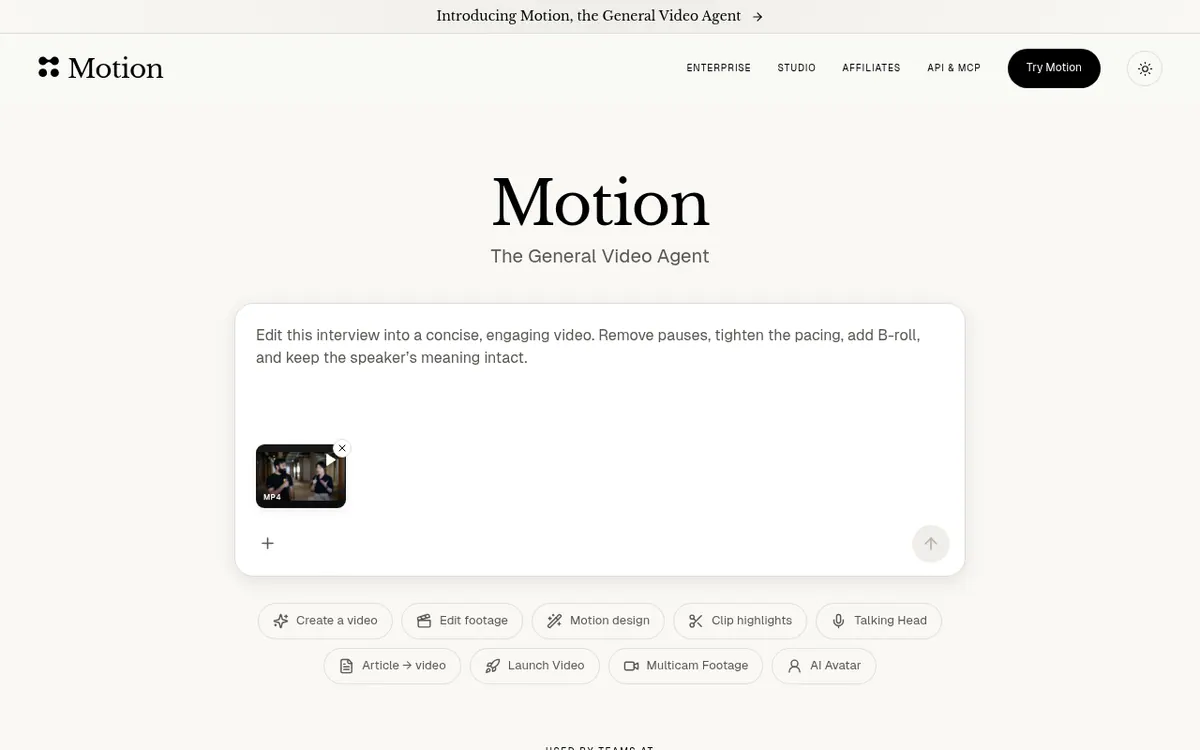
Motion is a video agent from Mosaic AI Labs, Inc. You give it a brief, your own footage or a reference video. According to the homepage, it plans the work, builds the shots, edits them and checks the cut before handing the result back.
After a first version exists, you can keep changing it. You can reply in the chat, edit in the timeline, or draw on the preview frame to mark where a change should happen. To finish in another tool, Motion exports to After Effects, Premiere Pro, DaVinci Resolve, Remotion and Hyperframes.
The product also connects to a wider workflow. Plugins bring in footage, brand assets, briefs and product context. Automations run a repeatable task on a schedule, when a new YouTube video lands, or when a stream ends. You can connect social accounts, schedule finished videos across channels and see how they perform. Developers can build video creation and editing into their own product, and an MCP connection lets agents such as Claude, ChatGPT and Cursor create and edit videos.
Usage is metered in credits. The homepage FAQ lists three options. Flex costs $6 for 200 credits, with no subscription, and the credits never expire. Pro starts at $29/month and includes 1,000 credits per month; larger credit bundles and annual billing are available. Enterprise has custom pricing for teams that need 50,000+ credits per month. The plan prices appear only in the homepage FAQ, and no separate pricing page was found. No free plan or free trial is stated.
- Video creation and editing from a brief, footage or reference
- Plans work, builds shots and checks the cut
- Chat, timeline and preview-frame revisions
- Export to After Effects, Premiere Pro and DaVinci Resolve
- Export to Remotion and Hyperframes
- Automations on a schedule or triggers
- Social scheduling and performance view
- API and MCP connection for agents
Good for / Not for
Good for
- Marketers or creators who want an agent to produce a first cut from a brief or reference
- For editors wanting to complete their projects inside Hyperframes, Remotion, DaVinci Resolve, Premiere Pro or After Effects
- Developers who want to add video creation to their own product
- Teams that want repeatable video tasks to run on a schedule or triggers
Not for
- Buyers who need a free plan or free trial, since none is stated
- Buyers who need a published list of supported platforms, which the pages do not give
How to start
Give Motion a brief, your footage or a reference video to start a video. source
Revise the result by replying in the chat, editing in the timeline or drawing on the preview frame. source
To keep editing, send your video out to Hyperframes, Remotion, DaVinci Resolve, Premiere Pro or After Effects, or link your social accounts and schedule completed videos. source
Limits and gotchas
- Credits are how usage is measured. Flex costs $6 for 200 credits, needs no subscription, and its credits never expire. source
- Pro starts at $29/month and includes 1,000 credits per month; larger credit bundles and annual billing are available. source
- Teams that need 50,000+ credits each month can get custom pricing through Enterprise. source
- Plan prices appear only in the homepage FAQ, and no free plan or trial is stated. source
From the official site and docs of Motion, checked on October 29, 2026.
Pros and cons
Pros
- Starts from a brief, your footage or a reference
- Revisions through chat, preview-frame marks or the timeline
- Exports to After Effects, Premiere Pro, DaVinci Resolve, Remotion and Hyperframes
- API and MCP connection for products and agents such as Claude, ChatGPT and Cursor
- Flex credits need no subscription and never expire
Cons
- No free plan or free trial is stated on the official site
- Credits needed per video are not explained
- Plan prices appear only in the homepage FAQ, not on a pricing page
- Supported platforms are not listed
- Enterprise pricing is custom, with no public price
Our take
Motion fits people who want to hand a video job to an agent and then adjust the result, whether through chat, marks on the preview frame or the timeline. Exports to After Effects, Premiere Pro, DaVinci Resolve, Remotion and Hyperframes suit teams that finish work in existing editors. The API and MCP connection add options for developers and for people who already work inside an agent. Pricing is credit-based. Flex is $6 for 200 credits with no subscription, and Pro starts at $29/month for 1,000 credits per month, with larger bundles and annual billing available. The pages do not say how many credits a given video uses, so the real cost per video is unclear from the official site. No free plan or trial is stated, and no supported platforms are listed. Check what a typical video costs in credits before committing.
Comparisons and lists with Motion
Coming soon
Coming soon — we are writing comparisons that include Motion.
Motion pricing
| Plan | Monthly billing | Annual billing (per month) | Limits / what’s included |
|---|---|---|---|
| Flex one-time credit bundle, no subscription | — | — | $6 for 200 credits; credits never expire (homepage FAQ, no pricing page) |
| Pro from; billing period not stated on a pricing page | — | — | Homepage FAQ says it starts at $29/month with 1,000 credits per month; larger credit bundles and annual billing available |
| Enterprise custom pricing | — | — | for teams needing 50,000+ credits per month |
Free trial: none listed. Free plan: no.
Prices checked on on the official Motion pricing page. “—” = not published.
Frequently asked questions
How much does Motion cost?
Usage runs on credits. Per the homepage FAQ, Flex is $6 for 200 credits with no subscription, Pro starts at $29/month for 1,000 credits per month with larger bundles and annual billing available, and Enterprise is custom priced for 50,000+ credits per month.
Can I keep editing in Premiere Pro or After Effects?
Yes. Motion exports directly to After Effects, Premiere Pro, DaVinci Resolve, Remotion and Hyperframes.
Does Motion have an API?
The homepage describes building video creation and editing into your product, and an MCP connection so agents such as Claude, ChatGPT and Cursor can create and edit videos.
Do Flex credits expire?
No. The homepage FAQ says Flex credits never expire and come with no subscription.
Is there a free plan?
The official pages do not state a free plan or a free trial.
Recently verified in Productivity
 Fyxer
 Craft
 ClickUp
 Eurekaa.io
 Jotform
 Logseq
Add an AGIPicks badge to your site
The badge shows Motion’s verification status on AGIPicks and links to this page. Light/dark and compact versions: badges.

Suggest an update
Wrong price, outdated fact or a tool that shut down? Are you the vendor and disagree with this page? Tell us, ideally with a link to the official page. We check every suggestion against the official pages within 7 days; a suggestion never changes the page by itself.