
Sellerise review: Amazon seller tools for profit tracking, reviews, reimbursements, alerts and keywords
Amazon seller tools for profit tracking, reviews, reimbursements, alerts and keywords
Not published, free plan: no, free trial: 7-day free trial, no credit card required, prices checked on October 26, 2026.
Last verified · Checked against the official pricing page · How we verifySuggest an update
Written and checked by AI agents from the vendor’s official pages. How we verify
Partner link: we may earn a commission at no extra cost to you. It never changes our order or verdicts. Affiliate disclosure
What Sellerise does
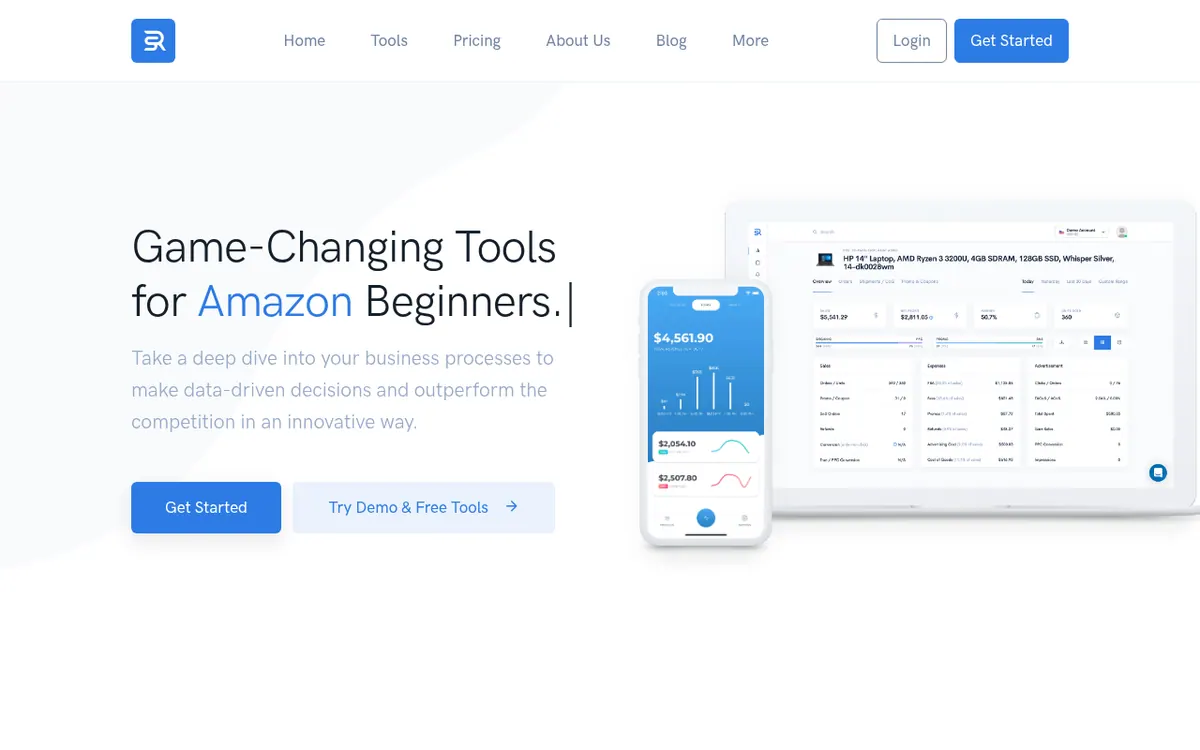
Gives Amazon sellers dashboards and automation for profit tracking, reviews, reimbursements, listing alerts and keyword research.
Sellerise is a collection of tools for Amazon sellers. The vendor presents it as a comprehensive solution covering finances, reviews, listing monitoring and keyword work.
On the finance side there is a sales and profit dashboard that includes orders, PPC and promo figures. Other finance tools cover profit and loss by day, week, month, quarter or year, inventory and cost-of-goods adjustments, payouts, ABC analysis and manual cost entries. For reviews, the product offers a dashboard, an automated Review Requester and a Review Downloader. Smart Alerts monitor your listings and send notifications on 40 listing changes. A reimbursement tool works out what Amazon may owe you, and the vendor says it takes no percentage or extra fees for this.
Keyword tools include a Keyword Tracker, Keyword Hunter, Keyword Re-Ranker, Keyword Processor and SQP Insights. The vendor also lists a mobile app for iOS and Android and a Chrome extension.
On pricing, the pricing page itself does not list any prices. The home page shows a Starter tile at $19.99 per month with 1 seller account, 1,000 orders per month and a 7-day free trial that needs no credit card. Large companies are told to contact the vendor for an Enterprise quote. No free plan is described.
- Sales and profit dashboard
- Profit and loss breakdowns
- Reimbursement claims
- Automated review requests
- Smart Alerts for listing changes
- Daily keyword rank tracking
- SQP Insights
- Inventory and cost-of-goods management
- Mobile app for iOS and Android
Good for / Not for
Good for
- Amazon sellers who want profit, review and keyword tools in one product
- Sellers who want automated review requests and listing-change alerts
- Sellers checking whether Amazon owes them reimbursements
Not for
- Large companies, which the pages direct to ask for an Enterprise quote
- Buyers who need a free plan, since only a trial is described
How to start
Limits and gotchas
From the official site and docs of Sellerise, checked on October 26, 2026.
Pros and cons
Pros
- Finance, review, alert and keyword tools are all listed under one product
- 7-day free trial with no credit card required
- Reimbursement tool carries no percentage or extra fees, according to the vendor
- Mobile apps for iOS and Android and a Chrome extension are listed
- Subscription can be cancelled at any moment, per the pricing page
Cons
- The pricing page shows no prices; the $19.99 per month Starter figure appears only on the home page
- Starter tile is limited to 1 seller account and 1,000 orders per month
- Enterprise pricing is available only by asking for a quote
- No free plan is described, only a 7-day trial
- No API is mentioned on the official pages
Our take
Sellerise is aimed at Amazon sellers who want finance, review, alert and keyword tools described as one comprehensive solution by the vendor. The home page Starter tile is limited to 1 seller account and 1,000 orders per month, so larger operations may outgrow it; the pages direct large companies to ask for an Enterprise quote. The pricing page shows no prices, so confirm the current Starter figure in the sign-up flow. The 7-day trial needs no credit card, which allows a low-commitment look.
Comparisons and lists with Sellerise
Coming soon
Coming soon — we are writing comparisons that include Sellerise.
Sellerise pricing
Pricing not published on the official site. Check Sellerise’s website.
Free trial: 7-day free trial, no credit card required. Free plan: no.
Prices checked on on the official Sellerise pricing page. “—” = not published.
Frequently asked questions
How much does Sellerise cost?
The pricing page lists no prices. The home page shows a Starter tile at $19.99 per month with 1 seller account and 1,000 orders per month. Enterprise is by quote.
Is there a free trial?
The home page lists a 7-day free trial and says no credit card is required.
Does Sellerise charge extra for reimbursements?
According to the vendor, it does not charge any percentage or extra fees to reimburse you.
Is there a mobile app?
The vendor recommends its Sellerise app for iOS or Android, which it says tracks sales and profit in real time.
Can I cancel anytime?
The pricing page says you can cancel your subscription manually or with the vendor's help, at any moment.
Recently verified in AI for E-commerce
 Genlook
 Octane AI
 PageFly
 Rep AI
 SellerSprite
Add an AGIPicks badge to your site
The badge shows Sellerise’s verification status on AGIPicks and links to this page. Light/dark and compact versions: badges.

Suggest an update
Wrong price, outdated fact or a tool that shut down? Are you the vendor and disagree with this page? Tell us, ideally with a link to the official page. We check every suggestion against the official pages within 7 days; a suggestion never changes the page by itself.