
Superhuman review: Docs, Mail and AI chat for individuals and teams, with a free plan
Docs, Mail and AI chat for individuals and teams, with a free plan
Starts at €15/mo, free plan: yes, prices checked on October 30, 2026.
Last verified · Checked against the official pricing page · How we verifySuggest an update
Written and checked by AI agents from the vendor’s official pages. How we verify
What Superhuman does
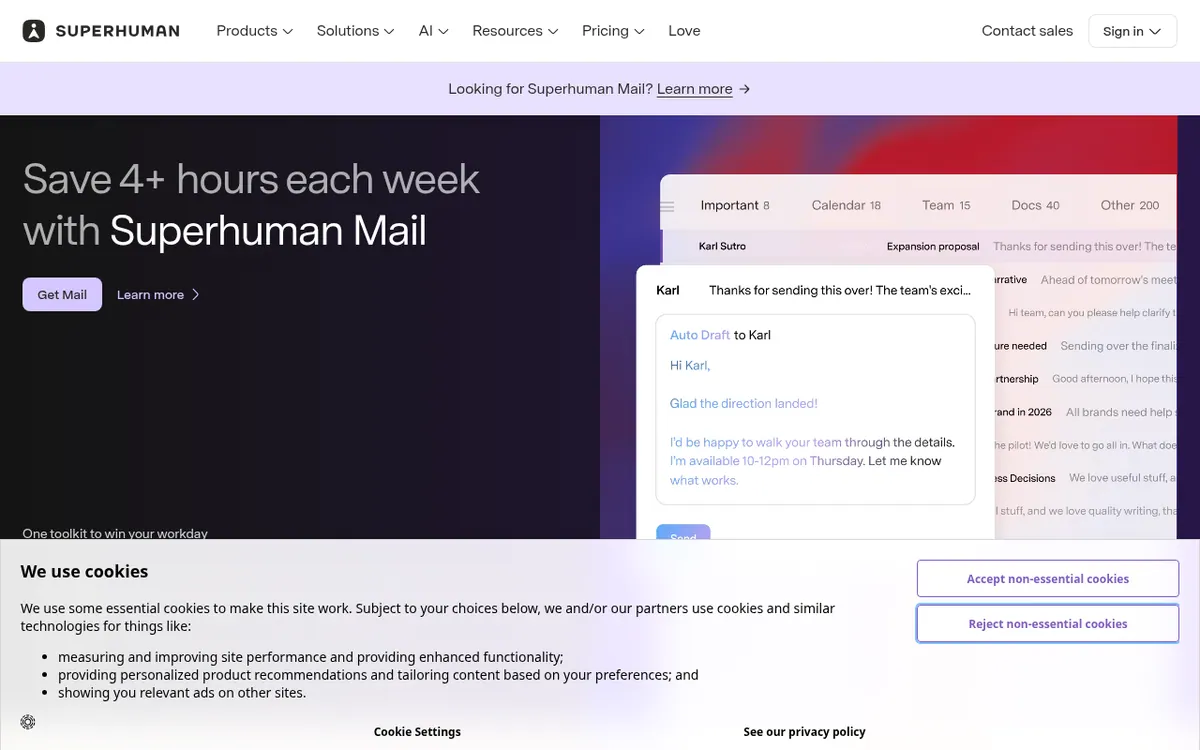
Combines AI chat, writing checks, collaborative Docs and a Gmail/Outlook email app with inbox splits, follow-up reminders and read statuses.
Superhuman is a suite of Docs, Mail and AI that, according to its homepage, works everywhere. The AI chat is described as working in every application and browser tab, and the plans page lists writing checks in 20+ languages. Docs covers collaborative documents with tables, charts, Kanban boards and forms, and can sync data from Jira, GitHub, Figma and more. The homepage also mentions connecting to 800+ tools. Mail is built for teams that use Gmail or Outlook. It can split the inbox into groups for your team, VIPs or most-used tools, let you pick a follow-up time when you send, and show when and on which device an email was read. The plans page lists web, extension, desktop and mobile apps.
Free costs €0. It has limited chat access and 7 days of version history in Docs. Pro is €12 per member per month billed yearly, or €15 per member per month billed monthly. It lists unlimited paragraph rewrites and translations and 30-day version history. Business is €33 per member per month billed yearly, or €40 per member per month billed monthly. It includes Mail with CRM views, which let you view and update HubSpot, Salesforce and Pipedrive from the inbox, plus unlimited automations and version history in Docs. Per-member pricing applies to Pro and Business. Enterprise has custom pricing through sales, and no Enterprise price is published. The pages state no trial length.
- AI chat in every application and tab
- Writing checks in 20+ languages
- Collaborative docs with tables, charts, Kanban boards and forms
- Inbox splits for team, VIPs and tools
- Follow-up reminders chosen when sending
- Read statuses with time and device
- CRM views for HubSpot, Salesforce and Pipedrive
- Docs data sync from Jira, GitHub and Figma
Good for / Not for
Good for
- Teams on Gmail or Outlook that want a faster inbox with splits and follow-up reminders
- Teams that want to view and update HubSpot, Salesforce or Pipedrive from the inbox
- People who write in several languages and want writing checks in 20+ languages
- Teams whose shared documents include forms, Kanban boards, charts and tables
Not for
- Anyone who needs a published Enterprise price, since it is custom
- Anyone needing full chat access on Free, since it is limited
How to start
Limits and gotchas
- Free has limited chat access and 7 days of Docs version history. Pro has 30 days. source
- Pro and Business are priced per member, and monthly billing costs more than yearly. source
- Teams working in Gmail or Outlook are the ones Mail was designed for. source
- Enterprise price is not published, and no trial length is stated. source
From the official site and docs of Superhuman, checked on October 30, 2026.
Pros and cons
Pros
- Free plan at €0, so you can start without paying
- Docs offers tables, charts, Kanban boards and forms, and syncs data from Jira, GitHub and Figma
- Business plan lists HubSpot, Salesforce and Pipedrive views and updates from the inbox
- Mail offers inbox splits, follow-up reminders and read statuses showing the device
- Writing checks in 20+ languages and a homepage mention of connections to 800+ tools
Cons
- Pricing is per member on Pro and Business, so costs grow with team size
- Monthly billing costs more: Pro is €15 and Business is €40 per member per month
- Free has limited chat access and only 7 days of Docs version history
- Enterprise pricing is not published, only a contact-sales route
- Mail is built for Gmail or Outlook users, and no trial length or API is stated
Our take
Superhuman fits people and teams that want AI chat, writing checks, shared documents and an email app from one vendor, and that are happy to pay per member on Pro or Business. The Business plan is the one that lists Mail with CRM views, so anyone mainly after the email app should compare it closely. Mail is built for Gmail or Outlook, so it does not fit teams on other mail systems. Free is a low-risk way to look at the product, but chat access is limited and Docs history is 7 days. The official pages do not state a trial length, an API, or the Enterprise price. Check the feature table against your needs before you commit.
Comparisons and lists with Superhuman
Coming soon
Coming soon — we are writing comparisons that include Superhuman.
Superhuman pricing
| Plan | Monthly billing | Annual billing (per month) | Limits / what’s included |
|---|---|---|---|
| Free | Free | — | Limited chat access; 7 days version history in Docs |
| Pro per member | €15 | €12 | Unlimited paragraph rewrites and translations; 30-day version history |
| Business per member | €40 | €33 | Includes Mail with CRM views; unlimited automations and version history in Docs |
| Enterprise | — | — | Custom pricing, contact sales |
Free trial: none listed. Free plan: yes.
Prices checked on on the official Superhuman pricing page. “—” = not published.
All Superhuman plans, limits and annual prices →
Frequently asked questions
How much does Superhuman cost?
Free is €0. Pro is €12 per member per month billed yearly or €15 per member per month billed monthly. Business is €33 per member per month billed yearly or €40 per member per month billed monthly. Enterprise pricing is custom.
Is there a free plan?
Yes. Free costs €0. Its chat access is limited, and Docs keeps 7 days of version history. Pro keeps 30 days.
Does Superhuman Mail work with Gmail and Outlook?
The Mail page says it is built for teams that use Gmail or Outlook.
Can it connect to a CRM?
The plans page lists viewing and updating HubSpot, Salesforce and Pipedrive from the inbox, shown with the Business plan's Mail with CRM views.
Recently verified in Productivity
 Fyxer
 Craft
 ClickUp
 Eurekaa.io
 Jotform
 Logseq
Add an AGIPicks badge to your site
The badge shows Superhuman’s verification status on AGIPicks and links to this page. Light/dark and compact versions: badges.

Suggest an update
Wrong price, outdated fact or a tool that shut down? Are you the vendor and disagree with this page? Tell us, ideally with a link to the official page. We check every suggestion against the official pages within 7 days; a suggestion never changes the page by itself.