
PostNitro.ai review: Designs carousels, image posts and video, then schedules them to six social networks
Designs carousels, image posts and video, then schedules them to six social networks
Starts at $15/mo, free plan: yes, free trial: 3 Day Trial on paid plans, prices checked on October 29, 2026.
Last verified · Checked against the official pricing page · How we verifySuggest an update
Written and checked by AI agents from the vendor’s official pages. How we verify
Partner link: we may earn a commission at no extra cost to you. It never changes our order or verdicts. Affiliate disclosure
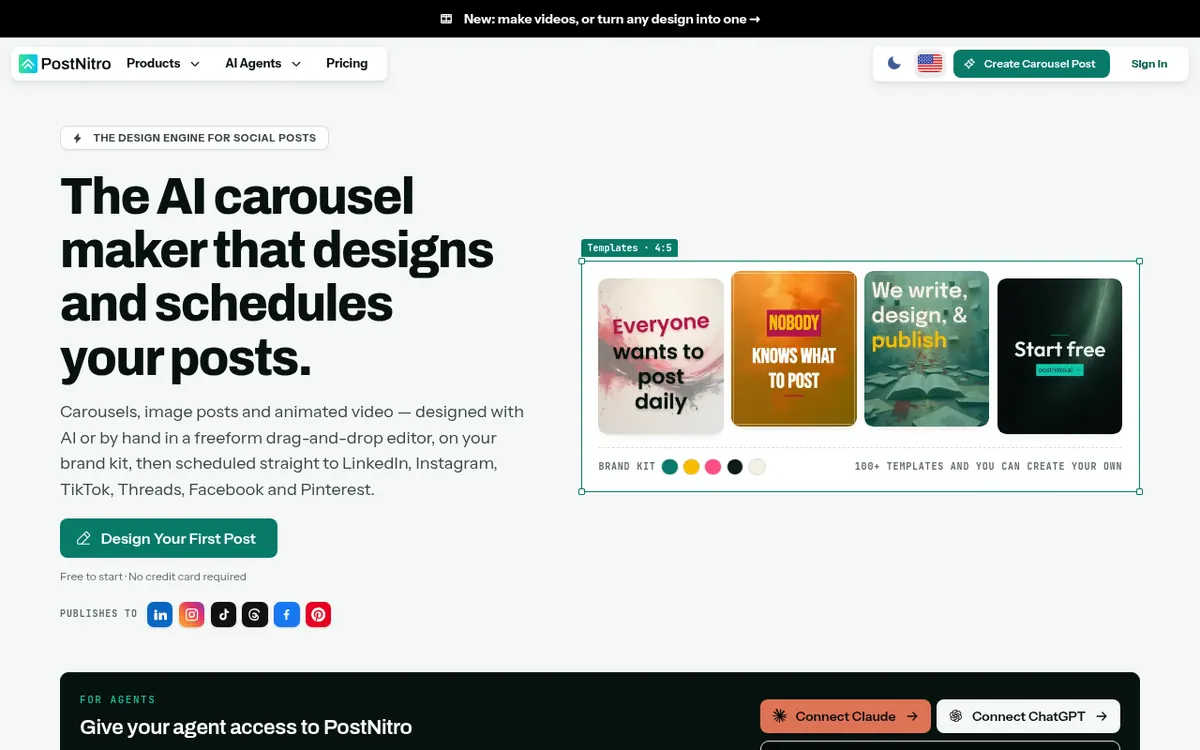
What PostNitro.ai does
Designs carousels, image posts and short videos on your brand kit, then schedules them to six social networks.
PostNitro is a design engine for social content. You give it a topic, an article link, text you already wrote, or an X post, and it builds a carousel, a single-image post or a short animated video using your brand kit. The kit holds your fonts, colours, logo and headshots, and the templates redraw in that identity. There are over 100 editable templates, and you can save your own.
The tool also covers publishing. From Creator+ upward it can schedule posts and send them natively to LinkedIn, Instagram, TikTok, Threads, Facebook and Pinterest. Exports to PNG, PDF and MP4 are available if you prefer to post yourself. X is a content source and export format only.
Developers and agent users get an MCP server, a CLI and a REST API, and a Chrome extension adds carousel creation to LinkedIn.
Pricing is freemium. A free plan needs no credit card, with watermarked exports and no scheduling. Paid plans are Starter at $15/month, Creator+ at $30/month and Team+ at $60/month, each with a 3 Day Trial. Starter cannot schedule or use the API, though API access can be added for $10/month. Creator+ and Team+ include scheduling and API credits. Yearly billing is offered, but the page text does not show those prices.
- Carousels, image posts and animated video
- Brand kit with fonts, colours, logo and headshots
- Over 100 editable templates
- Native scheduling to six social networks
- Exports to PNG, PDF and MP4
- MCP server, CLI and REST API
- Chrome extension for LinkedIn
- Input from topics, text, article URLs or X posts
Official video
How to Turn Carousel Posts Into Videos with PostNitro · by PostNitro ·
The player loads only when you press play.
Good for / Not for
Good for
- Creators and marketers who want carousels made from a topic, article link or X post
- Agencies that want one brand kit per client and scheduled publishing
- Developers who want to automate posts through an MCP server, CLI or REST API
Not for
- Anyone who needs scheduling on the Free or Starter plan
- Anyone who wants to publish directly to X
How to start
Open the editor and pick a template, or start free with no credit card. source
Bring a topic, article URL, your own text or an X post and choose how many slides to generate. source
Apply your brand kit, edit any slide, then export PNG, PDF or MP4. source
To schedule, choose Creator+ or Team+, which come with a 3 Day Trial, and connect your social accounts. source
Limits and gotchas
From the official site and docs of PostNitro.ai, checked on October 29, 2026.
Pros and cons
Pros
- Handles carousels, image posts and animated video in one editor
- Publishes natively to LinkedIn, Instagram, TikTok, Threads, Facebook and Pinterest
- Brand kit applies your fonts, colours, logo and headshots to the templates
- Offers an MCP server, CLI and REST API for automation
- Free plan available with no credit card
Cons
- Free and Starter plans cannot schedule or publish posts
- Free plan exports carry a watermark
- No free API tier; access is a $10/month add-on or bundled into Creator+ and Team+
- X is not a publishing destination
- Yearly prices are not shown in the page text
Our take
PostNitro suits creators, marketers and small agencies who want to go from an idea to a scheduled carousel in one place, with the same brand look every time. Developers who want to automate posting through an agent, CLI or API also have a clear route. It is a weaker fit if you only want a free tool, since the free plan adds a watermark and cannot schedule or use the API. Publishing starts at Creator+, so Starter users pay for design and export only. X cannot be a publishing target. We have not tested it; this summary rests on the vendor's own pages.
Comparisons and lists with PostNitro.ai
Coming soon
Coming soon — we are writing comparisons that include PostNitro.ai.
PostNitro.ai pricing
| Plan | Monthly billing | Annual billing (per month) | Limits / what’s included |
|---|---|---|---|
| Free | — | — | Carousels of up to 5 slides with AI (GPT-6 Luna), 5 downloads a month, one brand kit, watermarked exports, no scheduling or API |
| Starter | $15 | — | 30 downloads per month; no social scheduling or API access; agent access is a $10/month add-on |
| Creator+ | $30 | — | Schedule to 10 social accounts; 200 API credits per month; unlimited downloads |
| Team+ | $60 | — | 5 workspaces and 5 team members; schedule to 30 social accounts; 500 API credits per month |
Free trial: 3 Day Trial on paid plans. Free plan: yes.
Prices checked on on the official PostNitro.ai pricing page. “—” = not published.
All PostNitro.ai plans, limits and annual prices →
Frequently asked questions
Is there a free plan?
Yes. The free plan needs no credit card, but exports carry a watermark and it cannot schedule posts or use the API.
Which plan can schedule posts?
Creator+ at $30/month is the cheapest plan with scheduling and native publishing. Team+ at $60/month also includes it.
Which networks can it publish to?
LinkedIn, Instagram, TikTok, Threads, Facebook and Pinterest. X is only a content source and export format.
How does API access work?
There is no free API tier. It is a $10/month add-on on a paid plan, or included in Creator+ and Team+.
Can I get my money back?
The site says paid subscription fees are refundable within seven days of purchase.
Recently verified in Sales & Lead Generation
 SalesTarget.ai
 Snov.io
 11x
 Clay
 Foxreach
 Gong
Add an AGIPicks badge to your site
The badge shows PostNitro.ai’s verification status on AGIPicks and links to this page. Light/dark and compact versions: badges.

Suggest an update
Wrong price, outdated fact or a tool that shut down? Are you the vendor and disagree with this page? Tell us, ideally with a link to the official page. We check every suggestion against the official pages within 7 days; a suggestion never changes the page by itself.