Web scraping5 tools

AI web scraper: describe the data, get a table

You get structured rows (JSON, CSV or a spreadsheet) from one or more web pages by naming the fields you want in plain language or by giving example pages, instead of writing CSS or XPath selectors.

An AI web scraper lets a language model work out where the data sits on a page. You describe the fields, give a few example URLs, or let the tool detect them, and you get structured output back. The five tools here split into two groups. Apify's AI Web Scraper and Browse AI's Table Studio run from a web dashboard with no code: you type a prompt or review a table the AI proposed. Oxylabs, ScraperAPI and ZenRows add AI parsing to scraping APIs, which suits developers and automation builders. When comparing them, look at how you tell the tool what to extract, whether results arrive as a file or through an API, how multi-page crawls are handled, and how credits or per-page fees add up. The steps show a first run of Apify's AI Web Scraper. All facts come from the vendors' official pages, checked on 2026-10-20.

Last verified Suggest an update

At a glance

Apify's AI Web Scraper takes a plain-language prompt and includes the AI tokens in its price; Browse AI has a 50-credit free plan, and its Professional plan lists 10 users.

The shortlist

5 tools
  1. Apify

    Web Scraping & Proxies
    Free planVerifiedOur pick

    Its AI Web Scraper takes start URLs and a plain-language prompt, then returns structured fields per page. Apify says no programming knowledge is needed and no separate LLM subscription is required.

    When to pick it: If you want to type what you need and get a table back, without installing anything or holding an AI provider key.
    $19/moFree plan
  2. Browse AI

    Automation & AI Agents
    Free planVerified

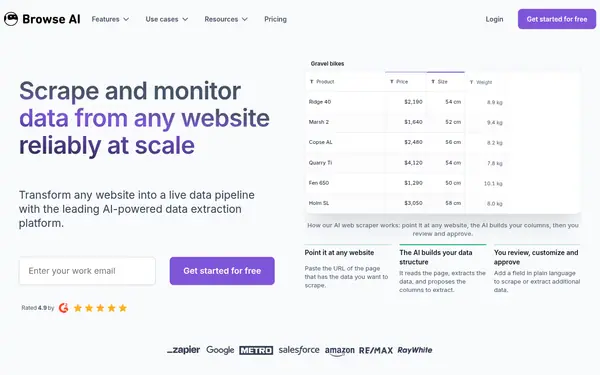
    Table Studio points an AI agent at a URL; it proposes tables and columns with sample rows, and you add columns with plain-language instructions before saving the robot for scheduled runs.

    When to pick it: If you want to review and approve the table the AI builds, then monitor the page or sync it to Google Sheets.

    $48/moFree plan
  3. Oxylabs

    Web Scraping & Proxies
    Free trialVerified

    Oxylabs describes OxyCopilot as an assistant for its Web Scraper API that turns natural-language prompts into parsing instructions and request payloads, returning listed or nested data as JSON.

    When to pick it: If a developer will call a scraping API and you want prompts to replace hand-written parsers.

    $30/moTrial: Welcome credits: $5 toward any product
  4. ZenRows

    Web Scraping & Proxies
    Free planVerified

    Adding extract=auto to a request returns the page's meaningful fields as typed JSON with no selectors or schema. ZenRows says extraction adapts when a site changes its layout.

    When to pick it: If you work from code or the CLI and the sites you need are on its prepared-domain list.

    Custom (contact sales)Free plan

Compared on this task

CriterionApifyBrowse AIOxylabsScraperAPIZenRowsChecked
How you tell it what to extractPlain-language prompt that runs on every page sourceAI proposes columns from a URL; extra columns from plain-language instructions sourceNatural-language prompts in OxyCopilot sourceUp to 3 example URLs of one page type; you can specify fields sourceNothing to describe: fields are detected automatically on prepared domains source
Coding neededNo — input form in Apify Console sourceNo — web dashboard sourceVendor says minimal programming knowledge; data is delivered through an API sourceYes — parsers are created and used through API endpoints sourceYes for regular use (API, SDK or CLI); the dashboard playground runs the default extraction source
OutputStructured fields plus page Markdown; export JSON, CSV, Excel, XML and more sourceTable; CSV or JSON export; Google Sheets and Airtable sync sourceJSON sourceStructured data from the parse endpoint sourceTyped JSON together with the raw HTML source
More than one pageScout and Agentic modes use the site's sitemap; capped by maxPagesToVisit sourceYou set a maximum list size; pages are chained with workflows sourceNot stated on official siteOne parser works on any similar page of the same domain sourceNot stated on official site
Free plan or trialFree plan: $5 to spend per month, no credit card sourceFree plan: 50 credits per month source$5 of welcome credits toward any product source7-day trial with 5,000 API credits, no credit card; first parser free sourceFree plan: 5,000 credits per month, no card source
From (official pricing)AI Web Scraper from $20.00 per 1,000 page extractions; Starter plan $19/month + pay as you go sourcePersonal $19 per month billed annually; $48 per month on monthly billing sourceStarter $30/mo; AI parsing $3.00 per 1K parsed pages sourceHobby $49/month (100,000 API credits); each extra parser costs 30,000 API credits sourceBuild $16/mo with 45K credits/month source

Facts from the vendors' official pages, checked on the date in the last column. Prices are what the vendor published on that date.

How to do it

  1. Create a free Apify account

    Sign up on apify.com. The Free plan costs $0, includes $5 per month to spend in Apify Store or on your own Actors, and does not ask for a credit card.

    Apifysource

  2. Open the AI Web Scraper Actor

    In Apify Store, open AI Web Scraper (apify/ai-web-scraper), which is maintained by Apify, and click Try for free. The input form opens in Apify Console.

    Apifysource

  3. Add URLs and describe the fields

    Enter one or more Start URLs (required). In the prompt, name each field you want, for example product name, price in USD and rating, and say what to return when a field is missing. Refer to visible labels or button text, not colors. With no prompt, the Actor returns each page as Markdown.

    Apifysource

  4. Pick an extraction mode

    Single page (the default) reads only your Start URLs. Scout uses the site's sitemap to find relevant pages and returns their Markdown without fields. Agentic also uses the sitemap, opens item pages and returns one record per item. For Scout and Agentic, set maxPagesToVisit (default 100, applied per Start URL).

    Apifysource

  5. Run it

    Click Save & Start. When the run finishes, the extracted data appears in the Output tab.

    Apifysource

  6. Export the table

    View the results as a table, click Export, choose a format (JSON, CSV, XML, Excel, HTML table, RSS or JSONL) and download. Rename the dataset if you want to keep it, because unnamed datasets expire after 7 days.

    Apifysource

  7. Optional: schedule or connect it

    Use Apify's built-in scheduler for repeat runs. The platform also connects to Zapier, Make, n8n, Google Sheets and Google Drive, and webhooks can trigger an action when a run ends.

    Apifysource

Limits and risks

  • Apify's AI Web Scraper charges per extracted page in every mode. Scout and Agentic can return several results per domain, and maxPagesToVisit applies per Start URL, so 2 URLs with a limit of 5 can be billed for up to 10 results. source
  • Browse AI's Table Studio is in beta and works with data that is visible when the page loads. Pages that need clicks, form input or a password login have to be trained in Robot Studio. source
  • Browse AI credits reset at the end of each billing cycle; unused credits do not roll over unless you upgrade before the cycle ends. source
  • ScraperAPI's Free plan lets you create one AI parser but not update it. Paid plans hold up to 5 parsers, and adding or changing fields costs 30,000 API credits. source
  • ZenRows Extract only works on prepared domains. A request to an unprepared domain fails with a 403 error (not charged), and you prepare a new domain through an API call with 1 to 5 example URLs. source
  • Oxylabs' figures about development hours saved with OxyCopilot are the vendor's own claims, and results are delivered through its Web Scraper API rather than a spreadsheet interface. source

Frequently asked questions

Is there a free AI web scraper?

Several have free allowances. Apify's Free plan includes $5 of usage per month without a credit card, and its AI Web Scraper is billed from $20.00 per 1,000 page extractions. Browse AI's Free plan gives 50 credits per month. ZenRows' Free plan gives 5,000 credits per month.

Is there an AI web scraper Chrome extension?

Browse AI still offers a Chrome extension, but its help center recommends it only when Table Studio (AI training) and Robot Studio (visual training) cannot train a site. Both of those run from the Browse AI dashboard.

Can I use an AI web scraper from Python?

Yes. Apify documents a Python API client that starts an Actor and reads its dataset. ScraperAPI's AI Parser quickstart includes Python examples, and ZenRows lists a Python SDK alongside Node and Go.

Which tool prepares web pages for an LLM?

Apify's AI Web Scraper returns each page as Markdown when you leave the prompt empty, and its Scout mode returns only the relevant pages with their Markdown. ZenRows' Extract returns typed JSON, and its CLI can also output a page as Markdown.

Can an AI scraper feed an n8n workflow?

Apify says its platform integrates with Zapier, Make, n8n, Google Sheets and Google Drive, and that you can embed the AI Web Scraper in an n8n workflow. ZenRows also lists n8n, Make and Zapier among its integrations.

Suggest an update

Something wrong or missing on this page — a wrong fact, an outdated price, a tool that should be here? Tell us, ideally with a link to the official page. We check every suggestion within 7 days; a suggestion never changes the page by itself.

What is wrong?

For example the new price, the feature that changed, or the tool we should add.

The official page that shows the change.

Only we see it, to reply. It is never published.