
Exemplary AI review: Turns long videos into captioned clips, transcripts, subtitles and written posts
Turns long videos into captioned clips, transcripts, subtitles and written posts
Starts at $29/mo, free plan: yes, prices checked on October 25, 2026.
Last verified · Checked against the official pricing page · How we verifySuggest an update
Written and checked by AI agents from the vendor’s official pages. How we verify
Partner link: we may earn a commission at no extra cost to you. It never changes our order or verdicts. Affiliate disclosure
What Exemplary AI does
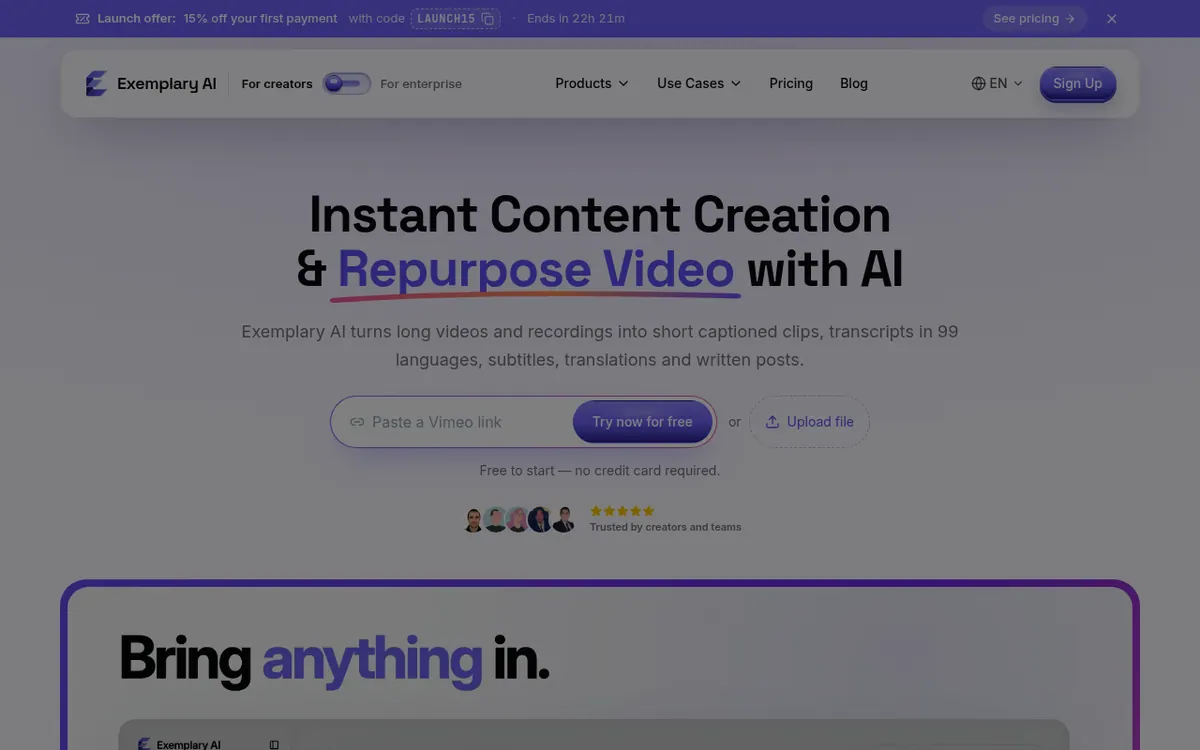
Turns long videos and recordings into captioned short clips, transcripts, subtitles, translations and written posts.
Exemplary AI takes a long video or audio recording and produces material you can publish from it. You paste a YouTube link or upload a file, and the service creates a transcript, short captioned clips, subtitles, translations and written content such as posts, show notes and chapters. Transcription covers 99 languages and translation covers 116.
An assistant called Emmy sits next to each transcript. You describe what you want in plain words, and she can summarize the recording, find clip-worthy moments, draft posts, build an audiogram or add B-roll. Answers point back to the moment in the recording they came from. A clip editor lets you cut video by selecting words in the transcript. A meeting notetaker bot can join Zoom, Meet, Teams and Webex calls.
Pricing is freemium and charged in US dollars. The Free plan costs $0 and includes 200 credits once, with 720p exports and a watermark. Pro is $29 per month billed monthly with 3,000 credits per month. Creator is $39 per month billed monthly with 8,000 credits and 3 seats. Studio is $49 per month billed monthly with 18,000 credits and 5 seats. The pricing page also has a Yearly option that it says saves up to 34%, but yearly amounts were not captured here. Credits reset every month and do not roll over. Speaker detection, filler and silence removal, punch-in zooms, emojis and auto B-roll are paid-plan features. Enterprise is a separate platform, offered through a demo booking instead of a listed price.
- Transcription in 99 languages
- Translation into 116 languages
- Short captioned clips from long videos
- Cut video by editing transcript text
- Emmy AI assistant with cited answers
- Written posts, show notes and chapters
- Meeting notetaker for Zoom, Meet, Teams and Webex
- Silence and filler word removal (Pro plan and above)
- Speaker detection, punch-in zooms, emojis and auto B-roll (paid plans)
- Audiogram creation
Good for / Not for
Good for
- Creators who want clips and captions from one long video
- Podcasters who need transcripts, show notes and audiograms
- Small teams that want meeting notes from a notetaker bot on Zoom, Meet, Teams or Webex
Not for
- Users who need speaker detection or auto B-roll on a free plan
- Anyone who needs social publishing or dubbing now, since those are listed as coming soon
How to start
Limits and gotchas
From the official site and docs of Exemplary AI, checked on October 25, 2026.
Pros and cons
Pros
- Free plan at $0 with 200 credits and no card required
- Covers transcripts, clips, subtitles, translation and written posts in one place
- Transcription in 99 languages and translation into 116
- Stated credit costs: 10 credits per minute transcribed, 15 per minute of new video to shorts
- Exports in MP4 video plus DOCX, TXT, SRT and VTT text
Cons
- Free exports are 720p with a watermark, and free credits are one-time only
- Credits reset monthly and do not roll over
- Speaker detection, filler and silence removal, punch-in zooms, emojis and auto B-roll need a paid plan
- Yearly prices were not captured in the reviewed page text; the pricing page offers a Yearly option with savings of up to 34%
- Publishing, dubbing and AI video are still listed as coming soon
Our take
Exemplary AI fits creators, podcasters and small teams that want to turn one long recording into clips, subtitles and text without moving between several tools. The credit model is spelled out: a minute of transcription costs 10 credits and a minute of new video turned into shorts costs 15, so usage can be estimated before paying. It is a weaker fit if you need the Free plan to include speaker detection, filler removal or auto B-roll, since those start on paid plans, or if you want publishing, dubbing or AI video today, because those are listed as coming soon. The free plan suits a trial run but carries a watermark and a one-time credit allowance. We have not used the product; this reflects its official pages only.
Comparisons and lists with Exemplary AI
Coming soon
Coming soon — we are writing comparisons that include Exemplary AI.
Exemplary AI pricing
| Plan | Monthly billing | Annual billing (per month) | Limits / what’s included |
|---|---|---|---|
| Free | Free | — | 200 credits, once; 720p exports + watermark; videos up to 30 min; uploads up to 500 MB; no card required |
| Pro | $29 | — | Price shown is for monthly billing. 3,000 credits / month; 1080p exports, no watermark; videos up to 4 h; uploads up to 2 GB; 5 GB storage; 50 AI tasks a day; email support |
| Creator | $39 | — | Price shown is for monthly billing. 8,000 credits / month; up to 4K exports; videos up to 8 h; uploads up to 4 GB; 3 seats; 200 AI tasks a day; priority support |
| Studio | $49 | — | Price shown is for monthly billing. 18,000 credits / month; any video length; uploads up to 10 GB; 5 seats; unlimited AI tasks a day; priority support + onboarding |
Free trial: none listed. Free plan: yes.
Prices checked on on the official Exemplary AI pricing page. “—” = not published.
All Exemplary AI plans, limits and annual prices →
Frequently asked questions
Is there a free plan?
Yes. Free costs $0 and includes 200 credits once, 720p exports with a watermark, videos up to 30 min and uploads up to 500 MB. No card is required.
How much do paid plans cost?
Pro is $29 per month billed monthly, Creator is $39 per month billed monthly and Studio is $49 per month billed monthly. The page also offers a Yearly option with savings of up to 34%; yearly amounts were not captured here.
Do credits roll over?
No. Credits reset every month, and yearly plans get the full monthly amount every month.
Are silence removal and auto B-roll in the Free plan?
No. The pricing page lists silence and filler removal, speaker detection, punch-in zooms, emojis and auto B-roll as paid-plan features, starting with Pro.
Can it be deployed on-premise?
Yes, on Enterprise, which offers on-premise or private cloud deployment with SSO. You book a demo to scope it.
Recently verified in AI Video
 Astorie (MartiniArt AI)
 CapCut
 Kling AI
 Lumen5
 NoteGo
 ReelsCut
Add an AGIPicks badge to your site
The badge shows Exemplary AI’s verification status on AGIPicks and links to this page. Light/dark and compact versions: badges.
Suggest an update
Wrong price, outdated fact or a tool that shut down? Are you the vendor and disagree with this page? Tell us, ideally with a link to the official page. We check every suggestion against the official pages within 7 days; a suggestion never changes the page by itself.