
SoftSync review: Seat-based CRM with email, meeting notes and an AI assistant for small teams
Seat-based CRM with email, meeting notes and an AI assistant for small teams
Starts at $39/mo, free plan: no, prices checked on October 25, 2026.
Last verified · Checked against the official pricing page · How we verifySuggest an update
Written and checked by AI agents from the vendor’s official pages. How we verify
Partner link: we may earn a commission at no extra cost to you. It never changes our order or verdicts. Affiliate disclosure
What SoftSync does
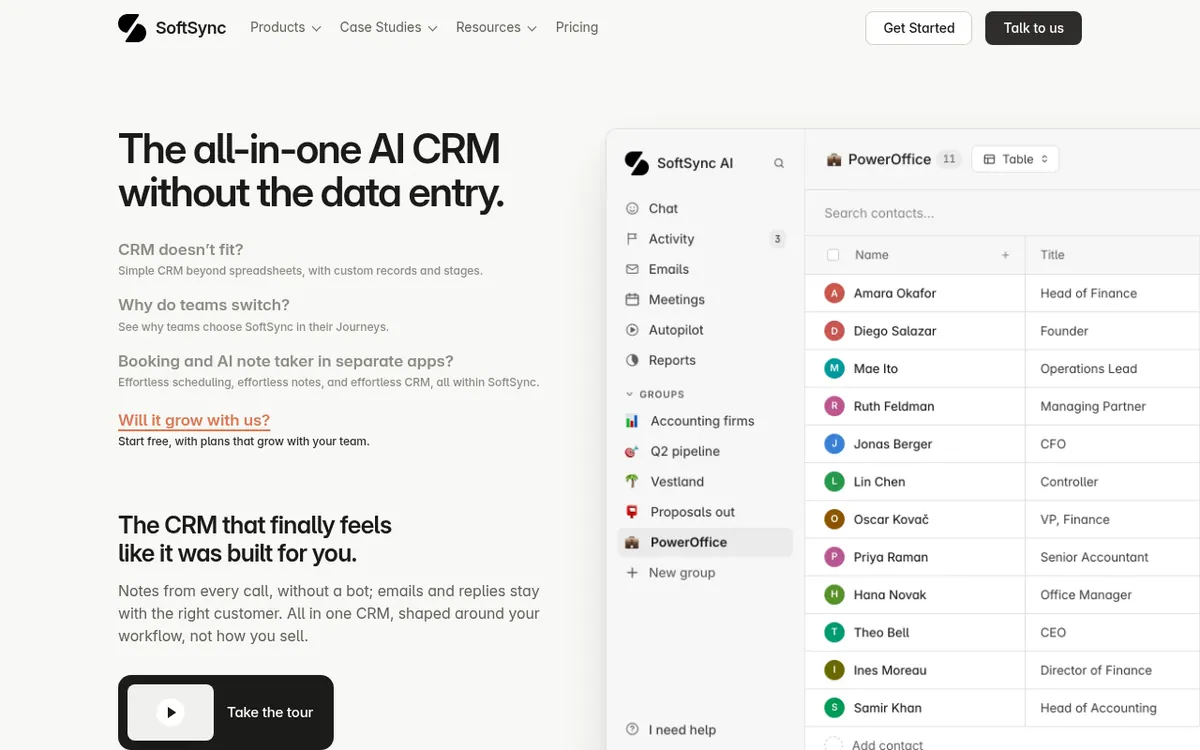
SoftSync is a customizable CRM aimed at startups and small teams. Instead of a fixed sales pipeline, you choose which records to track, add your own fields, name your stages, and look at the same data as a table, board or calendar. Emails, meeting notes and follow-ups stay attached to the customer they belong to.
Around the core CRM sit several connected tools. Email sync and campaigns let you send outreach from a mailbox you already use, plan follow-ups and see replies on the customer record. A desktop meeting assistant takes notes without a bot joining the call, booking pages help schedule demos, and a Chrome extension saves contact details while you browse. Reports, dashboards, an AI Assistant and Autopilot workflows are included, along with integrations, API and MCP access.
Pricing is per seat. Pro costs 39 USD per seat per month billed monthly, or 29 USD per seat per month billed yearly. Business costs 79 USD per seat per month billed monthly, or 59 USD per seat per month billed yearly. Both paid plans share the same core features; Business adds more capacity and Priority Support. Pro allows 5 team members per workspace, Business allows 25, and Enterprise is custom-priced with tailored limits. Prices exclude VAT, and the pricing page lists no free plan.
- Flexible records, custom objects and fields
- Table, pipeline and calendar views
- Email sync, campaigns and templates
- Meeting notes and summaries
- Reports and dashboards
- AI Assistant and Autopilot workflows
- Chrome extension for saving contacts
- Integrations, API and MCP access
Pros and cons
Pros
- Records, fields, stages and views can be shaped around your own process
- Email, campaigns, meeting notes and booking pages sit in the same CRM
- Meeting assistant takes notes without a bot joining the call
- API and MCP access are included in the paid plans
- Pro and Business share the same core features, with capacity as the main difference
Cons
- No free plan is listed on the pricing page
- Billed per seat, so cost grows with team size
- Pro is capped at 5 team members per workspace and Business at 25
- Trial length is not stated on the pages
- Monthly billing costs more per seat than yearly billing
Our take
SoftSync suits small teams that want contacts, email outreach, meeting notes and scheduling in one customizable workspace rather than several separate apps. Its seat-based pricing is easy to read, and both paid plans share the same core features, so the choice is mostly about capacity. It fits less well if you need a free tier, since none is listed, or a team above 25 people without an Enterprise conversation. The pages also do not state a trial length or platforms beyond a Chrome extension, so check those before committing.
Comparisons and lists with SoftSync
Coming soon
Coming soon — we are writing comparisons that include SoftSync.
SoftSync pricing
| Plan | Monthly billing | Annual billing (per month) | Limits / what’s included |
|---|---|---|---|
| Pro per seat | $39 | $29 | Max 5 team members and 10 groups per workspace, 250,000 records per table, 1 mailbox connection per user; per user per calendar month 1,000 campaign emails and 1,000 chats; 1,000 enrichment credits per workspace |
| Business per seat | $79 | $59 | Max 25 team members and 100 groups per workspace, 1,000,000 records per table, 5 mailbox connections per user; per user per calendar month 10,000 campaign emails and 10,000 chats; 10,000 enrichment credits per workspace |
| Enterprise custom pricing | — | — | Custom team member, group, record, mailbox, and usage limits |
Free trial: none listed. Free plan: no.
Prices checked on on the official SoftSync pricing page. “—” = not published.
All SoftSync plans, limits and annual prices →
Frequently asked questions
How much does SoftSync cost?
Pro is 39 USD per seat per month billed monthly or 29 USD per seat per month billed yearly. Business is 79 USD per seat per month billed monthly or 59 USD per seat per month billed yearly. Enterprise has custom pricing. Prices exclude VAT.
Is there a free plan?
The pricing page lists Pro, Business and Enterprise and describes Pro and Business as the standard paid plans. No free plan is shown.
What is the difference between Pro and Business?
Both include the same core CRM features. Business adds more capacity, such as 25 team members instead of 5 and 1,000,000 records per table instead of 250,000, plus Priority Support for migration and setup.
Can I move over from another CRM?
Yes. Import is available on every plan. Data Migration and Workspace Consultant are self-served on Pro and include Priority Support on Business and Enterprise.
Recently verified in Sales & Lead Generation
 SalesTarget.ai
 Snov.io
 11x
 Clay
 Foxreach
 Gong
Add an AGIPicks badge to your site
The badge shows SoftSync’s verification status on AGIPicks and links to this page. Light/dark and compact versions: badges.

Suggest an update
Wrong price, outdated fact or a tool that shut down? Are you the vendor and disagree with this page? Tell us, ideally with a link to the official page. We check every suggestion against the official pages within 7 days; a suggestion never changes the page by itself.