
Subclip review: Desktop AI video editor that edits from plain-language prompts
Desktop AI video editor that edits from plain-language prompts
Starts at €24.99/mo, free plan: no, free trial: Free to try, no credit card required, prices checked on October 29, 2026.
Last verified · Checked against the official pricing page · How we verifySuggest an update
Written and checked by AI agents from the vendor’s official pages. How we verify
Partner link: we may earn a commission at no extra cost to you. It never changes our order or verdicts. Affiliate disclosure
What Subclip does
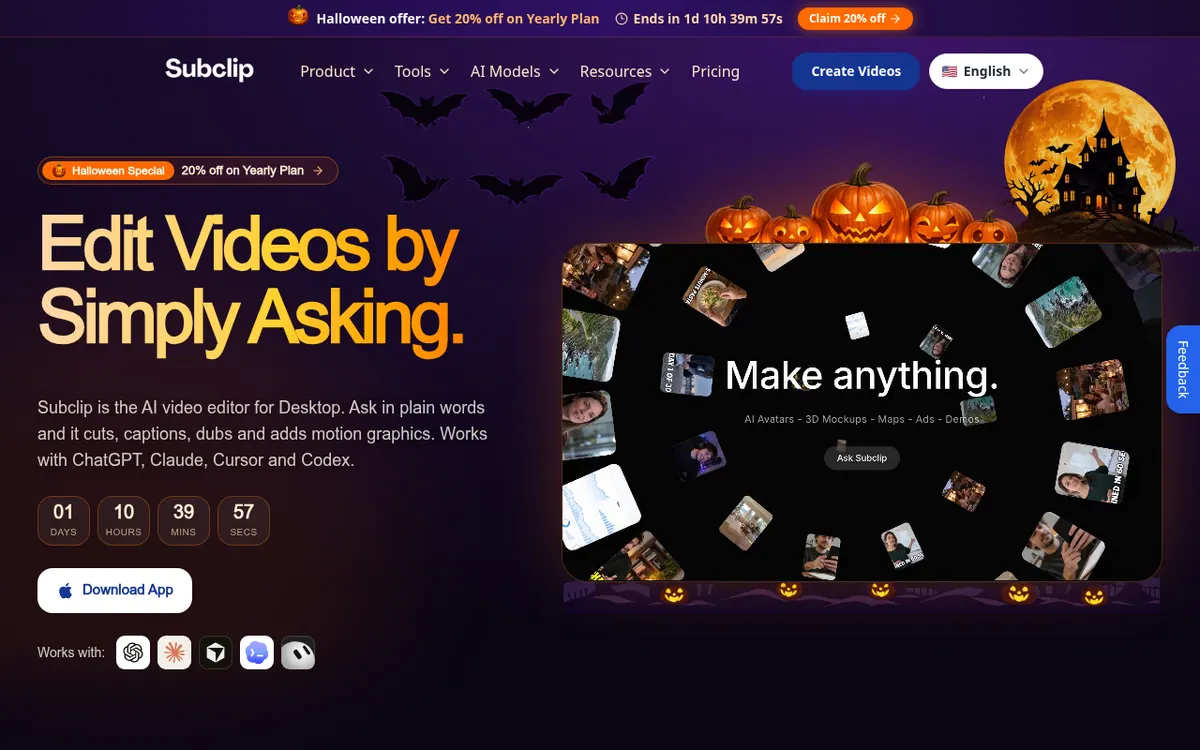
Edits video on the desktop from plain-language requests such as cuts, captions, dubbing and motion graphics, with each change visible on a timeline.
Subclip is a desktop video editor where you describe the change you want and the AI makes it. According to its homepage, requests can cover cuts, captions, dubbing and motion graphics. You can connect an existing Claude, Codex, Cursor or Grok subscription, or use Subclip's own AI gateway. Each AI edit shows up in a multi-track timeline, so you can adjust it by hand.
Other capabilities include customizable captions, generation of video, images and voiceovers inside the editor, and dubbing with voice cloning into 21+ languages. Transcription supports 48+ languages. A screen recorder and a live-streaming tool with automatic zoom are listed as exclusive to MacOS. The product also has a built-in MCP client and MCP server.
Pricing is in euros, with three paid plans: Creator, Pro and Business. The pricing page is shown in its yearly view. Creator is €19.99 per month on yearly billing, which comes to €239.92 for the first year and then €299.90 per year, and includes 600 credits per month and 10 GB of cloud storage. Pro is €33.33 per month (€399.92 for the first year, then €499.90 per year) with 1,050 credits and 15 GB. Business is €53.33 per month (€639.92 for the first year, then €799.90 per year) with 2,000 credits and 25 GB. The first-year totals reflect a Halloween offer of 20% off. Prices for monthly billing are not shown in the sources. Credits are used for AI generation, voice enhancement and background removal, and dubbing and voice cloning also need them. Editing by prompt through your own AI subscription does not use credits. The site says it is free to try with no credit card required, and it states a 15-day satisfaction guarantee.
- Prompt-based video editing
- Multi-track timeline editor
- Unlimited customizable captions
- AI video, image and voiceover generation
- Dubbing with voice clone in 21+ languages
- Transcription in 48+ languages
- Built-in MCP client and MCP server
- MacOS screen recorder and live-stream auto zoom
Good for / Not for
Good for
- Creators who want to direct edits by prompt but fine-tune them on a multi-track timeline
- People who already have a Claude, Codex, Cursor or Grok subscription and want to use it for editing
- Anyone who needs dubbing with voice cloning into 21+ languages or captions on their clips
- Mac users who want a screen recorder or live streaming with automatic zoom in the same app
Not for
- Anyone who needs a confirmed permanent free plan, since only a free-to-try note is stated
- Users on other operating systems who need the screen recorder or live-stream features, which are exclusive to MacOS
How to start
Try the editor first: the homepage says it is free to try with no credit card required (trial length not stated). source
Connect an existing Claude, Codex, Cursor or Grok subscription, or use Subclip's AI gateway, then describe the edit you want in plain words. source
Review the AI's changes in the timeline editor and adjust them by hand if needed. source
If you need more credits or storage, compare Creator, Pro and Business on the pricing page. source
Limits and gotchas
- Credits cover AI generation, voice enhancement and background removal. Dubbing and voice cloning also require credits. Prompt editing with your own AI subscription does not use them. source
- Monthly credits are 600 on Creator, 1,050 on Pro and 2,000 on Business. source
- The pricing page is shown in its yearly view with a first-year offer. For Creator, the first year is €239.92, then €299.90 per year. Monthly-billing prices are not shown. source
- Screen recording and live streaming with automatic zoom are exclusive to MacOS. source
- A 15-day satisfaction guarantee is stated. source
From the official site and docs of Subclip, checked on October 29, 2026.
Pros and cons
Pros
- Prompt edits appear in a multi-track timeline that you can adjust by hand
- Prompt editing with your own Claude, Codex, Cursor or Grok subscription does not use Subclip credits
- Dubbing with voice cloning into 21+ languages and transcription in 48+ languages
- Unlimited captions with customizable text and formatting
- Free to try with no credit card required, plus a 15-day satisfaction guarantee
Cons
- No permanent free plan is confirmed, and the trial length is not stated
- The prices shown are a yearly view with a first-year offer, and renewal costs more
- Monthly-billing prices are not shown in the sources
- AI generation, dubbing and voice cloning use credits, which are capped per plan
- Screen recorder and live-stream auto zoom are exclusive to MacOS, and other platforms are not stated
Our take
Subclip fits people who want to direct video edits with prompts but still keep a conventional timeline for precise changes. It looks especially relevant if you already pay for Claude, Codex, Cursor or Grok, because prompt editing through those subscriptions does not consume Subclip credits. Teams that dub into many languages or generate media inside the editor may also find it worth a look. The trade-offs are clear from the pages. No permanent free plan is confirmed, only a free-to-try note with no stated length. The prices shown are the yearly view with a first-year discount, and renewal is higher: Creator renews at €299.90 per year. Monthly-billing prices are not published in the sources. Dubbing, voice cloning and AI generation draw on capped monthly credits. The screen recorder and live-streaming features are MacOS-only, and the pages do not state support for other operating systems.
Comparisons and lists with Subclip
Coming soon
Coming soon — we are writing comparisons that include Subclip.
Subclip pricing
| Plan | Monthly billing | Annual billing (per month) | Limits / what’s included |
|---|---|---|---|
| Creator per month | €24.99 | €19.99 | 600 credits per month; 10 GB cloud storage; first-year Halloween 20% off on yearly billing: €239.92 for the first year, then €299.90/year |
| Pro per month | €41.66 | €33.33 | 1,050 credits per month; 15 GB cloud storage; first-year Halloween 20% off on yearly billing: €399.92 for the first year, then €499.90/year |
| Business per month | €66.66 | €53.33 | 2,000 credits per month; 25 GB cloud storage; first-year Halloween 20% off on yearly billing: €639.92 for the first year, then €799.90/year |
Free trial: Free to try, no credit card required. Free plan: no.
Prices checked on on the official Subclip pricing page. “—” = not published.
All Subclip plans, limits and annual prices →
Frequently asked questions
How much does Subclip cost?
The pricing page is shown in its yearly view. Creator is €19.99 per month (€239.92 for the first year, then €299.90 per year). Pro is €33.33 per month (€399.92 for the first year, then €499.90 per year). Business is €53.33 per month (€639.92 for the first year, then €799.90 per year). The first-year totals include a Halloween offer of 20% off. Monthly-billing prices are not shown in the sources.
Is there a free trial?
The homepage says Subclip is free to try with no credit card required. The exact trial length is not stated, and a permanent free plan is not confirmed.
Do I use credits when prompting with my own Claude or Cursor subscription?
No. The pricing page says prompt editing with your own Claude, Codex, Cursor or Grok subscription does not use Subclip AI Credits. Credits apply to AI generation, voice enhancement and background removal, and dubbing and voice cloning also require them.
Which languages does it support?
Transcription supports 48+ languages, and AI dubbing supports 21+ languages.
Is there a refund policy?
Subclip states a 15-day satisfaction guarantee on its pricing page.
Recently verified in AI Video
 Astorie (MartiniArt AI)
 CapCut
 Kling AI
 Lumen5
 NoteGo
 ReelsCut
Add an AGIPicks badge to your site
The badge shows Subclip’s verification status on AGIPicks and links to this page. Light/dark and compact versions: badges.

Suggest an update
Wrong price, outdated fact or a tool that shut down? Are you the vendor and disagree with this page? Tell us, ideally with a link to the official page. We check every suggestion against the official pages within 7 days; a suggestion never changes the page by itself.