
Synthesia review: AI video platform for creating, translating, and scaling videos with customizable avatars.
AI video platform for creating, translating, and scaling videos with customizable avatars.
Starts at $29/mo, free plan: yes, prices checked on October 24, 2026.
Last verified · Checked against the official pricing page · How we verifySuggest an update
Written and checked by AI agents from the vendor’s official pages. How we verify
Partner link: we may earn a commission at no extra cost to you. It never changes our order or verdicts. Affiliate disclosure
What Synthesia does
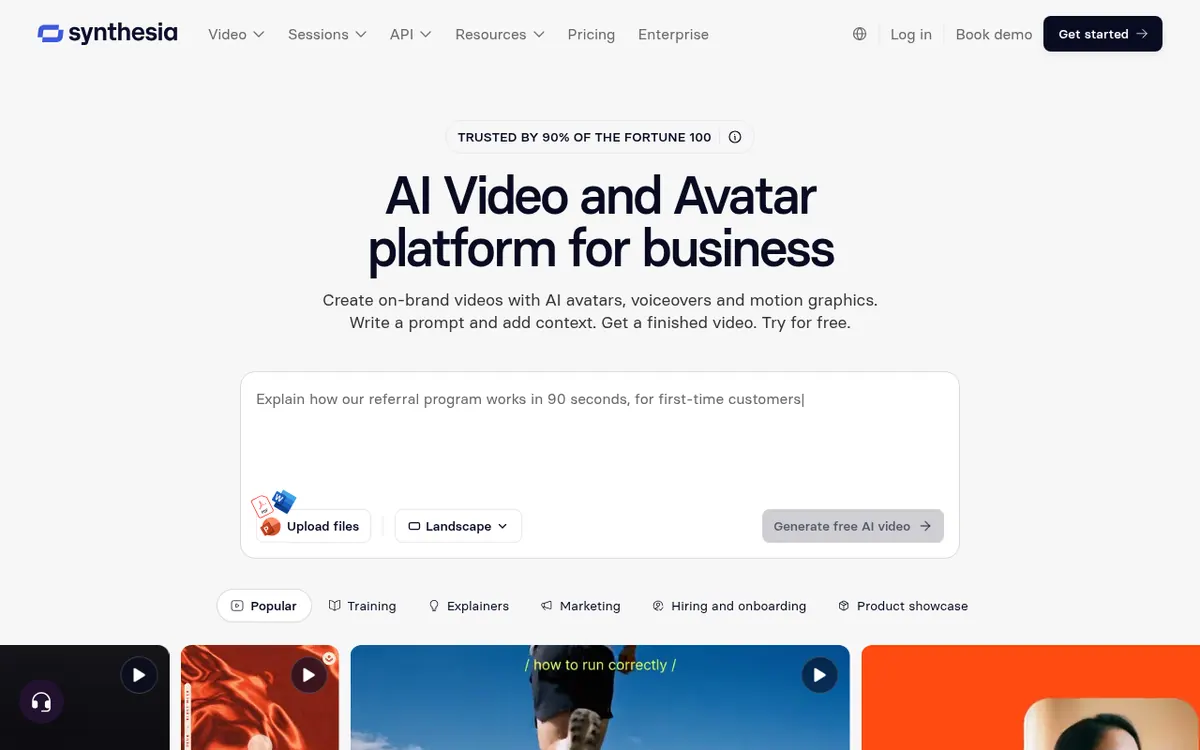
Generates and translates videos using AI avatars and voiceovers from text, documents, or presentations.
Synthesia is an AI video platform that allows businesses to generate studio-quality videos using AI avatars and voiceovers. Users can create content from text prompts, documents, or PowerPoint presentations, turning them into narrated videos in minutes. The platform supports over 140 languages, enabling teams to translate existing videos with voice cloning and lip-sync capabilities.
Beyond standard video creation, Synthesia offers interactive features such as roleplay sessions for training and conversational surveys. Users can choose from a library of stock avatars, build custom characters, or create a personal avatar from a single photo. The platform also provides an API for programmatic video generation and a Chrome extension for screen recording.
Pricing operates on a freemium model based on a shared credit system. The Basic plan is free and includes 500 credits per month, allowing for 10 minutes of video creation or dubbing. The Starter plan costs $29 per month billed monthly (or $18 per month billed yearly) and provides 1,250 credits. The Pro plan is $89 per month billed monthly (or $64 per month billed yearly) with 6,000 credits. An Enterprise plan with custom pricing is available for unlimited video minutes. Additional learner seats for roleplay training cost $29 per month.
- AI avatars and voiceovers
- PowerPoint to video conversion
- Video translation and dubbing
- Interactive roleplay sessions
- Conversational surveys
- Personal avatar creation
- API access
- Chrome extension for screen recording
Official video
Introducing: Sessions · by Synthesia
The player loads only when you press play.
Good for / Not for
Good for
- Training teams creating onboarding and compliance videos
- Marketing teams producing localized content
- Internal communications requiring consistent video updates
Not for
- Users needing unlimited video generation on standard plans
- Those unwilling to pay a premium for custom studio avatars
Compare
How to start
Limits and gotchas
From the official site and docs of Synthesia, checked on October 24, 2026.
Pros and cons
Pros
- Offers a free Basic plan with 10 minutes of video creation per month.
- Supports video translation and dubbing in over 140 languages.
- Provides an API for automating video creation workflows.
- Includes interactive features like roleplays and surveys.
Cons
- Creating a Studio Express-1 avatar requires a $1,000 per year paid add-on.
- Additional learner seats for roleplay training cost $29 per month.
- Video generation is limited by a monthly credit allowance on standard paid plans.
Our take
Synthesia is well-suited for training, internal communications, and marketing teams looking to produce localized video content at scale without the need for traditional filming. The ability to generate videos from text or presentations makes it highly accessible. However, it may not be ideal for those requiring highly complex video editing or those on a tight budget who need extensive video minutes, as usage is tied to a credit system and custom avatars require a significant annual add-on fee.
Comparisons and lists with Synthesia
Coming soon
Coming soon — we are writing comparisons that include Synthesia.
Synthesia pricing
| Plan | Monthly billing | Annual billing (per month) | Limits / what’s included |
|---|---|---|---|
| Basic per month | Free | — | 500 credits / month, 10 minutes of video creation or dubbing, 3 survey responses |
| Starter per month | $29 | $18 | 1,250 credits / month, 1 editor, 3 guests |
| Pro per month | $89 | $64 | 6,000 credits / month, 1 editor, 5 guests |
| Enterprise Custom | — | — | Custom credit volumes, unlimited video minutes |
Free trial: none listed. Free plan: yes.
Prices checked on on the official Synthesia pricing page. “—” = not published.
All Synthesia plans, limits and annual prices →
Frequently asked questions
Is there a free plan available?
Yes, Synthesia offers a free Basic plan that includes 500 credits per month, which covers 10 minutes of video creation or dubbing and 3 survey responses.
How much does the Starter plan cost?
The Starter plan costs $29 per month when billed monthly, or $18 per month when billed yearly.
Can I create an avatar of myself?
Yes, you can turn yourself into an AI avatar from a single photo. However, creating a Studio Express-1 avatar is a paid add-on that costs $1,000 per year.
Does Synthesia offer an API?
Yes, Synthesia provides an API to automate video creation and dubbing workflows.
Recently verified in AI Video
 Astorie (MartiniArt AI)
 CapCut
 Kling AI
 Lumen5
 NoteGo
 ReelsCut
Add an AGIPicks badge to your site
The badge shows Synthesia’s verification status on AGIPicks and links to this page. Light/dark and compact versions: badges.

Suggest an update
Wrong price, outdated fact or a tool that shut down? Are you the vendor and disagree with this page? Tell us, ideally with a link to the official page. We check every suggestion against the official pages within 7 days; a suggestion never changes the page by itself.