Verba Studio review: Windows app for recording, multi-platform live streaming and Vietnamese AI transcripts
Windows app for recording, multi-platform live streaming and Vietnamese AI transcripts
Custom (contact sales), free plan: yes, free trial: 14-day trial for teams, prices checked on October 29, 2026.
Last verified · Checked against the official website · How we verifySuggest an update
Written and checked by AI agents from the vendor’s official pages. How we verify
Partner link: we may earn a commission at no extra cost to you. It never changes our order or verdicts. Affiliate disclosure
What Verba Studio does
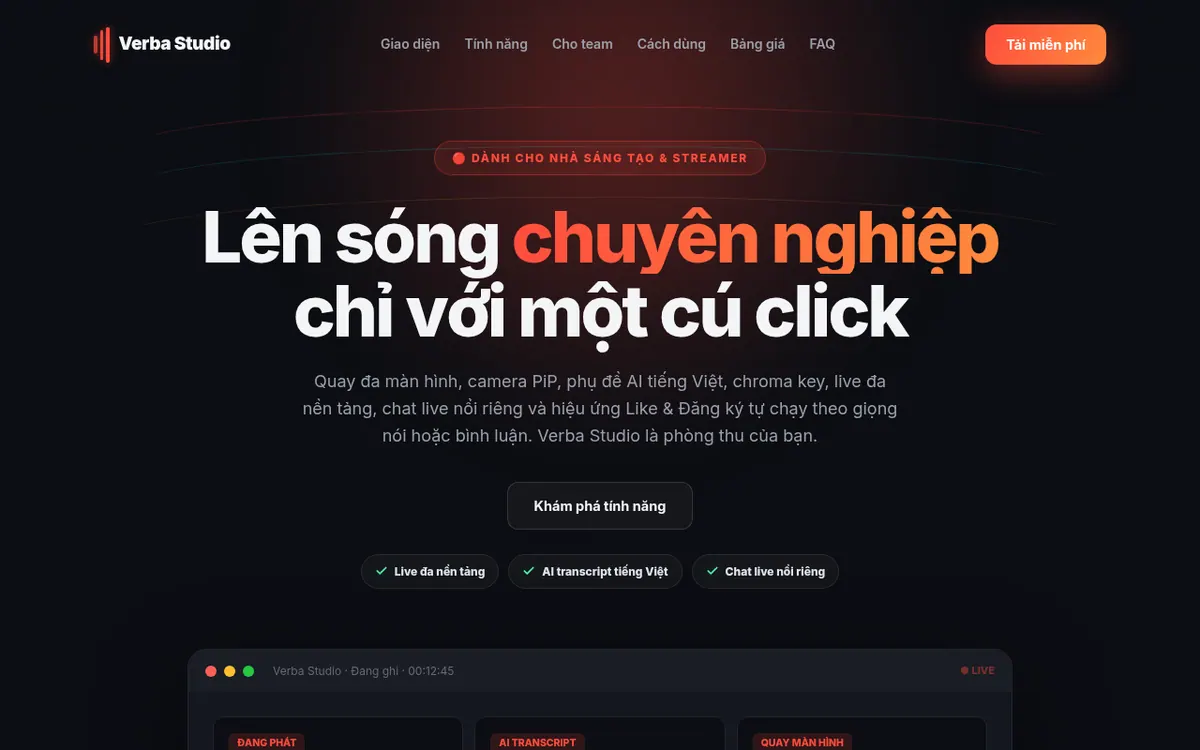
Records screens and streams live to several platforms from one Windows app, adding Vietnamese AI subtitles and meeting summaries.
Verba Studio is a desktop program for Windows that puts screen recording, live streaming and AI transcription into one app. The vendor says you do not need OBS or any third-party software alongside it. It is aimed at streamers and content creators, and it also covers meeting recording with AI summaries.
For streaming, it can broadcast to YouTube, Facebook, Twitch and TikTok at once, captures every connected screen and arranges them into a layout, and offers chroma key. A floating chat window shows YouTube comments on the desktop, and a subscribe effect can pop up on the video when the speaker or a commenter says certain keywords. Scenes and recording can be controlled with hotkeys or a Stream Deck.
For transcription, subtitles are produced in Vietnamese, and the app can switch between providers such as Kyma, OpenAI and Gemini when one fails. The personal version can also recognize speech locally on an NVIDIA GPU, so audio stays on your computer. Meeting features include summaries, speaker labels, a custom dictionary and sending tickets to Linear.
On pricing, the homepage shows Free, Pro, Team and Business plans. Free allows unlimited recording time but is limited to 720p and live on 1 platform, and needs no credit card. Pro is listed at 199k per month, with no currency shown next to the number, and adds multi-platform live, unlimited AI transcripts and summaries, chroma key, floating chat and priority support. Team is priced by number of people, with a 14-day trial for groups from 3 people. Business is custom. The current public release supports Windows 10/11 only.
- Live to YouTube, Facebook, Twitch and TikTok simultaneously
- Multi-screen capture with automatic layout
- Vietnamese AI subtitles with provider fallback
- Meeting recording with AI summaries and action items
- Chroma key (green-screen removal)
- Floating live chat window
- Automatic subscribe effect
- Local speech recognition on NVIDIA GPU
- Stream Deck and hotkey control
- Tickets pushed to Linear
Good for / Not for
Good for
- Vietnamese-speaking streamers who want to go live on several platforms at once
- Creators who want chroma key, floating chat and subscribe effects without OBS
- Teams that want meetings turned into transcripts, summaries and Linear tickets
Not for
- People on macOS or Linux, since public builds are Windows only
- Buyers who need published Team or Business prices
How to start
Download Verba Studio for Windows 10/11 (64-bit) and sign in with Google. source
Pick your screens, camera and the platforms to broadcast to, and paste your stream key. source
Click Live; transcripts, floating chat and subscribe effects run while you speak. source
Teams can enable Team mode in Settings after pasting a Kyma API Key with Audio enabled. source
Limits and gotchas
From the official site and docs of Verba Studio, checked on October 29, 2026.
Pros and cons
Pros
- Free plan with unlimited recording time and no credit card needed
- Live to YouTube, Facebook, Twitch and TikTok at once on the Pro plan
- Vietnamese AI subtitles with fallback between Kyma, OpenAI and Gemini
- Personal transcription can run locally on an NVIDIA GPU without sending audio online
- Includes chroma key, floating live chat and Stream Deck control without needing OBS
Cons
- Public release supports Windows 10/11 only; macOS and Linux come later
- Free plan is limited to 720p and 1 live platform
- Team and Business prices are not published, and Team needs a Kyma API Key
- Pro price is shown as 199k per month with no currency and no yearly-billing price
- Several Team features, such as the shared meeting library, are marked as coming soon
Our take
Verba Studio suits Vietnamese-speaking streamers and creators who want recording, multi-platform live and subtitles inside a single Windows app, and who value the option of keeping transcription on their own machine. The free plan is a low-risk way to try the basics, with unlimited recording time but 720p and 1 live platform. It does not fit people on macOS or Linux, since public builds are Windows only, nor buyers who need published Team or Business prices or a stated currency for Pro. Several team features are marked as coming soon, so confirm what is available before committing a group.
Comparisons and lists with Verba Studio
Coming soon
Coming soon — we are writing comparisons that include Verba Studio.
Verba Studio pricing
| Plan | Monthly billing | Annual billing (per month) | Limits / what’s included |
|---|---|---|---|
| Free | — | — | Recording and live at 720p, 1 platform; unlimited recording time; AI transcript runs locally without a key; no credit card needed |
| Pro 199k per month as written; no currency shown | — | — | Live 1080p / 2K on multiple platforms at once; unlimited AI transcript and summaries; chroma key, subtitle overlay; floating live chat and subscribe effect; priority support |
| Team priced by number of people | — | — | 14-day trial, from 3 people; all Pro features for each member; Kyma-based standard transcript for the whole team |
| Business custom | — | — | All Team features; Google Workspace single sign-on; member management; dedicated 1-on-1 support |
Free trial: 14-day trial for teams. Free plan: yes.
Prices checked on on the official Verba Studio pricing page. “—” = not published.
Frequently asked questions
Which operating systems does Verba Studio support?
Currently Windows 10/11 (64-bit). The vendor says macOS and Linux packages are prepared, with public releases to follow after testing.
Is there a free plan?
Yes. Free needs no credit card and has no recording time limit, but is limited to 720p and live on 1 platform.
How much does Pro cost?
The homepage lists Pro at 199k per month. No currency or yearly-billing price is shown next to it.
Is there a trial for teams?
Yes, a 14-day trial for the Team plan, starting from 3 people. Team needs a Kyma API Key with Audio enabled.
Is my meeting audio sent to a server?
According to the vendor, the personal version recognizes speech on your machine. Team mode sends audio to Kyma using the team's own key, and account sync only runs if you turn it on.
Recently verified in Social Media
 Later
 Post Bridge
 Blabla
 Hootsuite
 Metricool
 Modash
Add an AGIPicks badge to your site
The badge shows Verba Studio’s verification status on AGIPicks and links to this page. Light/dark and compact versions: badges.

Suggest an update
Wrong price, outdated fact or a tool that shut down? Are you the vendor and disagree with this page? Tell us, ideally with a link to the official page. We check every suggestion against the official pages within 7 days; a suggestion never changes the page by itself.