Happy Scribe review: AI notetaker and transcription for meetings, interviews and media files
AI notetaker and transcription for meetings, interviews and media files
Not published, free plan: yes, free trial: Free to try, no credit card required (no trial length stated), prices checked on October 20, 2026.
Last verified · Checked against the official website · How we verifySuggest an update
Written and checked by AI agents from the vendor’s official pages. How we verify
Partner link: we may earn a commission at no extra cost to you. It never changes our order or verdicts. Affiliate disclosure
What Happy Scribe does
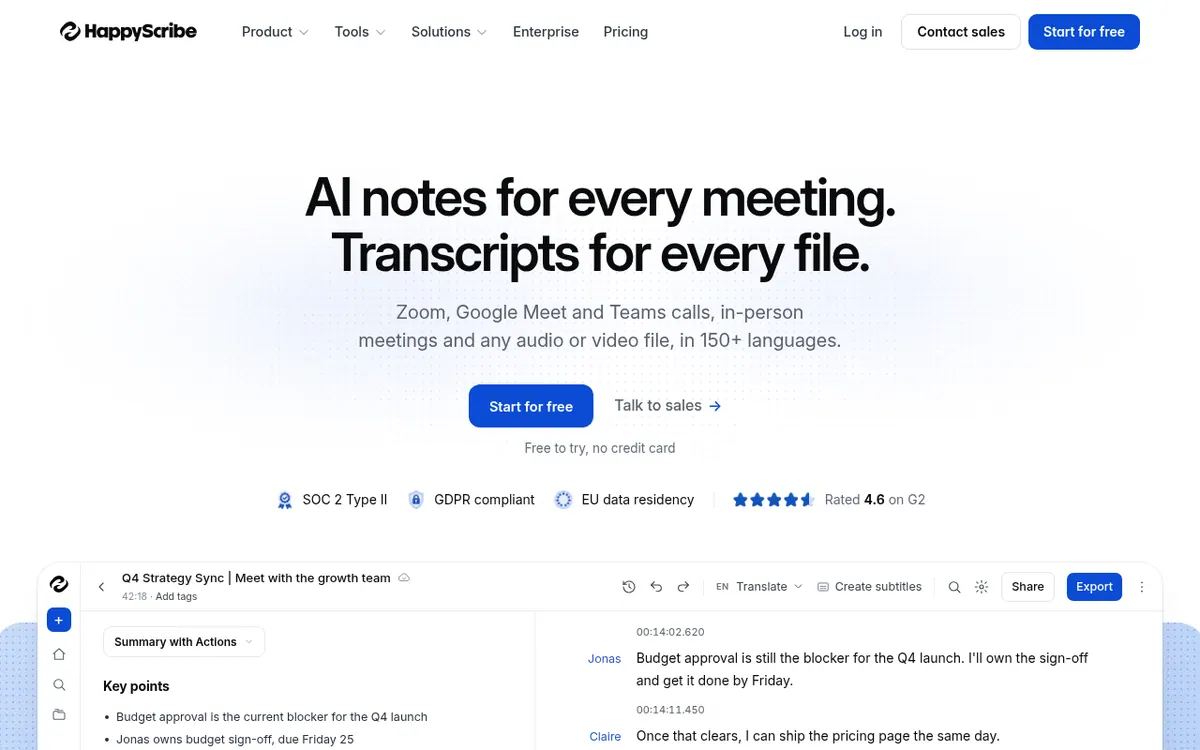
Happy Scribe is an AI notetaker and transcription service aimed at people who work with spoken content: researchers, sales teams, journalists, legal teams and educators. It can join Zoom, Google Meet and Microsoft Teams calls, and it also handles in-person meetings and uploaded audio or video files. Transcripts are available in 150+ languages, speakers are told apart, and a glossary lets you store product names, people and acronyms so they are spelled the same way everywhere.
After a recording, the product produces summaries and action items. You can put questions to your recorded meetings through AI Chat or an MCP connection, and the homepage mentions use with Claude and ChatGPT. Results can be exported to Word, PDF and subtitle formats, and the service also creates captions and translations. For recording without a bot in the call, the site describes capture from a Mac or a phone. A mobile app for iOS and Android records offline with a live transcript, while a desktop app is marked as coming soon.
The site also lists human transcription, which the vendor describes as 99% accurate. On pricing, the homepage says it is free to try with no credit card, but it does not explain what the free offer includes. Pricing not published on the official site: plan names, prices and billing options are not shown on the pages available.
- AI notetaker for Zoom, Google Meet and Teams
- Transcription in 150+ languages
- Speaker diarization
- Bot-free recording from Mac or phone
- Glossary for names and jargon
- AI Chat and MCP over meetings
- Subtitles and captions
- Export to Word, PDF and subtitles
- Mobile app with offline recording
Pros and cons
Pros
- Transcribes audio and video in 150+ languages
- Joins Zoom, Google Meet and Teams calls, or records without a bot from a Mac or phone
- Glossary keeps names and jargon spelled consistently across transcripts and summaries
- Exports to Word, PDF and subtitles, and supports questions over meetings via AI Chat and MCP
- Free to try with no credit card, according to the homepage
Cons
- Pricing not published on the official site, so costs cannot be compared
- The homepage does not describe what the free offer includes or how long it lasts
- Desktop app is only marked as coming soon
- Bot-free recording is described for Mac and phone only
- Accuracy and customer figures are vendor claims without independent confirmation
Our take
Happy Scribe suits people who need transcripts and meeting notes across many languages, especially where speaker labels, exports and a shared glossary matter. Call notetaking, file transcription, subtitles and AI questions over past meetings sit in one workspace, which may appeal to teams that would otherwise combine several tools. The main gap is cost clarity: pricing is not published on the official site, so plan structure, limits and the scope of the free offer remain unknown. Anyone who needs a desktop app must wait, because the site marks it as coming soon. Accuracy and adoption figures are vendor claims, not independently checked.
Comparisons and lists with Happy Scribe
Coming soon
Coming soon — we are writing comparisons that include Happy Scribe.
Happy Scribe pricing
Pricing not published on the official site. Check Happy Scribe’s website.
Free trial: Free to try, no credit card required (no trial length stated). Free plan: yes.
Prices checked on on the official Happy Scribe pricing page. “—” = not published.
Frequently asked questions
How much does Happy Scribe cost?
Pricing not published on the official site. The homepage only says it is free to try with no credit card.
Which languages does Happy Scribe support?
The site says transcription works in 150+ languages, and you can transcribe, subtitle and translate between them in one workspace.
Can it record meetings without a bot?
According to the homepage, Zoom, Meet and Teams calls can be recorded from a Mac or phone with no bot joining the meeting.
Is there a mobile app?
Yes. The site lists a mobile app for iOS and Android that records offline and shows a live transcript.
Is there a desktop app?
The homepage lists a desktop app as coming soon, so it is not yet available according to the official site.
Recently verified in Meeting Notes & Transcription
 Fathom Verified Nov 2, 2026
 Rev Verified Oct 30, 2026
 tl;dv Verified Oct 30, 2026
 Capacities Verified Oct 29, 2026
 Fireflies.ai Verified Oct 29, 2026
 Plansom Verified Oct 29, 2026
Add an AGIPicks badge to your site
The badge shows Happy Scribe’s verification status on AGIPicks and links to this page. Light/dark and compact versions: badges.

Suggest an update
Wrong price, outdated fact or a tool that shut down? Are you the vendor and disagree with this page? Tell us, ideally with a link to the official page. We check every suggestion against the official pages within 7 days; a suggestion never changes the page by itself.