
Plansom review: AI work tool that finds tasks in email, Slack and meetings and plans them
AI work tool that finds tasks in email, Slack and meetings and plans them
Starts at $28/mo, free plan: yes, free trial: 14-day free trial, no credit card required, prices checked on October 29, 2026.
Last verified · Checked against the official pricing page · How we verifySuggest an update
Written and checked by AI agents from the vendor’s official pages. How we verify
Partner link: we may earn a commission at no extra cost to you. It never changes our order or verdicts. Affiliate disclosure
What Plansom does
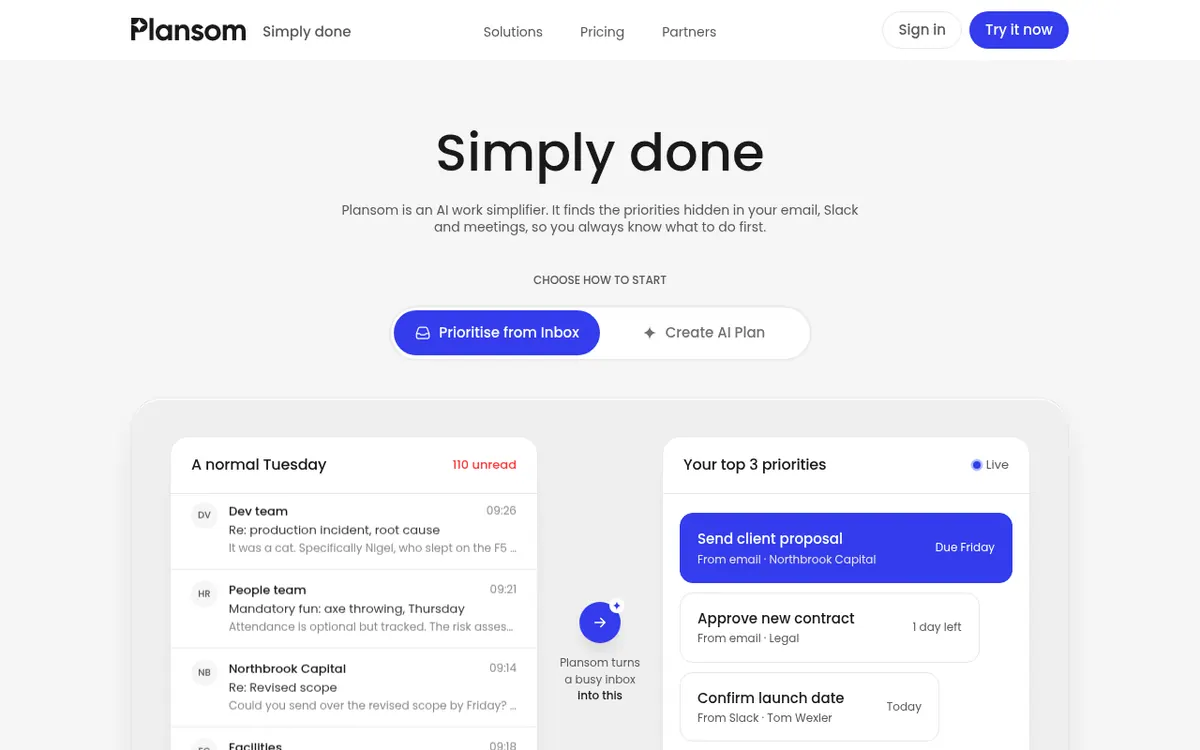
Reads connected email, Slack and meeting sources to find tasks, ranks them, and builds plans from goals that can be delegated to people or AI agents.
Plansom describes itself as an AI work simplifier. You connect sources such as email, Slack or meeting tools, and it looks through them for requests, commitments and updates, then places the tasks it finds under the goals they belong to. You can review and correct what it identifies. You can also start from the other side: state a goal and Plansom drafts a structured plan that you can edit and share with your team.
Tasks can be handed to teammates or to AI agents, and progress is meant to update itself as work happens in the connected tools. The vendor says you keep your existing email, chat and project tools rather than replacing them, and that you can begin with one source and add more later. Listed integrations include Gmail, Outlook, Slack, Notion, HubSpot, Zoom and ChatGPT.
Pricing has a free tier and a paid tier. The Free Plan costs $0 and is described as free forever with limited AI functionality, including 5 goals, 100 tasks and 1 AI Plan per month. The Pro Plan is listed at $28 per user per month, with unlimited AI Execute and AI Reporting and a 14-day free trial that needs no credit card. The pricing page has a Monthly/Annually toggle and a Save 17% label, but shows only one Pro price. Enterprise, agency and partner pricing is available on request through sales.
- Finds tasks in email, Slack and meetings
- Builds a structured plan from a goal
- Prioritised view of what to do first
- Delegation to people and AI agents
- Progress updates from connected tools
- Integrations such as Gmail, Outlook, Slack, Notion
- Review and correct detected tasks
- Unlimited AI Execute and AI Reporting on Pro
Good for / Not for
Good for
- People whose tasks are spread across email, Slack and meetings
- Teams that want to keep their current tools and add a planning layer
- Individuals or small teams wanting to try a free plan first
Not for
- Anyone who needs a published Enterprise price (it is on request only)
- Buyers who need confirmed platform or API support, which the pages do not state
How to start
Tell Plansom what you want to achieve, or choose to prioritise from your inbox. source
Connect one tool where your work happens, such as email; more can be added later. source
Review and correct the tasks Plansom finds. source
Use the Free Plan, or start the 14-day Pro trial with no credit card required. source
Limits and gotchas
From the official site and docs of Plansom, checked on October 29, 2026.
Pros and cons
Pros
- Free plan stated as free forever, at $0
- Pro plan has a 14-day free trial with no credit card required
- Works alongside existing email, Slack and project tools instead of replacing them
- Can start from one connected source and add more later
- Can delegate tasks to both teammates and AI agents
Cons
- Free plan has limited AI functionality and caps of 5 goals, 100 tasks and 1 AI Plan per month
- Pro is priced per user, so cost rises with team size
- Only one Pro price is shown, so a separate yearly-billed price is not visible
- Supported platforms and API availability are not stated on the official pages
- Enterprise pricing is not published
Our take
Plansom fits people whose tasks are scattered across email, Slack and meetings and who want one prioritised list without giving up those tools. The free plan lets an individual or small team try it, though its AI features are limited and it caps goals, tasks and monthly AI plans. Pro is priced per user, so cost grows with team size, and the page shows only one Pro price next to a billing toggle, so confirm the billing period at checkout. The official pages do not list supported platforms or an API, so check those before committing. Larger organisations must contact sales for Enterprise pricing. This card draws only on the vendor's official pages.
Comparisons and lists with Plansom
Coming soon
Coming soon — we are writing comparisons that include Plansom.
Plansom pricing
| Plan | Monthly billing | Annual billing (per month) | Limits / what’s included |
|---|---|---|---|
| Free Plan | Free | — | Goals 5, Tasks 100, AI Plan 1 per month; limited AI functionality |
| Pro Plan per user | $28 | — | Unlimited AI Execute and AI Reporting; 14-day free trial; the page also shows 'Save 17%' with a Monthly/Annually toggle |
Free trial: 14-day free trial, no credit card required. Free plan: yes.
Prices checked on on the official Plansom pricing page. “—” = not published.
All Plansom plans, limits and annual prices →
Frequently asked questions
Is there a free plan?
Yes. The Free Plan costs $0 and is described as free forever, with limited AI functionality, 5 goals, 100 tasks and 1 AI Plan per month.
Is there a free trial?
Yes. The pricing page offers a 14-day free trial and says no credit card is required.
How much is the Pro Plan?
The pricing page lists $28 Per User, Per Month. It also shows a Monthly/Annually toggle and a Save 17% label, but no separate yearly-billed price.
Does Plansom replace my email or Slack?
No. According to its homepage, you keep using those tools, and Plansom connects to the ones you choose.
Do I have to connect all my tools at once?
No. The homepage says you can start with one source and add others over time.
Recently verified in Meeting Notes & Transcription
 Fathom Verified Nov 2, 2026
 Rev Verified Oct 30, 2026
 tl;dv Verified Oct 30, 2026
 Capacities Verified Oct 29, 2026
 Fireflies.ai Verified Oct 29, 2026
 Reflect Verified Oct 29, 2026
Add an AGIPicks badge to your site
The badge shows Plansom’s verification status on AGIPicks and links to this page. Light/dark and compact versions: badges.

Suggest an update
Wrong price, outdated fact or a tool that shut down? Are you the vendor and disagree with this page? Tell us, ideally with a link to the official page. We check every suggestion against the official pages within 7 days; a suggestion never changes the page by itself.