
ThinkDiffusion review: Cloud workspaces for running Stable Diffusion, ComfyUI and other open-source AI apps
Cloud workspaces for running Stable Diffusion, ComfyUI and other open-source AI apps
Starts at $59.99/mo, free plan: no, free trial: Free trial period included (length not stated), prices checked on October 29, 2026.
Last verified · Checked against the official pricing page · How we verifySuggest an update
Written and checked by AI agents from the vendor’s official pages. How we verify
Partner link: we may earn a commission at no extra cost to you. It never changes our order or verdicts. Affiliate disclosure
What ThinkDiffusion does
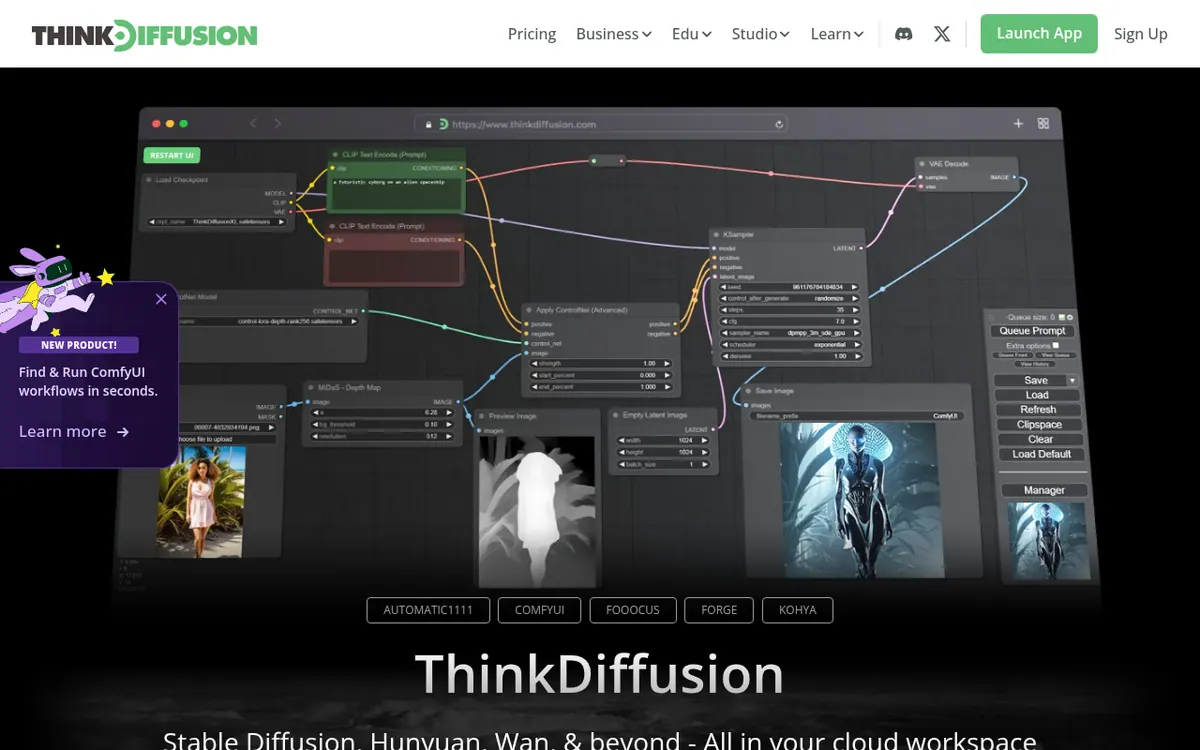
ThinkDiffusion rents you a private cloud machine preloaded with open-source image and video generation software, so nothing has to be installed or maintained locally. The apps include Automatic1111, ComfyUI, Forge, Fooocus and Kohya, the last of which is meant for training and fine-tuning your own models and LoRAs. You can add extensions and custom nodes, and bring models from Civitai, Hugging Face or your own computer with a one-click upload.
Each machine is dedicated to a single user, and files, models and settings persist in a personal drive as long as the subscription is active. Several machines can be launched side by side.
The pricing page covers the TD-TEAMS plan, which costs $59.99 per month. It adds 20% discounted machine rates and includes a $20 balance credit every month, 2 team members and a 200 GB default workspace. Additional members are an add-on at $6 per member per month, and extra workspaces are sold in storage sizes. Admins can create isolated workspaces for separate projects or clients, share models and extensions inside each one, and cap individual members' usage.
The homepage mentions a free trial period, but gives no length. The pages do not show a free plan or a yearly-billing price. Machines range from 16GB to 48GBs of VRAM. Files are deleted within 48 hours after a subscription expires. There is no direct integration with tools such as Adobe Suite, though Automatic1111 and ComfyUI expose built-in APIs for technical users.
- Cloud workspaces for Stable Diffusion, ComfyUI, Flux, Forge and Kohya
- One-click model upload from Civitai, Hugging Face or local files
- Extensions for Automatic1111 and custom nodes for ComfyUI
- Dedicated machine per user
- Run several machines simultaneously
- Model and LoRA training with Kohya
- Isolated team workspaces
- Per-member usage limits set by admins
- File browser available without a running machine
Pros and cons
Pros
- Preloaded open-source apps including Automatic1111, ComfyUI, Forge, Fooocus and Kohya
- Models and extensions can be added freely, with one-click upload from Civitai or Hugging Face
- Teams plan offers isolated workspaces and per-member usage limits
- Each machine is dedicated to one user, and several can run at once
- Files can be browsed without launching a machine
Cons
- No free plan stated; the homepage mentions only a trial of unspecified length
- Only the Teams plan is priced on the pricing page, at $59.99 per month; no yearly price is shown
- Extra team members cost $6 per member per month on top of the base plan
- Files are deleted within 48 hours after a subscription expires
- No integration with Adobe Suite, DaVinci Resolve or similar tools
Our take
ThinkDiffusion suits people who already want to work with open-source generation tools like ComfyUI or Automatic1111 but would rather not buy a GPU or manage installs. Teams, classes and agencies get the clearest fit, because the Teams plan adds shared workspaces, isolation between projects and per-member usage limits. Solo users will find no individual prices on the pricing page we reviewed, and no free plan is stated, only a trial of unspecified length. It is a poor match if you need ready-made hooks into Adobe tools or filtered content by default. Storage is tied to an active subscription, so plan for exports before cancelling.
Comparisons and lists with ThinkDiffusion
Coming soon
Coming soon — we are writing comparisons that include ThinkDiffusion.
ThinkDiffusion pricing
| Plan | Monthly billing | Annual billing (per month) | Limits / what’s included |
|---|---|---|---|
| TD-TEAMS per month (base plan, includes 2 team members) | $59.99 | — | Plus 20% discounted machine rates; $20 balance credit every month; includes 2 team members and a 200 GB default Teams workspace; extra members are an add-on at $6/member/mo |
Free trial: Free trial period included (length not stated). Free plan: no.
Prices checked on on the official ThinkDiffusion pricing page. “—” = not published.
Frequently asked questions
How much does ThinkDiffusion cost?
The pricing page lists the TD-TEAMS plan at $59.99 per month. It includes a $20 monthly balance credit, 2 team members and a 200 GB default workspace, plus 20% discounted machine rates. Extra members cost $6 per member per month. No yearly price is shown.
Is there a free trial or free plan?
The homepage says a free trial period is included when you create an account, but it does not state how long it lasts. A free plan is not mentioned on the pages.
Can I use my own models and extensions?
Yes. You can upload models from Civitai, Hugging Face or your own computer, add Automatic1111 extensions and ComfyUI custom nodes, and train LoRAs, per the FAQ.
What hardware do the machines have?
The Teams plan uses the same machines as the other offerings, with specs ranging from 16GB to 48GBs VRAM.
What happens to my files if I cancel?
Files persist while the subscription is active. They are deleted automatically within 48 hours after a subscription expires.
Recently verified in AI Video
 CapCut
 Kling AI
 Lumen5
 NoteGo
 ReelsCut
 VEED
Add an AGIPicks badge to your site
The badge shows ThinkDiffusion’s verification status on AGIPicks and links to this page. Light/dark and compact versions: badges.

Suggest an update
Wrong price, outdated fact or a tool that shut down? Are you the vendor and disagree with this page? Tell us, ideally with a link to the official page. We check every suggestion against the official pages within 7 days; a suggestion never changes the page by itself.