
Pinin review: AI photo restoration, colorization and upscaling for old or damaged photos
AI photo restoration, colorization and upscaling for old or damaged photos
Starts at $299, free plan: yes, free trial: 1 free restoration credit for every new user, no credit card required, prices checked on October 29, 2026.
Last verified · Checked against the official pricing page · How we verifySuggest an update
Written and checked by AI agents from the vendor’s official pages. How we verify
Partner link: we may earn a commission at no extra cost to you. It never changes our order or verdicts. Affiliate disclosure
What Pinin does
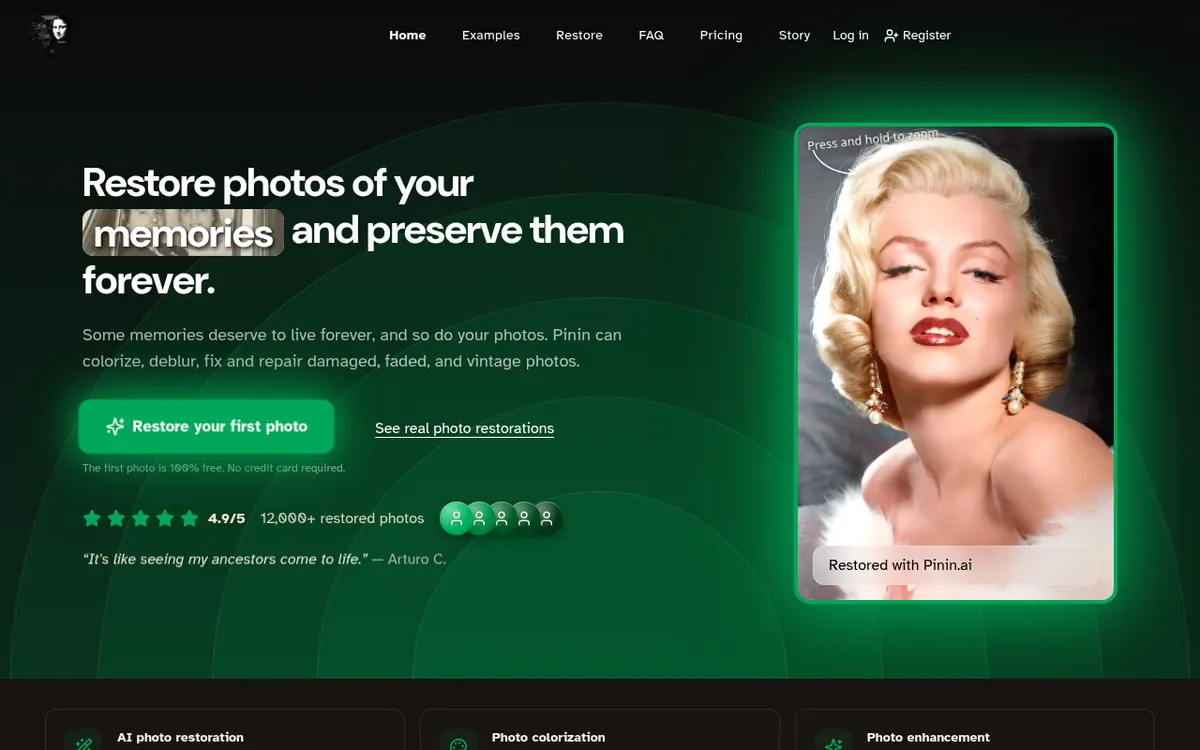
Pinin is an online service that restores old, faded, scratched or blurry photographs. It repairs physical damage, adds color to black-and-white images, and sharpens or upscales low-resolution pictures. The vendor says its model is built to keep faces and fine details true to the original instead of inventing new ones. You upload one photo or a whole album, the service processes it, and you download the result.
Pricing is based on credits, where one credit covers one photo. New users get one free restoration without a credit card. After that you can buy one-time credit packs, which expire after 1 year and are for personal use only, or subscribe. The subscription plans are Giotto — Personal at $12, Botticelli — Professional at $32 and Da Vinci — Studio at $72, each shown as a per-month price billed annually. They include 30, 100 and 400 monthly restorations respectively, plus batch mode and a commercial license. An Enterprise plan starts from $299 per month and adds team accounts, webhooks and API support. The site also lists white-label options and REST API access for agencies and archives. Uploaded photos are auto-deleted after 30 days.
- Scratch, tear and fading repair
- Black-and-white colorization
- Sharpening, denoising and upscaling
- Batch / album mode
- Face and detail preservation
- REST API access
- White-label options
- Auto-delete after 30 days
Pros and cons
Pros
- One free photo restoration with no credit card required
- Handles repair, colorization, deblurring and upscaling in one service
- Subscriptions include batch mode and a full commercial license
- REST API, white-label and Enterprise options for larger volumes
- Photos are auto-deleted after 30 days and the service states GDPR compliance
Cons
- Credit packs are personal use only and expire after 1 year
- Subscription credits reset monthly and do not roll over
- Only one free restoration, so extended free use is not possible
- Plan batch limits are modest on cheaper tiers, e.g. 30 photos on Giotto
- Supported apps and platforms are not stated on the official pages
Our take
Pinin fits people who want to rescue family photos without learning editing software, and small studios that need commercial rights and batch processing at a fixed monthly cost. The free first photo lets you judge the output before paying. It is less suitable if you only need an occasional fix with commercial use, since credit packs are personal use only. Subscription prices are shown only as yearly-billed monthly rates, so check the monthly cost at checkout. The pages do not state which devices or apps are supported, so plan on using the website. Results are described by the vendor and customer quotes; test with your own photo.
Comparisons and lists with Pinin
Coming soon
Coming soon — we are writing comparisons that include Pinin.
Pinin pricing
| Plan | Monthly billing | Annual billing (per month) | Limits / what’s included |
|---|---|---|---|
| Free | — | — | 1 free restoration credit for new users; personal use only |
| Giotto — Personal per month, billed annually | — | $12 | 30 monthly photo restorations; 30 photos batch restoration limit; email support (48-hour response) |
| Botticelli — Professional per month, billed annually | — | $32 | 100 monthly photo restorations; 50 photos batch restoration limit; priority support (24-hour response) |
| Da Vinci — Studio per month, billed annually | — | $72 | 400 monthly photo restorations; 100 photos batch restoration limit; priority support + account manager |
| Enterprise from | $299 | — | 1,000+ monthly credits; unlimited bulk upload; team accounts; webhooks + API support |
Free trial: 1 free restoration credit for every new user, no credit card required. Free plan: yes.
Prices checked on on the official Pinin pricing page. “—” = not published.
All Pinin plans, limits and annual prices →
Frequently asked questions
Is there a free option?
Yes. Every new user gets 1 free restoration credit, and the homepage says no credit card is required.
How much do the subscriptions cost?
Giotto — Personal is $12, Botticelli — Professional is $32 and Da Vinci — Studio is $72, each per month billed annually. Enterprise starts from $299 per month.
Can I use restored photos commercially?
The subscription plans list a full commercial license. Credit packs are personal use only.
Do credits expire?
Credit packs expire 1 year after purchase. Subscription credits reset monthly.
What is the maximum file size?
The pricing page states a maximum of 50MB per image.
Recently verified in AI Image Generation
 Backlog by Nulab Inc Verified Nov 3, 2026
 Black Forest Labs (FLUX) Verified Nov 3, 2026
- Ideogram Verified Nov 3, 2026
- Midjourney Verified Nov 3, 2026
 Playground Verified Nov 3, 2026
 Recruitment Intelligence Verified Nov 3, 2026
Add an AGIPicks badge to your site
The badge shows Pinin’s verification status on AGIPicks and links to this page. Light/dark and compact versions: badges.

Suggest an update
Wrong price, outdated fact or a tool that shut down? Are you the vendor and disagree with this page? Tell us, ideally with a link to the official page. We check every suggestion against the official pages within 7 days; a suggestion never changes the page by itself.