
Pixlr review: Online AI photo editor with image, video and audio generation and a free tier
Online AI photo editor with image, video and audio generation and a free tier
Starts at €2.49/mo, free plan: yes, prices checked on October 25, 2026.
Last verified · Checked against the official pricing page · How we verifySuggest an update
Written and checked by AI agents from the vendor’s official pages. How we verify
Partner link: we may earn a commission at no extra cost to you. It never changes our order or verdicts. Affiliate disclosure
What Pixlr does
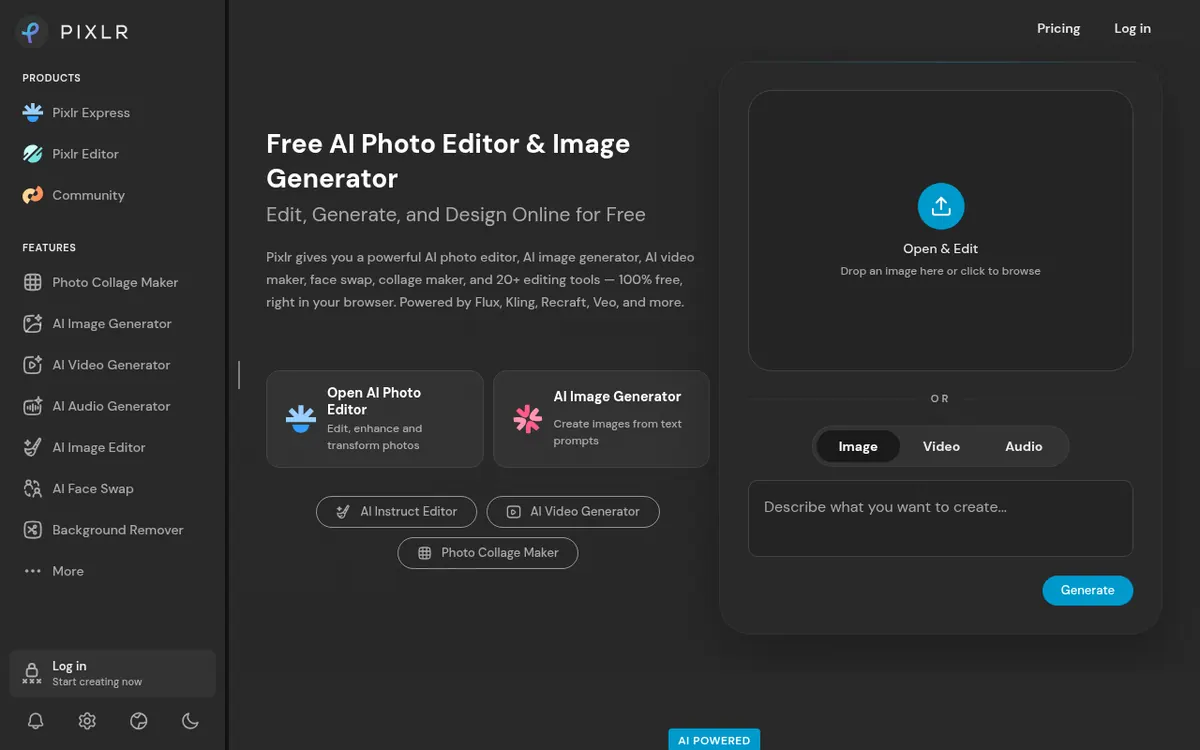
Edits photos in the browser and generates images, video and audio from prompts, with background removal, generative fill, face swap and upscaling.
Pixlr is an online photo editor and image generator that runs in the browser. The pricing page also refers to mobile apps on Android and iOS. It combines classic editing with generative AI, so you can work on an existing photo or start from a text prompt.
The homepage lists these capabilities: text-to-image generation, video generation from text or images, one-click background removal, generative fill (select an area and describe what to generate), face swap in photos and video, a photo collage maker with layouts, and AI upscaling up to 25 megapixels. It also lists audio tools (text to speech, speech to text and text to music) and says images can be edited by describing the changes in natural language.
Pixlr is freemium. The pricing page says it offers both free and premium access, and the homepage describes it as free in your browser. The pricing page lists four paid plans in euros. Plus is €2.49 per month billed monthly or €1.99 per month billed yearly. Premium is €9.99 per month billed monthly or €7.99 per month billed yearly. Ultra is listed from €24.99 per month billed monthly or from €19.99 per month billed yearly. Ultra MAX is €49.99 per month billed monthly or €39.99 per month billed yearly. The page states that yearly billing saves 20%.
The plans differ in AI credits and parallel generations. Plus is ad-free with unlimited saves, 1 concurrent AI generation and 80 monthly AI Credits. Premium adds access to all image, video and audio models, 4 concurrent generations and 1,000 monthly AI Credits. Ultra has 8 concurrent generations and a priority generation queue. The pricing page does not list limits for the free tier.
- AI image generation from text prompts
- AI video generation from text or images
- One-click background removal
- Generative fill for selected areas
- Face swap in photos and video
- Photo collage maker
- AI upscaling up to 25 megapixels
- Text to speech, speech to text and text to music
- Image editing by natural language description
Good for / Not for
Good for
- People who want to retouch photos and generate AI images in one browser tool
- Users who want to try the editor for free before choosing a paid plan
- Those who need AI video or audio generation alongside image editing
Not for
- Teams that need a documented API, since the pages do not mention one
- Buyers who want a free trial of paid features or refunds after payment, since neither is offered or stated
How to start
Open Pixlr in your browser; the homepage describes it as free to use there. source
Edit a photo or start from a text prompt, for example text to image, background removal or generative fill. source
If you need more AI credits or concurrent generations, pick Plus, Premium, Ultra or Ultra MAX on the pricing page, billed monthly or yearly. source
Limits and gotchas
From the official site and docs of Pixlr, checked on October 25, 2026.
Pros and cons
Pros
- Free access in the browser, as stated on the homepage
- Editing plus AI generation of images, video and audio in one product
- Four paid plans, starting at €2.49 per month billed monthly for Plus
- Yearly billing saves 20%, according to the pricing page
- Available on the web and in Android and iOS apps
Cons
- No refunds once a subscription payment has been processed
- Subscription credits reset to 0 if you cancel
- The free tier's limits are not listed on the pricing page
- The official pages do not mention a free trial or an API
- Ultra's top price is not stated, only a starting price
Our take
Pixlr suits people who want photo editing and AI generation of images, video and audio in one place and who would like to begin with the free browser access. The paid plans scale by monthly AI credits and the number of generations that can run at once, so heavier generation users would compare Premium and Ultra, while light users may find Plus enough. It is less clear a fit for anyone who needs a documented trial period or an API, because the official pages we read state neither. Read the terms before subscribing: the pricing page says no refunds are possible once payment is processed, and that subscription credits reset to 0 when you cancel. The free tier's limits are also not listed on the pricing page, so check what the free access covers for your task before paying.
Comparisons and lists with Pixlr
Coming soon
Coming soon — we are writing comparisons that include Pixlr.
Pixlr pricing
| Plan | Monthly billing | Annual billing (per month) | Limits / what’s included |
|---|---|---|---|
| Plus per month | €2.49 | €1.99 | Ad-free, unlimited saves, 1 concurrent AI generation, 80 monthly AI Credits |
| Premium per month | €9.99 | €7.99 | Everything in Plus, access to all image, video & audio models, 4 concurrent AI generations, 1,000 monthly AI Credits |
| Ultra from, per month | €24.99 | €19.99 | Everything from Premium, 8 concurrent AI generations, up to 10,000 monthly AI Credits, priority AI generation queue |
| Ultra MAX per month | €49.99 | €39.99 | Double the credits of Ultra: 10,000 instead of 5,000 monthly |
Free trial: none listed. Free plan: yes.
Prices checked on on the official Pixlr pricing page. “—” = not published.
All Pixlr plans, limits and annual prices →
Frequently asked questions
Does Pixlr have a free plan?
Yes. The homepage describes Pixlr as free in your browser, and the pricing page says it offers free and premium access. The pricing page does not list the free tier's limits.
How much do the paid plans cost?
Plus is €2.49 per month billed monthly or €1.99 per month billed yearly. Premium is €9.99 per month billed monthly or €7.99 per month billed yearly. Ultra is from €24.99 per month billed monthly or from €19.99 per month billed yearly. Ultra MAX is €49.99 per month billed monthly or €39.99 per month billed yearly.
Can I get a refund?
The pricing page says Pixlr cannot process refunds for a subscription once the payment has been processed.
What happens to my credits if I cancel?
The pricing page says subscription credits reset to 0 if you cancel your subscription.
Is there a mobile app?
Yes. The pricing page refers to Pixlr's mobile apps on Android and iOS.
Recently verified in AI Image Generation
 Backlog by Nulab Inc Verified Nov 3, 2026
 Black Forest Labs (FLUX) Verified Nov 3, 2026
- Ideogram Verified Nov 3, 2026
- Midjourney Verified Nov 3, 2026
 Playground Verified Nov 3, 2026
 Recruitment Intelligence Verified Nov 3, 2026
Add an AGIPicks badge to your site
The badge shows Pixlr’s verification status on AGIPicks and links to this page. Light/dark and compact versions: badges.

Suggest an update
Wrong price, outdated fact or a tool that shut down? Are you the vendor and disagree with this page? Tell us, ideally with a link to the official page. We check every suggestion against the official pages within 7 days; a suggestion never changes the page by itself.