
Shortcut Chat review: Send one prompt to up to 3 AI models and compare their answers side by side
Send one prompt to up to 3 AI models and compare their answers side by side
Starts at $20/mo, free plan: no, prices checked on October 25, 2026.
Last verified · Checked against the official website · How we verifySuggest an update
Written and checked by AI agents from the vendor’s official pages. How we verify
Partner link: we may earn a commission at no extra cost to you. It never changes our order or verdicts. Affiliate disclosure
What Shortcut Chat does
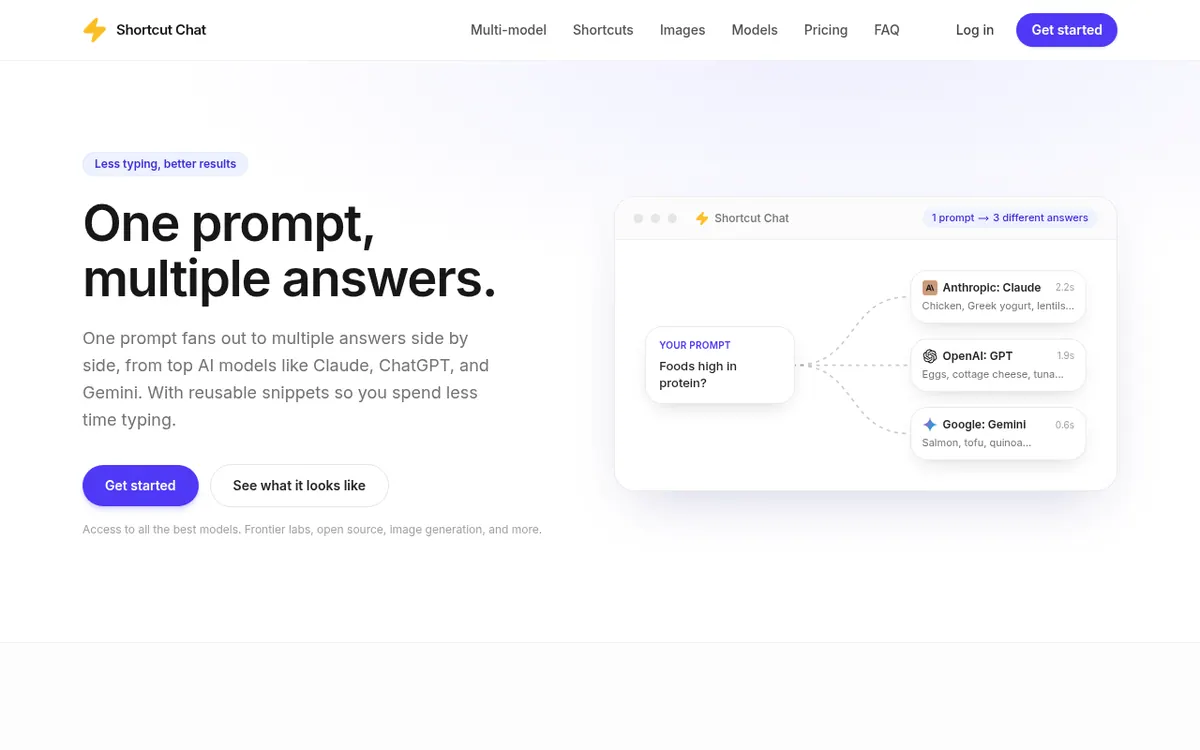
Sends one prompt to up to 3 AI models and shows their answers side by side, with reusable prompt shortcuts and side-by-side image generation.
Shortcut Chat is a chat interface built for comparing AI models. You write one prompt, and the answers from several models are shown next to each other. The homepage names Claude, ChatGPT and Gemini, and says models come from frontier labs and open-source providers, with web search and file inputs. A single prompt can go to up to 3 models, and during a conversation you can remove a model or swap in another.
The second core idea is shortcuts: reusable prompt snippets that you create, trigger with a click, or insert by typing / in the composer. Several shortcuts can be stacked together. Image generation follows the same pattern. The same prompt produces several pictures side by side, and image-specific shortcuts cover actions such as enhancing an image, removing a watermark, making the background transparent or resizing to a 1:1 aspect ratio.
The product is paid, and the official page mentions no free plan or trial. Three plans are listed: Pro at $20 per month, Pro+ at $40 per month and Ultra at $100 per month, as shown for monthly billing. All three plans list multi-model use of up to 3 at once, unlimited custom shortcuts and image generation. They differ in monthly usage allowance: Pro+ gives 2x the Pro usage and Ultra gives 5x. Usage resets each month on the day you first subscribed, and you can cancel from your account whenever you want.
- Side-by-side answers from multiple AI models
- Up to 3 models per prompt
- Reusable prompt shortcuts
- Type / to insert shortcuts
- Stackable shortcuts
- Side-by-side image generation
- Image-specific shortcuts
- Web search and file inputs
- Swap or remove models mid-conversation
Good for / Not for
Good for
- People who want to compare answers from several AI models to the same prompt
- Users who repeat the same instructions and want to save them as shortcuts
- Anyone who wants to generate several images from one prompt and pick a result
Not for
- Anyone looking for a free plan or trial, since none is mentioned
- Users who need more than 3 models in one comparison
How to start
Limits and gotchas
From the official site and docs of Shortcut Chat, checked on October 25, 2026.
Pros and cons
Pros
- Compares answers from up to 3 models for a single prompt
- Reusable shortcuts can be inserted with a click or by typing /
- Image generation with side-by-side results is listed on every plan
- Models can be removed or swapped during a conversation
- Cancel anytime from your account; an annual option is shown with 10 % off
Cons
- No free plan or free trial is mentioned on the official site
- Comparison is capped at 3 models at once on every plan
- Usage is limited by a monthly allowance, and models use different amounts
- Platforms, API access and company details are not stated on the page
Our take
Shortcut Chat fits people who want to see how several AI models answer the same prompt without switching between separate chat tools, and who often reuse the same instructions, since shortcuts save retyping. It is less suited to anyone who needs a free tier or a trial, because the official page mentions neither, or who wants to compare more than 3 models at once, as that is the cap on every plan. Usage is metered by a monthly allowance, and the page says models use different amounts, so heavy users may need a higher plan. Platforms, API access and company details are also not stated, so check those before committing.
Comparisons and lists with Shortcut Chat
Coming soon
Coming soon — we are writing comparisons that include Shortcut Chat.
Shortcut Chat pricing
| Plan | Monthly billing | Annual billing (per month) | Limits / what’s included |
|---|---|---|---|
| Pro | $20 | — | Multi-model up to 3 at once; unlimited custom shortcuts; image generation; monthly usage allowance |
| Pro+ | $40 | — | Multi-model up to 3 at once; unlimited custom shortcuts; image generation; 2x the Pro usage |
| Ultra | $100 | — | Multi-model up to 3 at once; unlimited custom shortcuts; image generation; 5x the Pro usage |
Free trial: none listed. Free plan: no.
Prices checked on on the official Shortcut Chat pricing page. “—” = not published.
All Shortcut Chat plans, limits and annual prices →
Frequently asked questions
Is there a free plan?
The official page does not mention a free plan or a free trial.
How many models can I compare at once?
Up to 3 at once, and every plan lists this limit.
How does usage work?
Each plan includes a monthly usage allowance, and models use different amounts. It resets each month on the day you first subscribed. Pro+ gives 2x the Pro usage and Ultra gives 5x.
Can I cancel?
Yes. The page says you can cancel whenever you want from your account.
Recently verified in AI Chatbots & Assistants
 Gemini
 DeepSeek
 Gleap
Add an AGIPicks badge to your site
The badge shows Shortcut Chat’s verification status on AGIPicks and links to this page. Light/dark and compact versions: badges.
Suggest an update
Wrong price, outdated fact or a tool that shut down? Are you the vendor and disagree with this page? Tell us, ideally with a link to the official page. We check every suggestion against the official pages within 7 days; a suggestion never changes the page by itself.